USB secondary display - a second screen for a computer
Plug the F101 board into a USB port of a Windows computer and the computer gains another display: the host-side driver compresses the desktop picture into JPEG, sends it to the board over a USB bulk endpoint, and the board decodes it with the on-chip video engine and puts it straight onto the video layer of the display. The same USB device also carries a HID multi-touch screen interface, so the touch screen on the board can send touches back. The example is samples/drivers/usb/cherryusb_display in the workspace; it uses the vendor display class of CherryUSB and does not need zephyr-components.
Before you start, complete Set up the development environment and Get the Zephyr source.
This page covers the code on the board side. The computer side is an off-the-shelf third-party Windows driver that is not built from this repository, so only how to install and use it is covered here.
Preparation
Section titled “Preparation”Host-side driver
Section titled “Host-side driver”To the host the board is a vendor-defined class device (interface class 0xff). The display driver that ships with Windows does not recognize it, so the third-party usb graphic virtual display driver has to be installed. The CherryUSB repository carries a signed installer:
~/f101-zephyr/modules/lib/cherryusb/tools/display/xfz1986_usb_graphic_250224_rc_sign.exeThe driver comes from chuanjinpang/win10_idd_xfz1986_usb_graphic_driver_display, and the requirement is to “install this exe in Windows before use”. Steps:
- Copy the exe to the Windows computer and run the installer.
- When the installation is done, connect the board to the computer with a USB-C cable. The board has to be running first; see Run.
- A new display appears in the display settings of the computer, with the resolution the board reports; use it as an extended screen.
The protocol and the internals of the driver are not in this repository; the protocol section below covers only the part handled on the board.
Run this in the workspace:
. ~/f101-zephyr/env.shcd ~/f101-zephyrwest build -b yuzukineko -d build/usbdisp zephyr/samples/drivers/usb/cherryusb_displayNo -D option is needed. prj.conf already carries the CONFIG_INPUT=y and CONFIG_INPUT_GT967_MAX_TOUCH_POINTS=5 that touch needs, and the generated .config has CONFIG_SAMPLE_USB_DISPLAY_CTP=y and CONFIG_INPUT_GT967=y.
The artifact is build/usbdisp/zephyr/zephyr.bin, about 295 KB, linked at 0x40000000.
Download it with any of the methods in Building and running; the console is UART1 (PB00/PB01, 115200 8N1).
- For debugging use method one:
xfel ddr f101-s3,xfel write 0x40000000 build/usbdisp/zephyr/zephyr.bin,xfel exec 0x40000000. - For stand-alone use method three:
mkuf2.py app build/usbdisp/zephyr/zephyr.bin -o out/usbdisp.uf2, then drag it onto theF101BOOTdrive.
Serial output: boot and touch screen ready
Section titled “Serial output: boot and touch screen ready”After downloading and running, the UART1 console reads as follows:
*** Booting Zephyr OS build b6f3dfe1a1f4 ***usb ctp: touch panel touch@5d, 1024x768usb display: waiting for the host (cherryusb_R1024x768_Ejpg9_Fps60_Bl500), shown on the 1024x768 panelusb display: configured by the hostusb display: 0 frames (0.00 fps), 0 KB/s, 0 bad, decode 0 us, show 0 us per frameusb display: 0 frames (0.00 fps), 0 KB/s, 0 bad, decode 0 us, show 0 us per frameusb display: 0 frames (0.00 fps), 0 KB/s, 0 bad, decode 0 us, show 0 us per frameusb display: 0 frames (0.00 fps), 0 KB/s, 0 bad, decode 0 us, show 0 us per frameusb display: 0 frames (0.00 fps), 0 KB/s, 0 bad, decode 0 us, show 0 us per frameusb ctp: touch panel touch@5d, 1024x768 shows that the GT967 driver of the touch node initialized successfully and that screen-width and screen-height picked up 1024 x 768 from the panel, so touch coordinates are scaled to that size. The string inside waiting for the host is the product string the host sees.
On the computer: enumeration
Section titled “On the computer: enumeration”With the USB-C cable of the board connected to the computer, once the board is up, look up the VID_303A device on Windows with Get-PnpDevice -PresentOnly:
Status Class FriendlyName InstanceIdOK USB USB Composite Device USB\VID_303A&PID_2986\2022123456Error cherryusb_R1024x768_Ejpg9_Fps60_Bl500 USB\VID_303A&PID_2986&MI_00\...OK HIDClass (中文名,控制台编码乱码) USB\VID_303A&PID_2986&MI_01\...OK HIDClass (中文名,控制台编码乱码) HID\VID_303A&PID_2986&MI_01\...- The device appears as
VID_303A&PID_2986and is a composite device (interface 0 display, interface 1 HID); the serial number2022123456matches the string descriptor. The board printsconfigured by the host. - The name of interface 0 is the product string
cherryusb_R1024x768_Ejpg9_Fps60_Bl500. Without the usb graphic driver installed its status isError. - Interface 1 is claimed by the HID class driver of the system, its status is
OK, and no driver has to be installed.
On the computer: the new display in display settings
Section titled “On the computer: the new display in display settings”Once the host-side driver is installed, the display settings of the computer gain a 1024x768 display and the screen of the board shows the computer desktop; from time to time the serial port prints one line of statistics (frame count, fps, KB/s, bad frames, decode and show time).
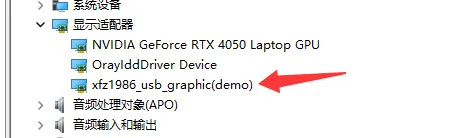
Under “Display adapters” in Device Manager there is now an xfz1986_usb_graphic(demo), which is this screen of the board.
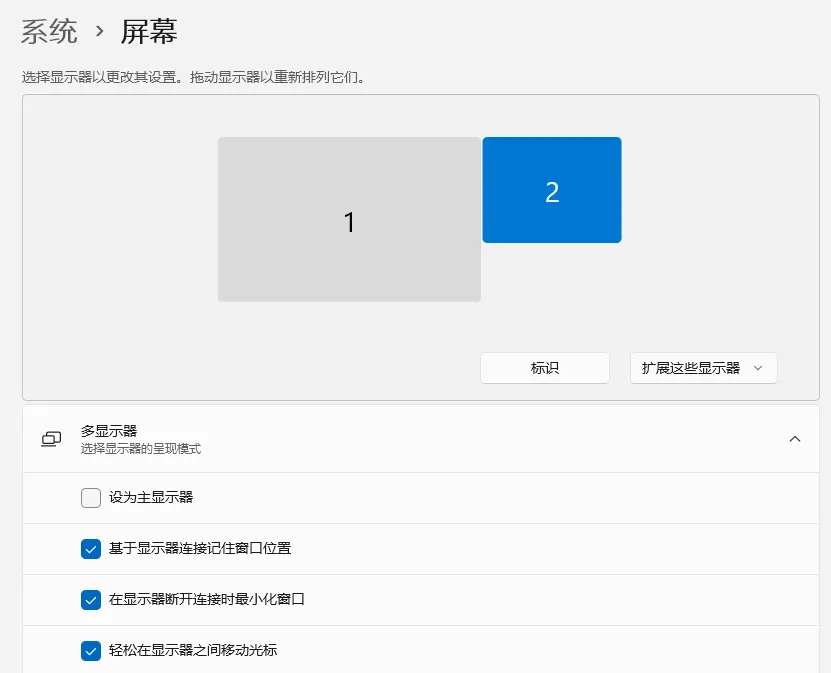
Under “System → Display” a display numbered 2 appears next to the main display 1, with the mode “Extend these displays”.
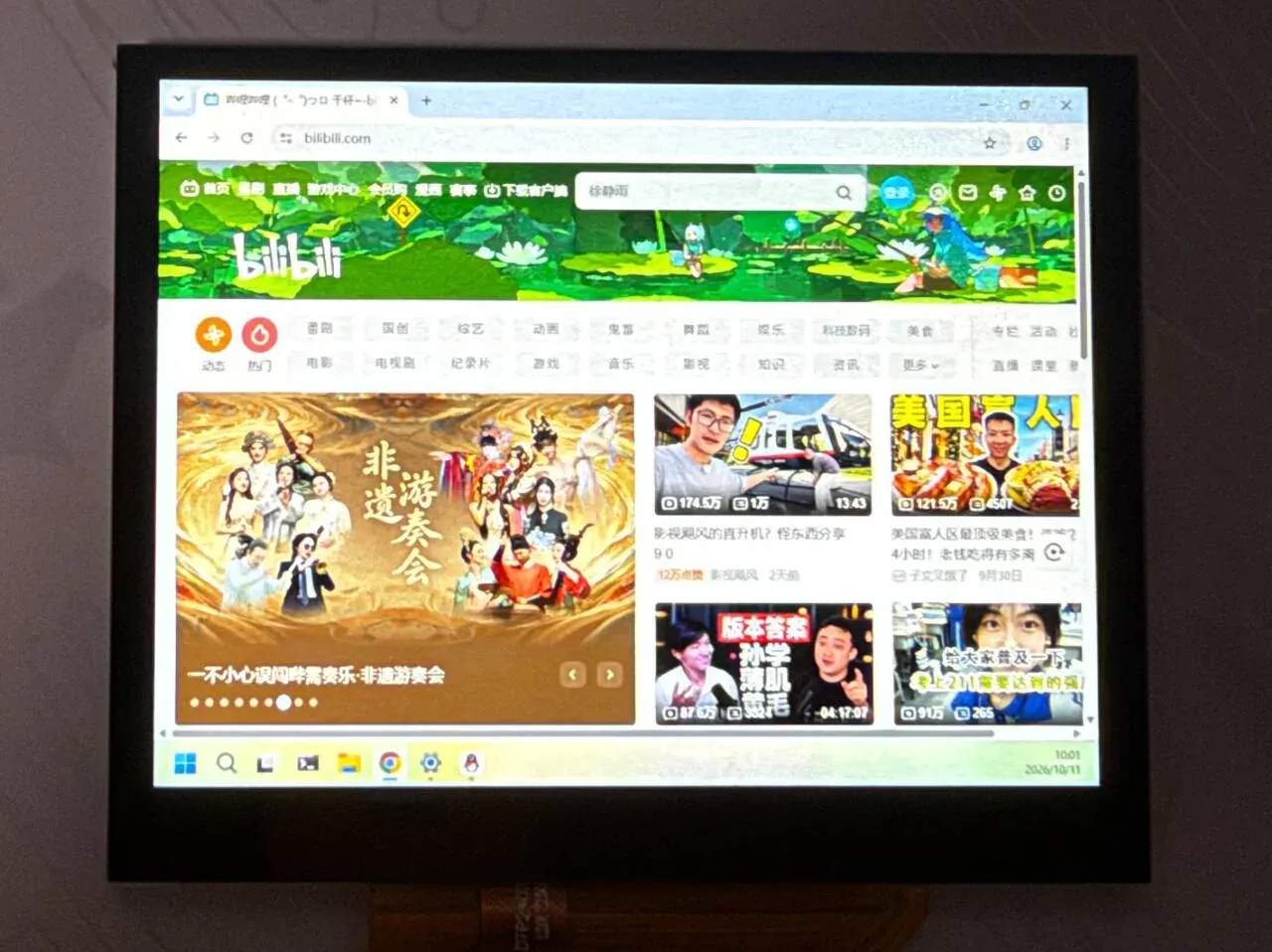
The screen of the board shows the desktop of the computer: the taskbar, a browser window and the clock in the bottom right corner are all visible.
Protocol
Section titled “Protocol”How the device tells the host what screen it is
Section titled “How the device tells the host what screen it is”The host learns the panel parameters from the product string (USB product string); there is no extra control request. main.c defines the format on lines 64–65:
/* name, size, encoding (jpg quality 1..10), frame rate, frame limit in KB */#define PRODUCT_FORMAT "cherryusb_R%ux%u_Ejpg%u_Fps%u_Bl%u"main() fills in the panel size and the Kconfig values on lines 358–359:
snprintk(product_string, sizeof(product_string), PRODUCT_FORMAT, w, h, CONFIG_SAMPLE_USB_DISPLAY_QUALITY, CONFIG_SAMPLE_USB_DISPLAY_FPS, FRAME_LIMIT_KB);With the default configuration the resulting string matches the actual boot log of the board:
cherryusb_R1024x768_Ejpg9_Fps60_Bl500| Field | Meaning | Source |
|---|---|---|
R1024x768 | Width x height of the screen | CONFIG_SAMPLE_USB_DISPLAY_WIDTH/HEIGHT, 0 takes the panel size |
Ejpg9 | JPEG encoding, quality 9 (range 1–10) | CONFIG_SAMPLE_USB_DISPLAY_QUALITY |
Fps60 | Target frame rate on the host side | CONFIG_SAMPLE_USB_DISPLAY_FPS |
Bl500 | 500 KB limit per frame | The FRAME_LIMIT_KB macro |
The fields of the string are parsed by the host-side driver, and the exact meaning of each field is defined by the driver. On the board side only this is guaranteed: the width and height are even numbers in 64–1920 x 64–1080, otherwise main() reports an error and exits (lines 352–356).
USB descriptors
Section titled “USB descriptors”The VID/PID of the device descriptor is 0x303A / 0x2987 (display only); with touch enabled it becomes a composite device with PID 0x2986. The configuration descriptor is assembled by build_config_descriptor() (lines 79–102):
static void build_config_descriptor(void){ static const uint8_t display_part[] = { USB_INTERFACE_DESCRIPTOR_INIT(0x00, 0x00, 0x02, 0xff, 0x00, 0x00, 0x00), USB_ENDPOINT_DESCRIPTOR_INIT(DISPLAY_IN_EP, 0x02, DISPLAY_EP_MPS, 0x00), USB_ENDPOINT_DESCRIPTOR_INIT(DISPLAY_OUT_EP, 0x02, DISPLAY_EP_MPS, 0x00), }; ... if (IS_ENABLED(CONFIG_SAMPLE_USB_DISPLAY_TOUCH)) { len += usb_touch_descriptor(config_descriptor + len, USB_TOUCH_INTERFACE); config_descriptor[4] = 2; /* bNumInterfaces */ device_descriptor[10] = USBD_PID_TOUCH & 0xFF; /* idProduct */ device_descriptor[11] = USBD_PID_TOUCH >> 8; }| Interface | Endpoint | Type | Purpose |
|---|---|---|---|
| 0: vendor (0xff) | 0x02 OUT | Bulk, 512 bytes | Frames sent by the host |
| 0: vendor (0xff) | 0x81 IN | Bulk, 512 bytes | Reserved, the board does not write to it |
| 1: HID (optional) | 0x83 IN | Interrupt, 64 bytes | Touch reports |
Frame format
Section titled “Frame format”Each frame is a 16 byte frame header plus a payload; the header structure is in class/vendor/display/usbd_display.h of CherryUSB:
struct usbd_disp_frame_header { uint16_t crc16; //payload crc16 uint8_t type; //raw rgb,yuv,jpg,other uint8_t cmd; uint16_t x; //32bit uint16_t y; uint16_t width; //32bit uint16_t height; uint32_t frame_id : 10; uint32_t payload_total : 22; //payload max 4MB} __PACKED;| Field | Description |
|---|---|
type | Payload type: 0 RGB565, 1 RGB888, 2 YUV420, 3 JPEG. This example handles only 3 and drops the rest |
x, y, width, height | Position and size of this frame. The example uses only width and height and treats the whole picture as the full screen |
frame_id | 10 bit frame sequence number, used only in the log |
payload_total | Payload size in bytes (22 bits, 4 MB maximum) |
crc16 | CRC16 of the payload. The example does not check it |
Frames are separated by short packets: bulk frames are not fixed length, and the end of a frame is marked by a packet shorter than 512 bytes (or a zero length packet). Each time, the class driver usbd_display_bulk_out() hangs a 16384 byte read request after the current frame buffer, and when the number of bytes received is not a multiple of 512 the frame is taken to be complete (class/vendor/display/usbd_display.c, lines 100–119):
        if ((nbytes % usbd_get_ep_mps(0, g_usbd_display.out_ep.ep_addr)) || (nbytes == 0)) {            frame = g_usbd_display.current_frame;            g_usbd_display.current_frame = NULL;
            frame->frame_format = header->type;            frame->frame_size = header->payload_total;            usbd_display_frame_send(frame);
When a frame exactly fills the last packet, the host sends one more empty frame with type 0xff, and handle_frame() in main.c returns at once for a frame whose type is not JPEG or whose size is 0. When the device has just been configured by the host (USBD_EVENT_CONFIGURED), the class driver discards data until it sees the first short packet, so a connection made in the middle of a frame realigns itself.
When a received frame is longer than the buffer, the class driver prints frame overflow, drop it and drops the frame.
Architecture and data flow
Section titled “Architecture and data flow”Architecture
Section titled “Architecture”flowchart TB
subgraph APP["Application samples/drivers/usb/cherryusb_display"]
MAIN["main.c<br/>descriptors · frame loop · decode and show"]
TOUCH["usb_touch.c<br/>HID touch reports"]
CTP["usb_ctp.c<br/>input callback → touch reports"]
end
subgraph CU["CherryUSB module"]
CORE["usbd_core"]
DISP["class/vendor/display<br/>usbd_display.c"]
HIDC["class/hid<br/>usbd_hid.c"]
end
subgraph DRV["Zephyr drivers"]
MUSB["drivers/usb/cherryusb<br/>MUSB glue + PHY"]
VDEC["drivers/vdec/sunxi"]
DSP["drivers/display/sunxi"]
end
MAIN --> DISP --> CORE --> MUSB
TOUCH --> HIDC --> CORE
CTP --> TOUCH
INP["input subsystem<br/>drivers/input/input_gt967.c"] --> CTP
MAIN --> VDEC
MAIN --> DSP
Threading: the callback in the USB interrupt only moves pointers and re-hangs the read request; the main thread that runs main() blocks in a loop taking frames, decoding and showing them; touch events arrive on a thread of the input subsystem, which calls the callback in usb_ctp.c, and that callback sends a HID report directly; the example starts no thread of its own.
Data flow
Section titled “Data flow”sequenceDiagram
participant H as Host driver
participant U as display class
participant M as main thread
participant V as vdec
participant D as Display video layer
H->>U: Bulk OUT: frame header + JPEG, received 16 KB at a time
U->>U: short packet = end of frame, frame queued, next frame buffer
M->>U: usbd_display_dequeue
M->>M: jpeg_complete: starts with FFD8, ends with FFD9
M->>V: vdec_stream_feed
V-->>M: vdec_stream_get_frame: NV12
M->>D: display_sunxi_show_yuv
M->>V: release the frame before the previous one
M->>U: usbd_display_enqueue: the buffer goes back to the class driver
The two frame buffers take turns: one receives while the other is decoded. When decoding is slower than receiving, the class driver cannot get a free frame buffer and throws away the following data until the next short packet (the drop_frame branch); that is a dropped frame, and it does not block the host.
Features and where to change them
Section titled “Features and where to change them”The line numbers of main.c refer to the current source. What can be changed:
- The resolution, frame rate and JPEG quality told to the host:
SAMPLE_USB_DISPLAY_WIDTH/HEIGHT/FPS/QUALITYinKconfig; a width or height of 0 takes the panel size. - The per-frame limit:
FRAME_BUF_SIZE,FRAME_COUNTandFRAME_LIMIT_KBon lines 53–55 ofmain.c; the buffer size must be a multiple of 16384. - The decode buffer:
JPEG_VBV_SIZEon line 58. - The number of decoded frames kept: the initial value of
jpeg_holdinstream_open()(lines 204–231). - The statistics print interval:
REPORT_MSon line 56. - Turning touch on and off:
CONFIG_SAMPLE_USB_DISPLAY_TOUCH; turned off, the device has only the display interface and its PID is0x2987. - The touch orientation:
CONFIG_SAMPLE_USB_DISPLAY_CTP_SWAP/FLIP_X/FLIP_Y.
Decoding and showing
Section titled “Decoding and showing”show_jpeg() (lines 234–295) is the core. A received JPEG is first fed to an always-open MJPEG decode stream, an NV12 frame is taken back, and it is handed to the video layer of the display:
ret = vdec_stream_feed(vdec_dev, jpeg_stream, jpeg, len, 0, &used); if (ret) { return ret; } for (tries = 0; tries < 20; tries++) { ret = vdec_stream_get_frame(vdec_dev, jpeg_stream, &f); if (ret != -EBUSY && ret != -EAGAIN) { break; } k_msleep(1); }The decoder is reopened only when the size changes (lines 242–244), which saves the cost of rebuilding it every frame. The frame that comes back is used directly as the input of the display layer, full range (0–255 of JPEG):
yuv.y = f.plane[0]; yuv.uv = f.plane[1]; yuv.width = f.width; yuv.height = f.height; yuv.stride_y = f.stride[0]; yuv.stride_uv = f.stride[1]; yuv.full_range = true; yuv.nonblock = jpeg_hold >= 2; ret = display_sunxi_show_yuv(disp, &yuv);The video layer does the scaling: when the picture sent by the computer differs in size from the panel, it is scaled proportionally to the panel with the aspect ratio kept.
Showing and releasing frames have timing constraints: the display layer may still be scanning the previous frame, so the larger the number of frames kept, jpeg_hold, the better. stream_open() tries from 3 downwards (line 209) and steps down when memory runs out:
jpeg_hold | How it is shown | When it is released |
|---|---|---|
| 3 or 2 | nonblock, does not wait for the refresh | The frame before the previous one is released one step later |
| 1 | Blocking, waits for the refresh | The previous frame is released after showing |
When the decode stream is opened it prints usb display: WxH decoder, N pictures kept (no-wait/waiting show), which says which step is in use.
Frame validity check
Section titled “Frame validity check”jpeg_complete() (lines 297–307) requires the head to be FF D8 and the tail FF D9, with zero padding allowed at the end. An incomplete frame counts into frames_bad and is printed only for the first 12 times:
static bool jpeg_complete(const uint8_t *d, uint32_t n){  uint32_t e = n;
  while (e > 2 && d[e - 1] == 0) {    e--;  }
  return n >= 4 && d[0] == 0xff && d[1] == 0xd8 && d[e - 2] == 0xff && d[e - 1] == 0xd9;}
Main loop
Section titled “Main loop”main() initializes the device, allocates two 544 KiB (34 x 16384 byte) frame buffers, registers the descriptors and then enters the main loop (lines 383–411):
  for (;;) {    ...    struct usbd_display_frame *frame;
    if (usbd_display_dequeue(&frame, 1000) >= 0) {      handle_frame(frame);      usbd_display_enqueue(frame);    }
    uint32_t ms = k_uptime_get_32() - last;
    if (ms >= REPORT_MS) {      uint32_t n = frames_ok - start_ok;
      printk("usb display: %u frames (%u.%02u fps), %u KB/s, %u bad, decode %u us, "             "show %u us per frame\n", ...);
HID touch screen
Section titled “HID touch screen”With CONFIG_SAMPLE_USB_DISPLAY_TOUCH on (the default), the device has one more HID interface, which in Windows is a multi-touch screen using the driver that ships with the system, so nothing has to be installed. It is implemented in usb_touch.c:
- Report descriptor: 5 fingers, each with a tip switch, contact id, X and Y, plus contact count and a contact count maximum feature report (answered in
usbd_hid_get_report()). - The coordinates are absolute values from 0–32767 (
USB_TOUCH_MAX) that the computer maps onto the screen. The physical size is written as 154 x 86 mm (PHYS_X/PHYS_Y, in units of 0.01 cm). usb_touch_send()packs at most 5 points into one report sent to0x83, and returns-EBUSYwhile the previous report has not finished being sent.
The touch points come from the touch screen on the board. The touch screen of the yuzukineko is a GT967, touch@5d in the devicetree (node label touch), driven by drivers/input/input_gt967.c, which reports events through the input subsystem of Zephyr: for each finger that changes, INPUT_ABS_MT_SLOT, INPUT_ABS_X, INPUT_ABS_Y and INPUT_BTN_TOUCH in turn, with the last event carrying sync. usb_ctp.c attaches to this device with INPUT_CALLBACK_DEFINE and records the state of each finger by slot:
static void ctp_event(struct input_event *evt, void *user_data){ switch (evt->code) { case INPUT_ABS_MT_SLOT: cur_slot = CLAMP(evt->value, 0, POINTS - 1); break; case INPUT_ABS_X: slot[cur_slot].x = evt->value; break; case INPUT_ABS_Y: slot[cur_slot].y = evt->value; break; case INPUT_BTN_TOUCH: if (!evt->value && slot[cur_slot].down) { slot[cur_slot].lifted = true; } slot[cur_slot].down = evt->value; break; default: break; } if (evt->sync) { ctp_send(); }}INPUT_CALLBACK_DEFINE(DEVICE_DT_GET(TOUCH_NODE), ctp_event, NULL);On sync it packs every slot into one report and sends it; a finger that is lifted is sent once with its tip switch 0:
/* one report with the slots 0..count-1, a lifted finger once with its tip switch off */static void ctp_send(void){  struct usb_touch_point out[POINTS];  int count = 0;
  memset(out, 0, sizeof(out));  for (int i = 0; i < POINTS; i++) {    out[i].id = i;    if (slot[i].down || slot[i].lifted) {      out[i].down = slot[i].down;      scale(slot[i].x, slot[i].y, &out[i].x, &out[i].y);      count = i + 1;    }    slot[i].lifted = false;  }  if (count == 0) {    return;  }  for (int n = 0; usb_touch_send(out, count) == -EBUSY && n < SEND_WAIT_MS; n++) {    k_msleep(1);  }}
The coordinates are scaled to 0–32767 from screen-width and screen-height of the touch node in the devicetree (1024 x 768 on the yuzukineko), with no hard-coded resolution:
#define TOUCH_NODE DT_NODELABEL(touch)#define CTP_MAX_X DT_PROP(TOUCH_NODE, screen_width)#define CTP_MAX_Y DT_PROP(TOUCH_NODE, screen_height)How many points the GT967 driver reports at most is set by CONFIG_INPUT_GT967_MAX_TOUCH_POINTS, default 1, and prj.conf sets it to 5. CONFIG_SAMPLE_USB_DISPLAY_TOUCH_DEMO does not use the touch screen: 3 seconds after the device is configured it draws a two-finger diagonal drag by itself (usb_touch_demo()).
Configuration options
Section titled “Configuration options”Options of the example itself (Kconfig):
| Option | Default | Description |
|---|---|---|
CONFIG_SAMPLE_USB_DISPLAY_WIDTH | 0 | Width told to the host; 0 takes the panel width |
CONFIG_SAMPLE_USB_DISPLAY_HEIGHT | 0 | Height told to the host; 0 takes the panel height |
CONFIG_SAMPLE_USB_DISPLAY_FPS | 60 | Frame rate told to the host, range 1–120 |
CONFIG_SAMPLE_USB_DISPLAY_QUALITY | 9 | JPEG quality told to the host, range 1–10 |
CONFIG_SAMPLE_USB_DISPLAY_TOUCH | y | Adds a HID multi-touch screen interface and turns the device into a composite device |
CONFIG_SAMPLE_USB_DISPLAY_TOUCH_DEMO | n | 3 seconds after the device is configured, sends one synthetic two-finger drag; depends on TOUCH |
CONFIG_SAMPLE_USB_DISPLAY_CTP | y | Touch points come from the touch screen of the board (input subsystem, node label touch); depends on TOUCH and an enabled touch node in the devicetree |
CONFIG_SAMPLE_USB_DISPLAY_CTP_SWAP | n | Swaps the X and Y of the touch screen; depends on CTP |
CONFIG_SAMPLE_USB_DISPLAY_CTP_FLIP_X | n | Mirrors the X of the touch screen; depends on CTP |
CONFIG_SAMPLE_USB_DISPLAY_CTP_FLIP_Y | n | Mirrors the Y of the touch screen; depends on CTP |
Change these options in prj.conf, or append -- -DCONFIG_xxx=value to the west build command.
The options in prj.conf related to the functionality:
| Option | Purpose |
|---|---|
CONFIG_CHERRYUSB | The CherryUSB stack |
CONFIG_CHERRYUSB_DEVICE | Device mode |
CONFIG_CHERRYUSB_DEVICE_SPEED_HS | High speed (480 Mbit/s), 512 byte bulk packets |
CONFIG_CHERRYUSB_DEVICE_MUSB_SUNXI | The MUSB controller of the F101 |
CONFIG_CHERRYUSB_DEVICE_DISPLAY | The vendor display class |
CONFIG_CHERRYUSB_DEVICE_HID | The HID class, used by the touch screen interface |
CONFIG_DISPLAY | The display driver |
CONFIG_VDEC | The video engine, decodes JPEG |
CONFIG_FPU, CONFIG_FPU_SHARING | Hardware floating point, allowed to be used from several threads |
CONFIG_MAIN_STACK_SIZE=8192 | Main thread stack |
CONFIG_SYSTEM_WORKQUEUE_STACK_SIZE=2048 | System work queue stack |
CONFIG_COMMON_LIBC_MALLOC_ARENA_SIZE=-1 | The libc heap uses all the remaining memory. The two frame buffers aligned_alloc() 1088 KiB in all, and the 1 MiB decode stream buffer also comes from here |
CONFIG_HEAP_MEM_POOL_SIZE=65536 | Kernel heap of 64 KiB |
CONFIG_LOG=n | Logging off, smaller image; driver errors are not printed |
CONFIG_SIZE_OPTIMIZATIONS=y | Optimize for size |
CONFIG_DISPLAY_SUNXI_FB_ALLOC=y | The display frame buffer is allocated from the heap and takes no space in the image |
CONFIG_G2D=n, CONFIG_ADC=n, CONFIG_SPI=n, CONFIG_MIPI_DBI=n, CONFIG_WDT_SUNXI=n | Drivers that are not used |
CONFIG_I2C=y, CONFIG_GPIO=y | The GT967 touch screen is on I2C1 and its interrupt pin is a GPIO |
CONFIG_INPUT=y | The input subsystem |
CONFIG_INPUT_GT967_MAX_TOUCH_POINTS=5 | The GT967 driver reports 5 points; the default is only 1 |
Code structure
Section titled “Code structure”| File | Contents |
|---|---|
samples/drivers/usb/cherryusb_display/src/main.c | Descriptors, frame loop, decode and show, statistics |
samples/drivers/usb/cherryusb_display/src/usb_touch.c, usb_touch.h | The HID touch screen interface |
samples/drivers/usb/cherryusb_display/src/usb_ctp.c, usb_ctp.h | Takes touch events from the input subsystem and turns them into HID reports |
drivers/input/input_gt967.c | The GT967 touch screen driver |
modules/lib/cherryusb/class/vendor/display/ | The display class of CherryUSB: frame queue, frame separation |
modules/lib/cherryusb/demo/display/usbdisplay_template.c | The display template shipped with CherryUSB |
zephyr/drivers/usb/cherryusb/usb_glue_sunxi.c | MUSB glue, provides usb_sunxi_otg_base() |
zephyr/drivers/vdec/, include/zephyr/drivers/vdec.h | The video engine, see Video engine |
zephyr/include/zephyr/drivers/display/display_sunxi.h | display_sunxi_show_yuv() |
For the USB stack itself see CherryUSB and USB; for the display see Display.
- Only JPEG frames are supported. Frames whose
typeis not 3 (RGB565, RGB888, YUV420) are all dropped. - CRC16 is not checked; only the head and tail markers of the JPEG are checked.
- The
xandyof the frame header are not used and partial updates are not supported; every frame is treated as the whole screen. - The per-frame limit
FRAME_LIMIT_KBis 500 KB and the buffers hold no more than that; a frame over the limit is dropped by the class driver. - Resolution limit: width and height 64–1920 x 64–1080, and both must be even.
- No audio; the only input is HID multi-touch with up to 5 points, there is no keyboard or mouse.
- When the host unplugs the cable it only prints
usb display: disconnected; the example has no code to clear the screen, so the last frame stays on it. - The host driver exists only for Windows; Linux and macOS are not supported.
- The board does not provide the Microsoft OS string descriptor (index 0xEE). Windows reads it during enumeration and CherryUSB prints a
descriptor <type:3,index:ee> not found!, and the device enumerates as usual. - The number of touch points is limited by
CONFIG_INPUT_GT967_MAX_TOUCH_POINTS, 5 inprj.conf, matching the 5 fingers of the HID descriptor.
Troubleshooting
Section titled “Troubleshooting”| Symptom | Cause and what to do |
|---|---|
The log stays at waiting for the host | The USB cable is not connected to the computer, or the cable is charge-only. Note that with method one the USB port is also the xfel port |
| No new display appears on the computer | The driver is not installed, see Host-side driver |
usb display: ... not possible | The panel or Kconfig size is not an even number in 64–1920 x 64–1080 |
usb display: no memory for the frame buffers | The heap is below 1088 KiB; check that CONFIG_COMMON_LIBC_MALLOC_ARENA_SIZE=-1 has not been changed |
broken frame N: size S | The JPEG head or tail is wrong, most likely a packet was lost in transfer |
frame N (WxH, S bytes) failed: <error code> | Decoding failed; the error code comes back from vdec or the display |
frame overflow, drop it | The payload of one frame is larger than the frame buffer (544 KiB) |
At boot it prints usb ctp: the touch panel is not ready | The GT967 driver did not come up; check the devicetree touch@5d and I2C1 |
| The touch orientation is wrong | Turn on CONFIG_SAMPLE_USB_DISPLAY_CTP_SWAP or _FLIP_X, _FLIP_Y |