FEL download mode and tools
F101’s BROM contains a USB download mode called FEL. Under FEL, the host can read and write SPI NOR over USB, and load a program into memory and run it. Every download method for this board (xfel, rfel, booting the UF2 loader from FEL) is based on it.
Entering FEL
Section titled “Entering FEL”- Hold down the FEL button on the board.
- Connect the USB data cable (or reset while the board is already powered).
- Release the FEL button.
Confirm with the tool:
xfel versionYou should see output like AWUSBFEX ID=0x00193700(F101). The USB device’s VID/PID is 1f3a:efe8.
Installing xfel
Section titled “Installing xfel”xfel repository: https://github.com/xboot/xfel. Use v1.4.0 or newer — v1.4.0 adds the F101 xfel extra exec riscv64 command.
Windows
Section titled “Windows”Download xfel-windows-v1.4.0.7z from the repository’s v1.4.0 release page, extract the whole archive, add the directory containing xfel.exe to PATH, and reopen PowerShell. The bundled DLLs must sit alongside xfel.exe. Without setting PATH, you can use ./xfel.exe in the tool directory instead of xfel.
Linux (Debian / Ubuntu example)
Section titled “Linux (Debian / Ubuntu example)”sudo apt updatesudo apt install git build-essential pkg-config libusb-1.0-0-devgit clone https://github.com/xboot/xfel.gitcd xfelmakesudo make installsudo udevadm control --reload-rulesReplug the FEL device so the installed udev rule takes effect.
xcode-select --installbrew install libusb pkg-configgit clone https://github.com/xboot/xfel.gitcd xfelmakesudo install -m 755 xfel /usr/local/bin/xfelIf /usr/local/bin does not exist, run sudo mkdir -p /usr/local/bin first and make sure it is in PATH. macOS does not use udev rules.
Installing rfel
Section titled “Installing rfel”rfel is part of rustsbi/allwinner-hal, written in Rust, with the same commands on all three platforms. It requires Rust and Cargo and Git. Windows also needs the C++ toolchain from Visual Studio Build Tools; Linux needs a C compiler and linker (build-essential on Debian / Ubuntu); macOS needs the Xcode Command Line Tools.
git clone https://github.com/rustsbi/allwinner-hal.gitcd allwinner-halrustup update stablecargo +stable install --path rfelrfel --helpThe source must include commit 11544b3 (feat(rfel): support F101 chip) or newer F101 support. Update older checkouts before reinstalling. Cargo normally installs the executable to %USERPROFILE%\.cargo\bin on Windows or ~/.cargo/bin on Linux / macOS; make sure it is in PATH.
rfel version queries the chip version of a connected device.
USB driver and permissions
Section titled “USB driver and permissions”Windows
Section titled “Windows”If the tool cannot open the FEL device, use Zadig to install the WinUSB driver for the FEL USB device (VID 1f3a, PID efe8). Check the VID/PID before selecting the device, and do not change the driver of your USB serial adapter.
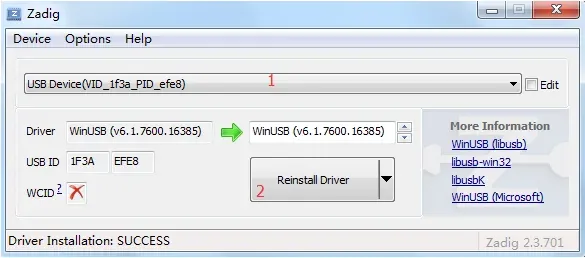
When rfel reports insufficient USB permissions, you can run it with an absolute path and administrator privileges, or configure a udev rule. On a desktop system using systemd-logind, create /etc/udev/rules.d/70-allwinner-fel.rules:
SUBSYSTEM=="usb", ATTR{idVendor}=="1f3a", ATTR{idProduct}=="efe8", TAG+="uaccess"Then run sudo udevadm control --reload-rules and replug the device. On a system without a desktop session, configure USB permissions through the local user group.
Neither WinUSB nor udev rules are needed.
Common commands
Section titled “Common commands”| Command | Purpose |
|---|---|
xfel version | Query the chip and confirm the FEL connection |
xfel spinor | Identify the SPI NOR and its capacity |
xfel spinor read <addr> <len> <file> | Read Flash |
xfel spinor write <addr> <file> | Write Flash (erases the required sectors automatically) |
xfel reset | Reset the board |
rfel’s subcommands have the same names; just replace xfel with rfel.
Common errors
Section titled “Common errors”| Message | Cause and handling |
|---|---|
unsupported chip | The tool version does not support F101; upgrade xfel / rfel |
| Device not found | Not in FEL; whether the cable carries data; whether WinUSB is installed on Windows |
usb bulk send/recv error | If it happens after exec: the CPU has left the BROM and the program is running, which is normal |
| Insufficient permissions (Linux) | Configure a udev rule, see above |