mGBA - GBA emulator
Runs Game Boy Advance games on the board (Game Boy / Game Boy Color work too): the emulator core is mGBA and the ROM is read from the TF card; the 240×160 game picture is handed to the display engine’s video plane and scaled up to the whole screen; the sound goes out over I2S from the on-chip codec; and a layer of semi-transparent buttons drawn with LVGL is overlaid on the screen and operated with the touchscreen. The sample is zephyr-components/mgba/samples/gba_player; mGBA itself is a git submodule in the component (MPL-2.0), and no BIOS file is needed.
flowchart TB
    SD["TF card<br/>xxx.gba + xxx.sav"] -->|"fs_read"| CORE["mGBA core<br/>gba_run_frame()"]
    TP["GT967 touchscreen"] -->|"input events"| PAD["pad.c<br/>LVGL buttons + touch hit test"]
    PAD -->|"GBA_KEY_* bit mask"| CORE
    CORE -->|"RGB565 240x160"| VID["video.c<br/>4 framebuffers in rotation"]
    CORE -->|"PCM resampled to 48 kHz"| ARING["audio.c<br/>ring buffer"]
    PAD -->|"LVGL"| ARGB["display engine ARGB plane"]
    ARING -.->|"queue length = the clock"| CORE
    ARING -->|"i2s_write"| CODEC["on-chip codec"]
    VID -->|"display_sunxi_show_rgb"| DE["display engine video plane<br/>hardware upscale + centering → 1024x768 screen"]
    ARGB -.->|"stacked on the video plane"| DE
There is no separate timer: each time the emulator finishes a frame it checks the sound queue, and if too much sound has piled up it waits with k_msleep(1), so the speed of the sound output sets the game speed.
Before you start, first complete Setting up the development environment and Getting the Zephyr source.
Preparation
Section titled “Preparation”ROM and TF card
Section titled “ROM and TF card”You must supply the ROM yourself; neither this page nor the repository provides any game files. Use only games you legally own (for example, a file dumped from your own cartridge).
| Item | Description |
|---|---|
| ROM file | .gba (GBA), .gb, .gbc (Game Boy / Color); the extension is recognized in either case (.gba or .GBA), and the core is chosen by the extension |
| Where it goes | the TF card’s root directory |
| Which one is chosen | it first looks for CONFIG_SAMPLE_GBA_ROM (default /SD:/game.gba); if it does not exist it takes the first file in the root directory whose size does not exceed CONFIG_MGBA_MAX_ROM_SIZE_MB (set to 10 MiB in the sample), preferring .gba and then .gb / .gbc |
| Save file | in the same directory as the ROM, with the same base file name and the extension .sav (xxx.gba corresponds to xxx.sav); if the file exists it is read in, and it is written back every 3 seconds whenever the game’s save data has changed |
| BIOS | not needed; mGBA’s built-in replacement BIOS is used, and loading a real BIOS from a file is not supported |
| Filesystem | FAT or exFAT, with long file name support |
The ROM is read into memory in one piece, so its size is limited by CONFIG_MGBA_MAX_ROM_SIZE_MB. A ROM larger than 10 MiB (up to 32 MiB) needs on-demand paging: add -DEXTRA_CONF_FILE=…/paged.conf at build time so the ROM is a file mapping and a page is read from the card only when it is used; see Configuration options. paged.conf does not change how the ROM is chosen; it is still game.gba or the first file in the root directory.
Fetching the mGBA submodule
Section titled “Fetching the mGBA submodule”mGBA itself is a git submodule in the component and must be fetched before the first build:
cd ~/f101-zephyr/zephyr-components/mgbagit submodule update --init mgbaBuilding
Section titled “Building”Run this in the workspace:
. ~/f101-zephyr/env.shcd ~/f101-zephyrwest build -b yuzukineko -d build/mgba zephyr-components/mgba/samples/gba_playerThe output is build/mgba/zephyr/zephyr.bin, about 4.98 MB, linked at 0x40000000.
The sample’s prj.conf has CONFIG_MINIMAL_LIBC=y: the headers in shim/ are written for Zephyr’s minimal C library, and your own application must select it too when it uses this module.
The sample’s CMakeLists.txt brings in the component module two directories up with ZEPHYR_EXTRA_MODULES, so it does not have to be specified separately:
# the mGBA module is two directories uplist(APPEND ZEPHYR_EXTRA_MODULES ${CMAKE_CURRENT_SOURCE_DIR}/../..)Running
Section titled “Running”Download it with either method in Building and running; the console is UART1 (115200 8N1).
- For debugging use method one:
xfel ddr f101-s3,xfel write 0x40000000 build/mgba/zephyr/zephyr.bin,xfel exec 0x40000000. - For stand-alone running use method three:
mkuf2.py app build/mgba/zephyr/zephyr.bin -o out/mgba.uf2, then drag it onto theF101BOOTdrive.
Insert the TF card with the ROM into the slot first, then power up and download.
Output after running
Section titled “Output after running”The serial console prints the following in order (the TF card holds an 8 MiB .gba, and the file name in the log is written as game; after that, one line of statistics every 5 seconds):
*** Booting Zephyr OS build b6f3dfe1a1f4 ***[00:00:00.493,000] <inf> display_sunxi: 1024x768 @ 60 Hz, fb 0x4011c180, video plane 0[00:00:00.564,000] <inf> gt967: GT967 firmware 0x1040, 1024x768[00:00:00.569,000] <inf> gt967: configuration 0x63: 1024 x 768, up to 5 point(s), module switch 0x04ROM /SD:/game.gba, save /SD:/game.sav[00:00:02.252,000] <inf> gba: ROM /SD:/game.gba, 8388608 bytesgba: 306 frames, emulation 4224 us/frame, sound 244898 frames pushed, queued 2722, underruns 0, ring empty 36, slab full 462, skipped 157gba: 300 frames, emulation 11407 us/frame, sound 241097 frames pushed, queued 3179, underruns 0, ring empty 36, slab full 932, skipped 150Display and touchscreen initialization
Section titled “Display and touchscreen initialization”display_sunxi reports 1024x768 @ 60 Hz, which means the video plane is available; gt967 reports the firmware version and up to 5 point(s), which means the touchscreen can recognize 5 fingers at once.
TF card and ROM reading
Section titled “TF card and ROM reading”The console prints ROM /SD:/game.gba, save /SD:/game.sav, followed by gba: ROM …, 8388608 bytes: the TF card is mounted, the ROM is chosen and read into memory in one piece. The game picture then appears on the screen, with the semi-transparent buttons overlaid on it.
Emulation speed and sound queue
Section titled “Emulation speed and sound queue”After that there is one line of statistics every 5 seconds. In 5 seconds it emulates about 300 frames (about 60 fps) and pushes about 240000 stereo frames into the sound buffer (48 kHz × 5 seconds), and underruns is 0. The emulation figure varies with the game scene; the two 5-second windows are 4224 μs and 11407 μs, both within the 16700 μs frame time.
The meaning of each field:
| Field | Meaning |
|---|---|
frames | frames emulated in these 5 seconds; full speed is about 300 |
emulation … us/frame | average emulation time per frame; above 16700 μs it cannot keep up with real time |
sound … frames pushed | stereo frames pushed into the sound ring buffer |
queued | frames currently waiting to be played in the buffer |
underruns | number of I2S underrun restarts |
ring empty | times the sound thread found fewer than one block in the ring buffer |
slab full | times the sound thread could not get a free block (it appears when emulation is faster than playback, which is normal) |
skipped | frames whose drawing was skipped; by default one frame is drawn every two |
The picture on the screen
Section titled “The picture on the screen”The game picture is scaled up and shown in the middle of the panel, with the semi-transparent on-screen buttons overlaid on it; when a finger holds a button, that button turns orange.
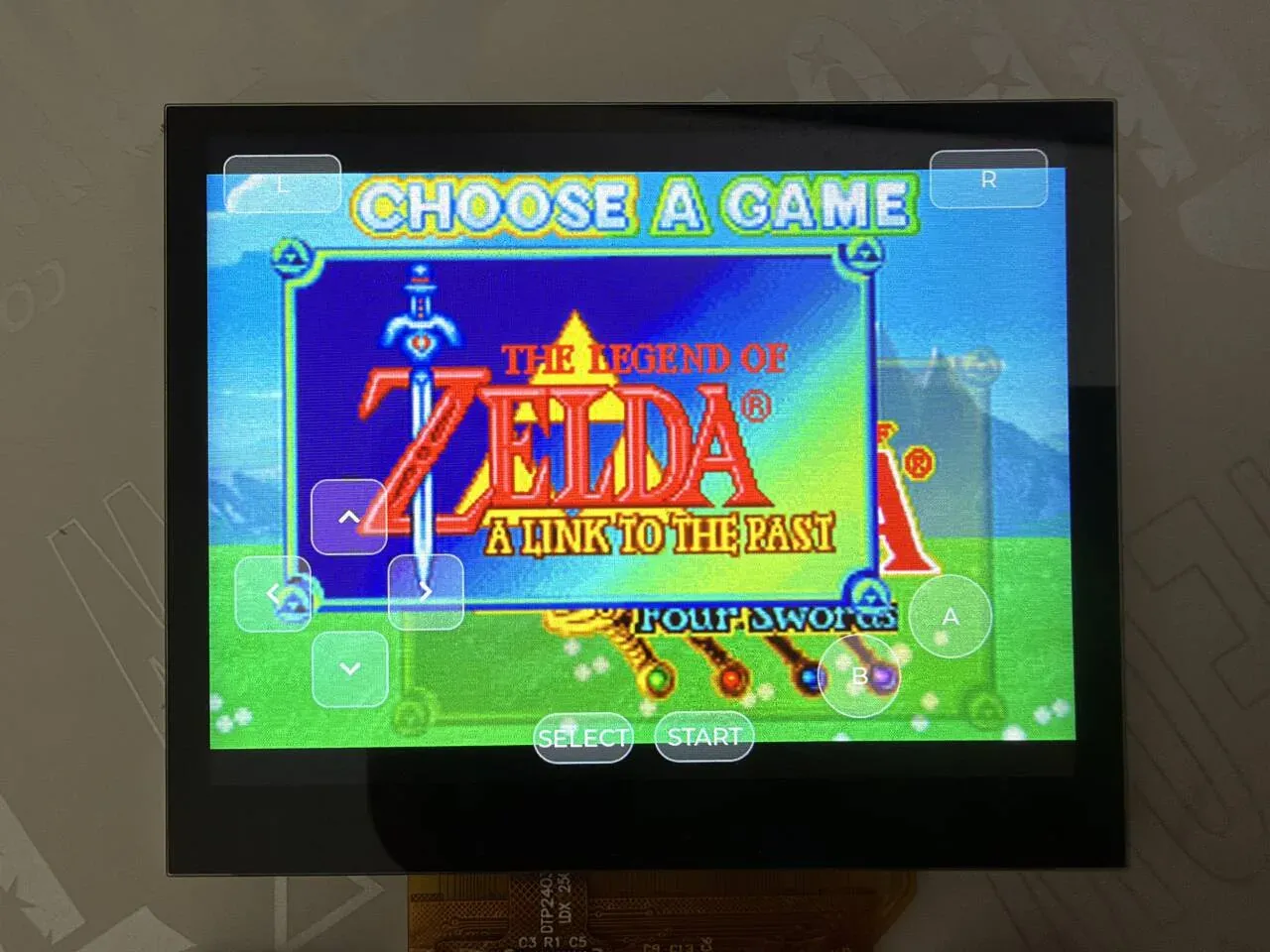
The photo shows the selection screen of The Legend of Zelda: A Link to the Past & Four Swords. Button positions: L and R at the top-left and top-right, the D-pad at the lower left, A and B at the lower right, and SELECT and START at the bottom center.
Scaling and output path
Section titled “Scaling and output path”Picture
Section titled “Picture”The picture is RGB565 all the way, with no CPU scaling; the upscaling is left to the display engine’s video plane:
- The core draws a frame into the buffer
video_acquire()supplies, 240×160×2 bytes. video_present()flushes the buffer’s data cache back to memory and wakes thevideothread.- The
videothread callsdisplay_sunxi_show_rgb(); the video plane reads directly from this memory and upscales in hardware. - At the same time, LVGL’s ARGB plane draws above the video plane, so the on-screen buttons do not consume the game picture’s bandwidth.
video.c uses 4 buffers (NBUF 4) in rotation: while the core draws the next frame, the video plane is still scanning the previous one, so it cannot write the same buffer. video_present() puts only the index of the latest frame into ready_idx, and the core is not blocked while the video thread waits for the display (which may mean waiting for the next refresh); if it cannot keep up, the old picture is simply overwritten by the new one.
video.c lines 45–66:
static void video_main(void *a, void *b, void *c){  bool warned = false;
  while (true) {    struct display_sunxi_rgb img = {.width = 0};    int idx, ret;
    k_sem_take(&frame_sem, K_FOREVER);    idx = atomic_get(&ready_idx);    img.data = buf[idx];    img.width = ready_w;    img.height = ready_h;    img.stride = STRIDE;    img.nonblock = false;    ret = display_sunxi_show_rgb(disp, &img);    if (ret != 0 && !warned) {      printk("video: show_rgb failed: %d\n", ret);      warned = true;    }  }}
Scaling rule
Section titled “Scaling rule”The scaling is in display_sunxi_show_rgb() in the driver zephyr/drivers/display/sunxi/display_sunxi.c: keep the aspect ratio and scale to just fit the whole screen, centered, with even width and height.
if ((uint64_t)data->width * img->height <= (uint64_t)data->height * img->width) { dw = data->width; dh = (uint64_t)img->height * data->width / img->width;} else { dh = data->height; dw = (uint64_t)img->width * data->height / img->height;}dw &= ~1U;dh &= ~1U;The target screen is 1024×768:
| Game | Source picture | After scaling | Position |
|---|---|---|---|
| GBA | 240×160 | 1024×682 | fills the width, centered vertically, with black bars of about 43 pixels at the top and bottom |
| Game Boy / Color | 160×144 | 853×768 | fills the height, centered horizontally, with black bars at the left and right |
The source picture size comes from the width and height returned by gba_frame() (the core reports them itself) and is not hard-coded. The upscaling is linear interpolation; integer scaling (pixel art) and filters are not supported, and the scaling mode cannot be selected in the application.
Frame skipping
Section titled “Frame skipping”By default one frame is drawn every two (CONFIG_SAMPLE_GBA_VIDEO_DIV=2, about 30 fps). A skipped frame runs only the emulation and the sound, not the renderer, which leaves time for heavy scenes. There is a second layer in the main loop: when the sound queue drops below SKIP_BELOW (1500 frames) it goes into “catch-up” and draws at least one frame in four, until the queue climbs back to SKIP_RESUME (2800 frames). main.c lines 311–329:
while (true) {  uint32_t c0 = k_cycle_get_32();  size_t n;
  gba_set_keys(pad_keys());  gba_set_frame_buffer(video_acquire());  /* behind the sound: draw less until it has caught up */  {    size_t queued = audio_queued();
    if (queued < SKIP_BELOW) {      catching_up = true;    } else if (queued > SKIP_RESUME) {      catching_up = false;    }    gba_set_frameskip(catching_up ? MAX(SKIP_COUNT, SKIP_BASE) : SKIP_BASE);  }  drawn = gba_run_frame();
...}The sample rate of the sound the core produces is decided by the game; resample() in gba_player.c (lines 142–174) converts it to the output sample rate (CONFIG_SAMPLE_GBA_RATE, default 48000, also settable to 44100) with 16.16 fixed-point linear interpolation, and outputs 16-bit signed stereo.
The main loop puts the PCM into the ring buffer in audio.c; the audio thread cuts it into 512-frame blocks and hands them to I2S for playback, and the on-chip codec outputs to the headphones and the amplifier. The codec volume is set in audio.c lines 59–62:
audio_codec_start_output(ctl);/* small speaker: digital volume raised from the default */audio_codec_set_property(ctl, AUDIO_PROPERTY_OUTPUT_VOLUME, AUDIO_CHANNEL_ALL, (audio_property_value_t){.vol = 150});.vol ranges from 0 to 255. To change the volume, change this number; for muting and for setting the left and right channels separately see the MP4 player; the two applications use the same codec interface.
A few constants in audio.c decide the buffer sizes:
| Constant | Value | Meaning |
|---|---|---|
BLOCK_FRAMES | 512 | stereo frames per block, about 10.7 ms at 48 kHz |
SLAB_BLOCKS | 6 | number of memory blocks given to I2S |
PREFILL | 3 | send 3 blocks before starting I2S |
RING_BLOCKS | 8 | the ring buffer holds 8 blocks |
HIGH_WATER (main.c) | RATE / 15 | above this many queued frames (3200 at 48 kHz, about 67 ms) the emulation waits |
An I2S write returning -EIO means the stream broke; audio_main() PREPAREs again and pre-fills again, and that is where underruns in the statistics line comes from.
On-screen buttons: UI and event implementation
Section titled “On-screen buttons: UI and event implementation”The on-screen buttons are implemented in src/pad.c, a single file of 215 lines. Two points stand out in the design:
- The picture uses LVGL, but touch does not use LVGL’s input. LVGL’s pointer input recognizes only one finger at a time, whereas playing a game needs a direction and A/B pressed at once. So
pad.creads the Zephyr input subsystem’s multi-touch events directly and works out which button each finger lands on itself; the LVGL buttons are only for display. - The button state is a bit mask (
GBA_KEY_*); the touch thread writes it and the emulation thread reads it once per frame.
flowchart TD
    GT["GT967 touchscreen<br/>I2C, up to 5 points"] -->|"INPUT_ABS_MT_SLOT / ABS_X / ABS_Y / BTN_TOUCH"| IT["input thread<br/>priority 4"]
    IT -->|"touch_event callback"| FING["fingers[5]<br/>x, y, down"]
    FING --> SCAN["touch_scan()<br/>hit test each button against 5 fingers<br/>+ 50 ms release hold"]
    SCAN -->|"press / release"| BTN["LVGL button<br/>LV_STATE_PRESSED turns orange"]
    SCAN -->|"mask"| KEYS["keys<br/>atomic_t"]
    BTN --> LV["lv_timer_handler()<br/>every 16 ms"]
    LV --> ARGB["ARGB plane"]
    KEYS -->|"pad_keys()"| MAIN["main loop<br/>gba_set_keys()"]
    MAIN --> EMU["mGBA core<br/>setKeys()"]
Creating the widgets
Section titled “Creating the widgets”Each button is an lv_button with an lv_label inside it (the D-pad uses LVGL’s built-in symbols, the rest use text). key_add() does two things at once: it creates the button and sets the styles, and it records its position and key bit in the pad_keys_tbl array, which the touch hit test uses. pad.c lines 140–167:
static void key_add(int x, int y, int w, int h, const char *text, uint32_t bit, int radius){  lv_obj_t *b = lv_button_create(lv_screen_active());  lv_obj_t *l = lv_label_create(b);
  lv_obj_set_size(b, w, h);  lv_obj_align(b, LV_ALIGN_TOP_LEFT, x, y);  lv_obj_set_style_radius(b, radius, 0);  lv_obj_set_style_bg_color(b, lv_color_white(), 0);  lv_obj_set_style_bg_opa(b, LV_OPA_30, 0);  lv_obj_set_style_bg_color(b, lv_color_make(255, 200, 60), LV_STATE_PRESSED);  lv_obj_set_style_bg_opa(b, LV_OPA_70, LV_STATE_PRESSED);  lv_obj_set_style_border_color(b, lv_color_white(), 0);  lv_obj_set_style_border_opa(b, LV_OPA_50, 0);  lv_obj_set_style_border_width(b, 2, 0);  lv_obj_set_style_shadow_width(b, 0, 0);  lv_obj_set_style_text_font(l, &lv_font_montserrat_28, 0);  lv_obj_set_style_text_color(l, lv_color_white(), 0);  lv_label_set_text(l, text);  lv_obj_center(l);  lv_obj_add_event_cb(b, key_event, LV_EVENT_ALL, (void *)(uintptr_t)bit);
if (nkeys < MAX_KEYS) { pad_keys_tbl[nkeys++] = (struct pad_key){ .obj = b, .x = x, .y = y, .w = w, .h = h, .bit = bit, }; }}- Arguments: the position
x, y(relative to the top-left corner of the screen), the sizew, h, the displayed texttext, the corresponding GBA key bitbit, and the corner radiusradius(LV_RADIUS_CIRCLEis a circle). - Style: normally white at 30% opacity with a white border at 50% opacity, letting the game picture behind show through; in the pressed state (
LV_STATE_PRESSED) it becomes orange(255, 200, 60)at 70% opacity. - There are at most
MAX_KEYS(10) keys, exactly the 10 keys of a GBA; adding more requires raising this macro first. - The font is
lv_font_montserrat_28, soprj.confenablesCONFIG_LV_FONT_MONTSERRAT_28=y; symbols such asLV_SYMBOL_LEFTare in this font too.
The screen background must be transparent, otherwise it would cover the video plane. This is the first line of pad_main():
lv_obj_set_style_bg_opa(lv_screen_active(), LV_OPA_TRANSP, 0);LVGL’s own events
Section titled “LVGL’s own events”The button also carries a key_event callback, which handles the press and release events LVGL produces itself (when LVGL pointer input is connected, for example). It responds to only three events: LV_EVENT_PRESSED sets the bit, LV_EVENT_RELEASED and LV_EVENT_PRESS_LOST clear it, and every other event (drawing, style changes, PRESSING and so on, which keep arriving while the button is held) is ignored. pad.c lines 122–138:
static void key_event(lv_event_t *e){  uint32_t bit = (uint32_t)(uintptr_t)lv_event_get_user_data(e);
  /* only these events change a key: drawing and style events arrive while it is held */  switch (lv_event_get_code(e)) {  case LV_EVENT_PRESSED:    atomic_or(&keys, bit);    break;  case LV_EVENT_RELEASED:  case LV_EVENT_PRESS_LOST:    atomic_and(&keys, ~bit);    break;  default:    break;  }}
The sample does not configure an LVGL pointer input device, so this callback is never triggered in the sample; with a touchscreen, keys is overwritten wholesale every 16 ms by the result of touch_scan().
Touch events to GBA key bits
Section titled “Touch events to GBA key bits”The touchscreen is zephyr,touch in the devicetree’s chosen (on yuzukineko it is the GT967, on I2C1). pad.c registers a callback with INPUT_CALLBACK_DEFINE, and every touch event that comes in reaches it. The event sequence for multi-touch is “select the slot first, then give that slot’s coordinates and press state”, so the callback keeps the current slot in cur_slot. Lines 54–80:
#define TOUCH_SLOTS  5
static struct {  int x, y;  bool down;} fingers[TOUCH_SLOTS];static int cur_slot;
static void touch_event(struct input_event *evt, void *user_data){  switch (evt->code) {  case INPUT_ABS_MT_SLOT:    cur_slot = CLAMP(evt->value, 0, TOUCH_SLOTS - 1);    break;  case INPUT_ABS_X:    fingers[cur_slot].x = evt->value;    break;  case INPUT_ABS_Y:    fingers[cur_slot].y = evt->value;    break;  case INPUT_BTN_TOUCH:    fingers[cur_slot].down = evt->value != 0;    break;  }}INPUT_CALLBACK_DEFINE(DEVICE_DT_GET(DT_CHOSEN(zephyr_touch)), touch_event, NULL);
The touchscreen coordinates are 1024×768 and map one to one onto screen pixels (screen-width = <1024>, screen-height = <768> in the devicetree), so no conversion is needed and they are compared directly with the button rectangles.
touch_scan() then checks each button against the 5 fingers one by one (lines 83–119):
static uint32_t touch_scan(void){  uint32_t mask = 0;  uint32_t now = k_uptime_get_32();
  for (int k = 0; k < nkeys; k++) {    struct pad_key *key = &pad_keys_tbl[k];    bool pressed = false;
    for (int f = 0; f < TOUCH_SLOTS; f++) {      if (fingers[f].down && fingers[f].x >= key->x - HIT_MARGIN &&          fingers[f].x < key->x + key->w + HIT_MARGIN &&          fingers[f].y >= key->y - HIT_MARGIN &&          fingers[f].y < key->y + key->h + HIT_MARGIN) {        pressed = true;      }    }    if (pressed) {      key->hold_until = now + RELEASE_HOLD_MS;    } else if ((int32_t)(now - key->hold_until) < 0) {      pressed = true;    }    if (pressed) {      mask |= key->bit;    }    if (pressed != key->shown) {      if (pressed) {        lv_obj_add_state(key->obj, LV_STATE_PRESSED);      } else {        lv_obj_remove_state(key->obj, LV_STATE_PRESSED);      }      key->shown = pressed;    }  }
return mask;}- Hit area: the button rectangle is expanded by
HIT_MARGIN(12 pixels) on each of the four sides, so the hit areas of adjacent buttons (between the D-pad keys, say) overlap and a finger in the gap may press two buttons at once, which is useful for diagonal input. - Release hold: the touch controller occasionally reports one frame of no finger while the finger is actually still on the glass, which would count as a release and a re-press. So the key is held for
RELEASE_HOLD_MS(50 ms) after the finger leaves. - Synchronized display: when a key’s state changes,
LV_STATE_PRESSEDis added to or removed from the LVGL button at the same time, and the button changes color. LVGL itself does not know about fingers; the colors are driven entirely from here. - The return value is the bit mask of all the keys that are pressed.
The key bit values come from include/mgba_zephyr/gba.h and match the bit order of the GBA hardware’s KEYINPUT register:
| Key | Macro | Bit |
|---|---|---|
| A | GBA_KEY_A | BIT(0) |
| B | GBA_KEY_B | BIT(1) |
| SELECT | GBA_KEY_SELECT | BIT(2) |
| START | GBA_KEY_START | BIT(3) |
| Right | GBA_KEY_RIGHT | BIT(4) |
| Left | GBA_KEY_LEFT | BIT(5) |
| Up | GBA_KEY_UP | BIT(6) |
| Down | GBA_KEY_DOWN | BIT(7) |
| R | GBA_KEY_R | BIT(8) |
| L | GBA_KEY_L | BIT(9) |
Threads and state passing
Section titled “Threads and state passing”pad_start() starts a thread named pad (priority 7, 4096-byte stack); in pad_main() the buttons are created first, then it enters a loop: every 16 ms it scans the touch, writes keys, and calls lv_timer_handler() once to let LVGL refresh. Lines 193–199:
while (true) {#if HAS_TOUCH atomic_set(&keys, touch_scan());#endif lv_timer_handler(); k_msleep(16);}The emulation thread (the one main() runs in) calls pad_keys() at the start of each frame to take keys and passes it to the core with gba_set_keys(). keys is an atomic_t, so no locking is needed between the two threads.
Input events are handled in Zephyr’s input thread, whose priority boards/yuzukineko.conf raises to 4, higher than the emulation thread (the main thread, priority 6) and the pad thread (7), so fingers are not lost even when a frame takes long to emulate:
CONFIG_INPUT=yCONFIG_INPUT_GT967_MAX_TOUCH_POINTS=5CONFIG_INPUT_THREAD_PRIORITY_OVERRIDE=yCONFIG_INPUT_THREAD_PRIORITY=4CONFIG_INPUT_QUEUE_MAX_MSGS=64Default layout
Section titled “Default layout”The layout is drawn for a 1024×600 screen, and dy = screen height - 600 moves the lower buttons down, so on a taller screen the D-pad and buttons still sit against the bottom edge. The yuzukineko screen is 768 high, so dy = 168. pad_main() lines 177–191:
const int dy = lv_display_get_vertical_resolution(NULL) - 600;
key_add(30, 330 + dy, 90, 90, LV_SYMBOL_LEFT, GBA_KEY_LEFT, 20);key_add(210, 330 + dy, 90, 90, LV_SYMBOL_RIGHT, GBA_KEY_RIGHT, 20);key_add(120, 240 + dy, 90, 90, LV_SYMBOL_UP, GBA_KEY_UP, 20);key_add(120, 420 + dy, 90, 90, LV_SYMBOL_DOWN, GBA_KEY_DOWN, 20);
key_add(830, 360 + dy, 100, 100, "A", GBA_KEY_A, LV_RADIUS_CIRCLE);key_add(720, 430 + dy, 100, 100, "B", GBA_KEY_B, LV_RADIUS_CIRCLE);
key_add(20, 20, 140, 70, "L", GBA_KEY_L, 16);key_add(864, 20, 140, 70, "R", GBA_KEY_R, 16);
key_add(380, 520 + dy, 120, 60, "SELECT", GBA_KEY_SELECT, 30);key_add(524, 520 + dy, 120, 60, "START", GBA_KEY_START, 30);
The actual coordinates on the 768-high screen (x, y, width × height):
| Key | Position | Size |
|---|---|---|
| Left | 30, 498 | 90 × 90 |
| Right | 210, 498 | 90 × 90 |
| Up | 120, 408 | 90 × 90 |
| Down | 120, 588 | 90 × 90 |
| A | 830, 528 | 100 × 100 (circle) |
| B | 720, 598 | 100 × 100 (circle) |
| L | 20, 20 | 140 × 70 |
| R | 864, 20 | 140 × 70 |
| SELECT | 380, 688 | 120 × 60 |
| START | 524, 688 | 120 × 60 |
The buttons are stacked on the picture: after scaling, the picture fills the width of 1024 (see Scaling rule).
How to change the layout
Section titled “How to change the layout”| What you want to change | Where to change it |
|---|---|
| Move or enlarge a button | the matching key_add(x, y, w, h, …) line in pad_main() in pad.c; the coordinates are screen pixels with the origin at the top-left corner |
| Change the text on a button | the text argument of key_add(); the D-pad uses LV_SYMBOL_*, and ordinary text must use characters the font contains |
| Change the color or opacity | the lv_obj_set_style_bg_* lines in key_add(). Normally white at LV_OPA_30, pressed orange at LV_OPA_70 |
| Change the font size | lv_font_montserrat_28; switch to lv_font_montserrat_16 and the like, enabling the matching CONFIG_LV_FONT_MONTSERRAT_* in prj.conf at the same time |
| Switch to a Game Boy layout (no L, R) | delete the L and R key_add lines; gba_set_keys() works for the GB core too, and extra bits are ignored |
| Add a button | raise MAX_KEYS first, then key_add(…, GBA_KEY_xxx, …) |
| Make touch easier to hit or less prone to mis-taps | HIT_MARGIN (the hit area expansion, 12 pixels by default) |
| Adjust the release hold time | RELEASE_HOLD_MS (50 ms by default) |
| No on-screen buttons | delete pad_start() in main.c (line 271); pad_keys() is then always 0 and the game receives no input at all |
Example of adding a button: adding a “fast-forward” button to the left of START that accelerates while held (this only demonstrates how to add a button; the sample itself has no fast-forward) requires a matching key bit in gba.h, and a GBA has only the 10 keys in the table above, so an extra key must be interpreted by you in main().
Limits
Section titled “Limits”- Touchscreen only. On a board without
zephyr,touch,HAS_TOUCHis 0 and the buttons can only be driven by LVGL’s pointer input, but the sample does not configure LVGL pointer input, so there is no usable input on such a board. Physical buttons, gamepads, and USB keyboards are not supported. - There is no pause, fast-forward, save state, cheat codes, or menu. The only saves are the game’s own battery saves (
.sav).
Features and where to change them
Section titled “Features and where to change them”| Feature | Location | How to change |
|---|---|---|
| Choose the ROM | main.c pick_rom() (line 122), CONFIG_SAMPLE_GBA_ROM | specify the path at build time, or name the file game.gba |
| Save file name | at the end of pick_rom(), the ROM extension is replaced by .sav | change the concatenation rule |
| Save write-back interval | main.c SAVE_MS (3000 ms) | change the macro |
| Sound output sample rate | CONFIG_SAMPLE_GBA_RATE | 48000 or 44100 |
| Volume | .vol in audio.c lines 60–62 | 0–255 |
| Picture frame rate | CONFIG_SAMPLE_GBA_VIDEO_DIV | 1 draws every frame, 2 is 30 fps, the maximum is 4 |
| Catch-up thresholds | SKIP_BELOW, SKIP_RESUME, SKIP_COUNT in main.c | change the macros |
| On-screen buttons | pad.c | see the previous section |
| Scaling | the display driver display_sunxi_show_rgb() | change it in the driver; there is no option in the application |
| CPU clock | main.c cpu_clock_setup() + CONFIG_SAMPLE_GBA_CPU_MHZ | see the configuration options |
cpu_clock_setup() raises the CPU clock toward the target in 72 MHz steps, self-testing with a checked loop after each step; if the self-test fails it falls back to the previous frequency, and the voltage is not changed. The sample sets 1008 MHz, and if the raise does not succeed the log prints cpu: … MHz refused or cpu: … MHz BAD.
Configuration options
Section titled “Configuration options”Sample options (samples/gba_player/Kconfig):
| Option | Default | Description |
|---|---|---|
CONFIG_SAMPLE_GBA_ROM | "/SD:/game.gba" | preferred ROM path; if it does not exist, the first suitable file in the root directory is used |
CONFIG_SAMPLE_GBA_RATE | 48000 | sound output sample rate, 48000 or 44100 |
CONFIG_SAMPLE_GBA_VIDEO_DIV | 2 | draw one frame every N frames, range 1–4 |
CONFIG_SAMPLE_GBA_CPU_MHZ | 0 (set to 1008 in prj.conf) | CPU clock; 0 means keep the value the bootloader set |
CONFIG_SAMPLE_GBA_BENCH | off | runs a fixed number of frames without pacing or display, printing the elapsed time |
CONFIG_SAMPLE_GBA_BENCH_FRAMESKIP | 0 | frames skipped between two drawn frames in the benchmark |
CONFIG_SAMPLE_GBA_BENCH_FRAMES | 1200 | number of frames for the benchmark; prints a picture CRC every 200 frames |
CONFIG_SAMPLE_GBA_ROM_DIAG | off | prints each ROM’s size, trailing padding, and random-read speed on the card, then stops |
CONFIG_SAMPLE_GBA_PROFILE | off | samples the emulation thread’s PC and prints a histogram |
CONFIG_SAMPLE_GBA_HOT_RAM | off | for an XIP image, places the emulator and sample code in RAM to run from there |
Module options (zephyr-components/mgba/Kconfig):
| Option | Default | Description |
|---|---|---|
CONFIG_MGBA | off (on in the sample) | builds the mGBA core; RISC-V only |
CONFIG_MGBA_RVV | on when SUN252I_F101_RVV is enabled | uses the vector extension to accelerate copies, fills, and the background renderer, with output identical to the scalar version |
CONFIG_MGBA_ROM_DEMAND_PAGED | off | the ROM becomes an on-demand paged file mapping; needs the MMU and DEMAND_PAGING |
CONFIG_MGBA_MAX_ROM_SIZE_MB | 32 (set to 10 in the sample) | maximum size of a ROM read into memory in one piece, range 1–32 |
The main playback-related options in prj.conf and boards/yuzukineko.conf:
| Option | Purpose |
|---|---|
CONFIG_SDHC, CONFIG_DISK_DRIVER_SDMMC | the TF card |
CONFIG_FAT_FILESYSTEM_ELM, CONFIG_FS_FATFS_EXFAT, CONFIG_FS_FATFS_LFN | FAT / exFAT and long file names |
CONFIG_FPU, CONFIG_FPU_SHARING | hardware floating point, shared between threads |
CONFIG_I2S, CONFIG_AUDIO, CONFIG_AUDIO_CODEC | sound output and volume |
CONFIG_DISPLAY, CONFIG_DISPLAY_SUNXI_ARGB8888 | display; the ARGB overlay plane holds the on-screen buttons |
CONFIG_LVGL, CONFIG_LV_COLOR_DEPTH_32 | LVGL, with a 32-bit color depth to support alpha |
CONFIG_LV_Z_MEM_POOL_SIZE=131072 | LVGL memory pool 128 KiB |
CONFIG_LV_Z_VDB_SIZE=4 | LVGL draw buffer, 4% of the screen |
CONFIG_LV_FONT_MONTSERRAT_16, CONFIG_LV_FONT_MONTSERRAT_28 | the fonts used for the button text |
CONFIG_INPUT, CONFIG_I2C | the touchscreen controller is on I2C |
CONFIG_INPUT_GT967_MAX_TOUCH_POINTS=5 | recognizes 5 fingers at once |
CONFIG_INPUT_THREAD_PRIORITY=4 | input thread priority, higher than the emulation thread |
CONFIG_INPUT_QUEUE_MAX_MSGS=64 | input queue depth |
CONFIG_MAIN_STACK_SIZE=16384 | main thread stack; the core has a deep call chain |
CONFIG_HEAP_MEM_POOL_SIZE=262144 | kernel heap |
CONFIG_COMMON_LIBC_MALLOC_ARENA_SIZE=-1 | the C library malloc uses all the remaining memory; the ROM buffer is allocated from it |
CONFIG_SUN252I_F101_RVV=y | the kernel supports saving the vector registers |
CONFIG_VDEC=n, CONFIG_G2D=n and so on | unused drivers are turned off |
- Only bare ROM files are recognized; archives (
.zip,.7z) are not supported. The file goes in the TF card’s root directory, and subdirectories are not scanned. - A ROM read in one piece is at most 10 MiB (the sample’s setting); a larger ROM uses on-demand paging, see Configuration options.
- An external BIOS, save states, cheat codes, link cable, infrared, and the solar sensor are not supported.
- Switching games, pause, fast-forward, and reset are not supported at runtime; changing games requires a restart.
- There is only one kind of scaling: scale up to full screen keeping the aspect ratio; for integer scaling or filters, change the display driver.
- When
emulation … us/framein the statistics line is above 16700 the emulation cannot keep up with real time; the main loop catches up by skipping frames, the picture frame rate drops, and keeping the sound uninterrupted takes priority.
Troubleshooting
Section titled “Troubleshooting”| Symptom | Cause and handling |
|---|---|
The log prints cannot mount the SD card | the TF card was not mounted; check that it is seated properly and is FAT / exFAT |
The log prints no .gba/.gb/.gbc file on the card | there is no usable ROM in the root directory; put the file in the TF card’s root directory, no larger than CONFIG_MGBA_MAX_ROM_SIZE_MB |
emulation in the statistics line is above 16700 μs | the emulation cannot keep up with real time and the main loop skips frames automatically; CONFIG_SAMPLE_GBA_VIDEO_DIV can be raised |
underruns is not 0 | an I2S underrun; audio_main() re-prepares and pre-fills |
Code structure
Section titled “Code structure”| File | Contents |
|---|---|
zephyr-components/mgba/include/mgba_zephyr/gba.h | public interface: gba_open(), gba_run_frame(), gba_audio_read(), gba_set_keys(), gba_save_flush(), and GBA_KEY_* |
zephyr-components/mgba/src/gba_player.c | wraps the mGBA core in the interface above: reads the ROM and save file, resamples the sound, frame buffers |
zephyr-components/mgba/src/gba_memory.c, src/renderers/ | modified versions of mGBA files (MPL-2.0): on-demand paging, vector renderers |
zephyr-components/mgba/src/mgba_libc.c, shim/ | supplies the C library functions and headers that are missing |
samples/gba_player/src/main.c | main loop: choose the ROM, run the emulation, sound pacing, saving |
samples/gba_player/src/video.c | framebuffer rotation and video plane output |
samples/gba_player/src/audio.c | sound ring buffer, I2S, and codec |
samples/gba_player/src/pad.c | LVGL on-screen buttons and the touch hit test |
Flow of execution
Section titled “Flow of execution”What main() does, in order:
cpu_clock_setup()raises the CPU clock.fs_mount()mounts the TF card at/SD:; on failure it printscannot mount the SD cardand exits.video_init()allocates the 4 framebuffers and starts thevideothread;audio_init()starts theaudiothread; either one failing causes an exit.pick_rom()chooses the ROM and decides the save path; if none is found it printsno .gba/.gb/.gbc file on the cardand exits.gba_open()reads in the ROM and the save file and creates the core;pad_start()starts thepadthread.- It enters the main loop: take the keys → set the frame buffer and frame skip →
gba_run_frame()→ hand the picture tovideo_present()→ put the sound into the ring buffer → wait when the sound queue is full → save every 3 seconds → print one line of statistics every 5 seconds.
flowchart TD
    A["cpu_clock_setup<br/>fs_mount"] --> B["video_init / audio_init"]
    B --> C["pick_rom<br/>gba_open"]
    C --> D["pad_start"]
    D --> E["gba_set_keys(pad_keys())"]
    E --> F["gba_run_frame()"]
    F -->|"drawn"| G["video_present()"]
    F --> H["gba_audio_read -> audio_push"]
    G --> H
    H --> I{"audio_queued()<br/>> HIGH_WATER ?"}
    I -->|"yes"| J["k_msleep(1) wait for the sound to play"]
    J --> I
    I -->|"no"| K["gba_save_flush every 3 s<br/>print statistics every 5 s"]
    K --> E
Threads and priorities (a smaller number is higher priority):
| Thread | Priority | Purpose |
|---|---|---|
audio | 3 | takes blocks from the ring buffer and sends them to I2S |
| input (system) | 4 | touch event callback |
video | 5 | calls display_sunxi_show_rgb(), possibly waiting for the next refresh |
| main (emulation) | 6 | the main loop |
pad | 7 | LVGL refresh and touch scanning |