LVGL - GUI
LVGL is an embedded graphics library: widgets (buttons, labels, sliders, charts, …), styles, animations, and touch events all come ready-made. On the F101 with Zephyr, LVGL is built into the application as a west module (modules/lib/gui/lvgl, version 9.3.0), drawing to the screen through the standard display interface and reading the touchscreen through the standard input subsystem. No zephyr-components and no external assets are needed.
flowchart TB
    APP["App lv_button_create<br/>LVGL 9.3 software rendering"] -->|"partial render buffer<br/>CONFIG_LV_Z_VDB_SIZE"| FLUSH["lvgl_flush_cb_16bit<br/>display_write"]
    TP["GT967 touch<br/>I2C1 + INT"] -->|"input subsystem<br/>ABS_X / ABS_Y / BTN_TOUCH"| PTR["lvgl_pointer_input.c"]
    PTR -->|"lv_indev pointer"| APP
    FLUSH -->|"memcpy + cache flush"| FB["framebuffer plane<br/>RGB565 / ARGB8888"]
    VID["video plane<br/>mp4 / game picture"] -.->|"in ARGB mode stacked below"| DE["display engine DE → TCON"]
    FB --> DE
    DE -->|"MIPI DSI"| DSI["1024x768 screen"]
This page covers, in order: preparation, building and running the hello program, running the official demos on the board, then how LVGL connects to the display and touch, the complete code of a minimal UI, and the recommended Kconfig. Every running step states what appears on the serial port and on the screen.
Before you start, first complete Setting up the development environment and Getting the Zephyr source.
Preparation
Section titled “Preparation”| Item | Description |
|---|---|
| LVGL source | fetched with Zephyr’s west manifest, in ~/f101-zephyr/modules/lib/gui/lvgl, version 9.3.0. The Zephyr-side glue is in zephyr/modules/lvgl/ |
| Screen | the 1024×768 MIPI DSI panel of the yuzukineko carrier board; in the devicetree it is chosen { zephyr,display = &display; }, see Display |
| Touch | the GT967 touch controller on the carrier board, at 0x5d on i2c1; in the devicetree it is the touch node, see I2C. It runs without touch too, you just cannot tap the widgets |
| Assets | not needed. The fonts and icons are compiled into LVGL, and the demo images are compiled into the demo |
| External hardware | only a board that can display. The official demo’s music player makes no sound; it is only a UI |
| hello program | examples/lvgl_hello/, source in Creating a minimal UI below |
Building
Section titled “Building”Run this in the workspace:
. ~/f101-zephyr/env.shcd ~/f101-zephyrwest build -b yuzukineko -d build/lvgl-hello examples/lvgl_helloThe output is build/lvgl-hello/zephyr/zephyr.bin, about 2.7 MB (2733692 bytes), linked at 0x40000000, like any other Zephyr program. The 1.5 MiB framebuffer and the 64 KiB LVGL memory pool are static arrays and make up most of it.
Running
Section titled “Running”Download and run it with xfel (see Building and running); the console is UART1 (115200 8N1).
1. Starting the hello program
Section titled “1. Starting the hello program”The commands:
xfel ddr f101-s3xfel write 0x40000000 build/lvgl-hello/zephyr/zephyr.binxfel exec 0x40000000The output after running, on the serial port:
[00:00:00.000,000] <inf> usb_phy_sunxi: ready[00:00:00.000,000] <inf> g2d_sunxi: module clock 300000000 Hz (PLL_PERI_2X 1200000000 Hz / 4)[00:00:00.000,000] <inf> g2d_sunxi: ready, queue depth 8[00:00:00.000,000] <inf> display: core: soc sun252iw2, board devicetree[00:00:00.000,000] <inf> display: core: bound tcon-top@5460000 (tcon-top)[00:00:00.000,000] <inf> display: de-rcq: rcq0: 41 blocks, 7112 bytes of shadow registers[00:00:00.000,000] <inf> display: de: sun252iw2-de: 3 channel(s), 12 plane(s), 1 display(s)[00:00:00.000,000] <inf> display: core: bound display-engine@5000000 (display-engine)[00:00:00.000,000] <inf> display: tcon: tcon-lcd@5461000 attached to disp0[00:00:00.000,000] <inf> display: core: bound tcon-lcd@5461000 (tcon-lcd)[00:00:00.000,000] <inf> display: core: bound phy@5451000 (combo-dphy)[00:00:00.000,000] <inf> display: core: bound backlight-dsi (pwm-backlight)[00:00:00.000,000] <inf> display: dsi: device attached: 4 lane(s), format 0, flags 0xd[00:00:00.000,000] <inf> display: core: bound panel-dsi (panel-dsi)[00:00:00.000,000] <inf> display: core: bound dsi@5450000 (mipi-dsi)[00:00:00.000,000] <inf> display: core: disp0 -> dsi@5450000 -> panel-dsi: 1024x768@59.918Hz[00:00:00.002,000] <inf> display: dphy: D-PHY 4 lane(s), HS clock 324000000 Hz*** Booting Zephyr OS build b6f3dfe1a1f4 ***lvgl hello: 1024 x 768[00:00:00.493,000] <inf> display_sunxi: 1024x768 @ 60 Hz, fb 0x4007e200, video plane 0[00:00:00.564,000] <inf> gt967: GT967 firmware 0x1040, 1024x768[00:00:00.569,000] <inf> gt967: configuration 0x63: 1024 x 768, up to 5 point(s), module switch 0x04[00:00:00.575,000] <inf> gt967: configuration updated: 1024x768, 1 point(s)lvgl hello: 1024 x 768is printed bymain(); LVGL’s display was created at 1024×768.display_sunxi: 1024x768 @ 60 Hz, fb 0x4007e200is the display driver, andfbis the framebuffer address.- The three
gt967:lines are the touch driver: it reads the firmware version, and the configuration, originally up to 5 points, is changed by the driver to 1 point perCONFIG_INPUT_GT967_MAX_TOUCH_POINTS=1.
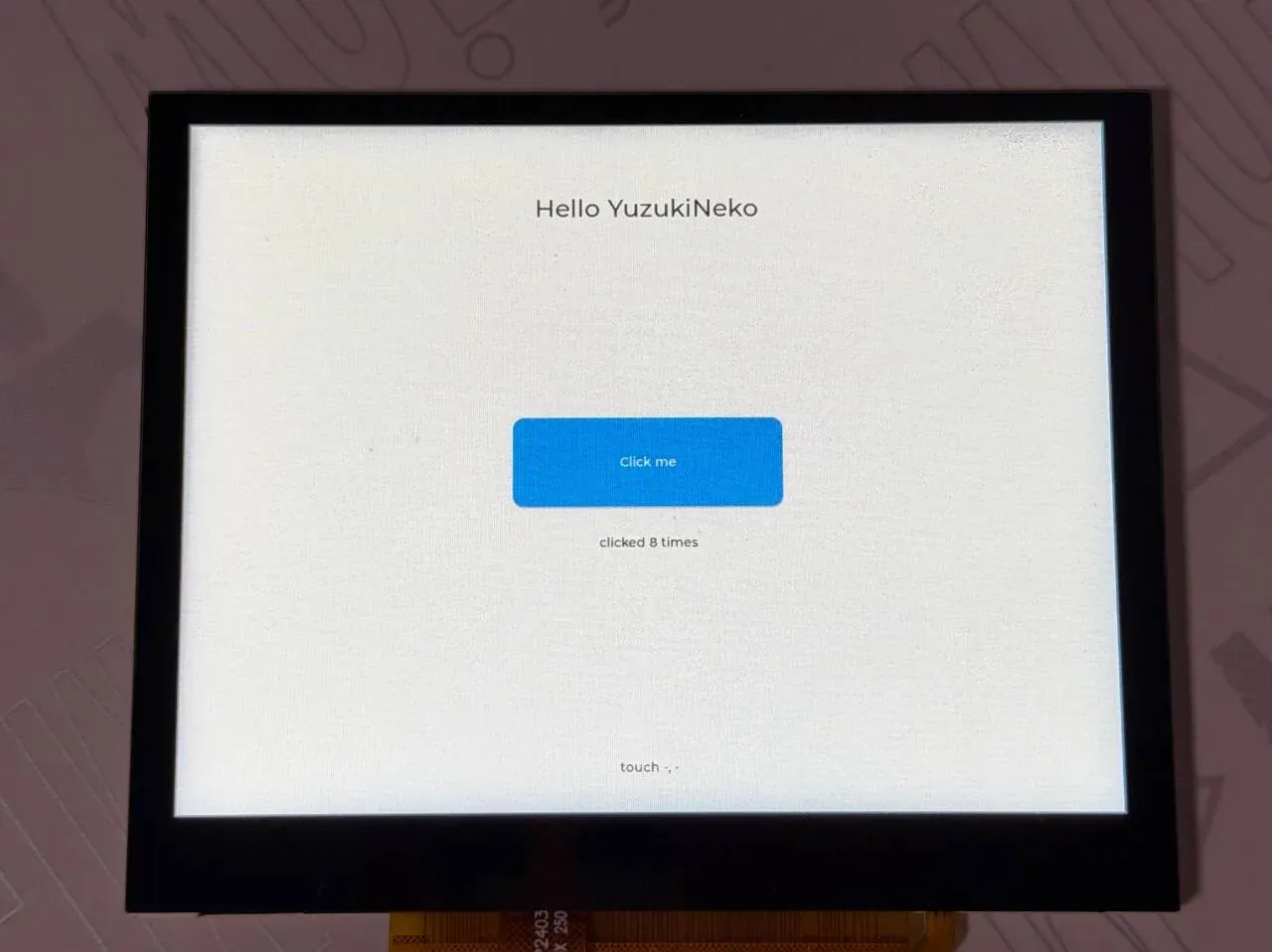
The screen shows the title Hello YuzukiNeko, a blue Click me button in the middle, the click count clicked 8 times below the button, and a line of small text at the bottom showing the touch coordinates (touch -, - when there is no touch).
2. Tapping the button
Section titled “2. Tapping the button”Tap the “Click me” button in the middle of the screen with your finger. Each tap increments “clicked N times” on the screen and adds a button clicked line on the serial port:
button clicked, count 1button clicked, count 2button clicked, count 3button clicked, count 4button clicked, count 5This chain is the GT967 interrupt, an I2C coordinate read, an input event, lvgl_pointer, LVGL hitting the button, LV_EVENT_CLICKED, and btn_cb(). Tapping empty space updates the “touch X, Y” label with the coordinates.
3. Looking at the raw touch events
Section titled “3. Looking at the raw touch events”To see the raw touch coordinates, add -DCONFIG_INPUT_LOG_LEVEL_DBG=y to the build command and rebuild (this is for debugging; the build command above does not include it), then download and run again. The driver prints a line on each press and release:
[00:00:00.493,000] <inf> display_sunxi: 1024x768 @ 60 Hz, fb 0x4007e440, video plane 0[00:00:00.564,000] <inf> gt967: GT967 firmware 0x1040, 1024x768[00:00:00.570,000] <inf> gt967: configuration 0x63: 1024 x 768, up to 5 point(s), module switch 0x04[00:00:00.575,000] <inf> gt967: configuration updated: 1024x768, 1 point(s)[00:00:01.018,000] <dbg> gt967: gt967_work_handler: down id 0 at 7,752[00:00:01.041,000] <dbg> gt967: gt967_work_handler: up id 0[00:00:01.154,000] <dbg> gt967: gt967_work_handler: down id 0 at 11,564[00:00:01.178,000] <dbg> gt967: gt967_work_handler: up id 0down id 0 at X,Yis a press and its coordinates, andup id 0is a release.- This log is the output without touching the screen: about 0.44 seconds after bootup the driver reported two short touches of about 23 ms each, at coordinates (7, 752) and (11, 564), both at the far-left edge of the screen and outside the button (the button is in a 300×100 area in the middle of the screen); no further touch events appeared after that.
- The driver (
gt967_work_handler()ininput_gt967.c) turns the state the controller reports into input events as-is.
4. Running the benchmark
Section titled “4. Running the benchmark”The benchmark prints its summary table through the LVGL log. In lvgl_log() in zephyr/modules/lvgl/lvgl.c, for LV_LOG_LEVEL_USER the [User] prefix is skipped only when the message starts with [; the bare message printed by LV_LOG() is printed as-is:
case LV_LOG_LEVEL_USER: /* * LV_LOG_USER() comes with the "[User] " prefix, LV_LOG() (the benchmark demo * prints its table with it) is the bare message. */ LOG_INF("%s", buf[0] == '[' ? buf + (sizeof("[User] ") - 1) : buf); break;Under samples/modules/lvgl/demos/boards/ the demo has yuzukineko.conf and yuzukineko.overlay, which Zephyr merges automatically when building for the yuzukineko board:
# yuzukineko: 1024x768 MIPI DSI panel, RGB565 frame buffer, GT967 touch panelCONFIG_INPUT=yCONFIG_LV_COLOR_DEPTH_16=yCONFIG_LV_Z_MEM_POOL_SIZE=262144CONFIG_LV_Z_VDB_SIZE=10CONFIG_MAIN_STACK_SIZE=8192
# the benchmark prints its summary table through the LVGL log, and the CPU column needs the loadCONFIG_LV_USE_LOG=yCONFIG_LV_LOG_LEVEL_USER=yCONFIG_CPU_LOAD=y
/* LVGL reads the GT967 touch panel as a pointer *// { lvgl_pointer { compatible = "zephyr,lvgl-pointer-input"; input = <&touch>; };};Select a demo with CONFIG_LV_Z_DEMO_*; to select the benchmark:
. ~/f101-zephyr/env.shcd ~/f101-zephyrwest build -b yuzukineko -d build/lvgl-bench zephyr/samples/modules/lvgl/demos -- -DCONFIG_LV_Z_DEMO_BENCHMARK=yxfel ddr f101-s3xfel write 0x40000000 build/lvgl-bench/zephyr/zephyr.binxfel exec 0x40000000The available demos are:
The benchmark runs through all the scenes in turn by itself, and after about 70 seconds the serial port prints the summary table (times in milliseconds; Avg. time is render plus flush):
[00:00:00.564,000] <inf> gt967: GT967 firmware 0x1040, 1024x768[00:00:00.569,000] <inf> gt967: configuration 0x63: 1024 x 768, up to 1 point(s), module switch 0x04*** Booting Zephyr OS build b6f3dfe1a1f4 ***Heap at 0x40266fb0 contains 32767 units in 15 buckets
  bucket#    min units        total      largest      largest             threshold       chunks      (units)      (bytes)  -----------------------------------------------------------        0            1            1            1            8        1            2            1            2           16       14        16384            1        31770       254160
254184 free bytes, 7872 allocated bytes, overhead = 84 bytes (0.0%)[00:01:09.822,000] <inf> lvgl: Benchmark Summary (9.3.0 )[00:01:09.822,000] <inf> lvgl: Name, Avg. CPU, Avg. FPS, Avg. time, render time, flush time[00:01:09.823,000] <inf> lvgl: Empty screen, 72%, 27, 21, 5, 16[00:01:09.823,000] <inf> lvgl: Moving wallpaper, 97%, 29, 32, 16, 16[00:01:09.824,000] <inf> lvgl: Single rectangle, 11%, 30, 2, 0, 2[00:01:09.824,000] <inf> lvgl: Multiple rectangles, 76%, 29, 24, 3, 21[00:01:09.825,000] <inf> lvgl: Multiple RGB images, 87%, 29, 26, 10, 16[00:01:09.826,000] <inf> lvgl: Multiple ARGB images, 100%, 25, 36, 20, 16[00:01:09.827,000] <inf> lvgl: Rotated ARGB images, 100%, 19, 49, 36, 13[00:01:09.828,000] <inf> lvgl: Multiple labels, 100%, 23, 41, 23, 18[00:01:09.829,000] <inf> lvgl: Screen sized text, 100%, 12, 78, 62, 16[00:01:09.830,000] <inf> lvgl: Multiple arcs, 99%, 25, 35, 19, 16[00:01:09.831,000] <inf> lvgl: Containers, 44%, 30, 12, 8, 4[00:01:09.832,000] <inf> lvgl: Containers with overlay, 91%, 19, 47, 33, 14[00:01:09.834,000] <inf> lvgl: Containers with opa, 57%, 29, 16, 12, 4[00:01:09.835,000] <inf> lvgl: Containers with opa_layer, 94%, 21, 43, 37, 6[00:01:09.837,000] <inf> lvgl: Containers with scrolling, 100%, 17, 53, 37, 16[00:01:09.839,000] <inf> lvgl: Widgets demo, 74%, 18, 45, 35, 10[00:01:09.839,000] <inf> lvgl: All scenes avg.,81%, 23, 34, 22, 12
The table in the log (the FPS ceiling is 30, from the 33 milliseconds of LV_DEF_REFR_PERIOD):
- The “flush” column is the time taken by
display_write(). For scenes that redraw the whole screen it holds steady at 16 to 21 milliseconds: 1024×768 RGB565 is 1.5 MiB, a copy plus cache write-back of about 90 MB/s. Scenes that change only a small area (Single rectangle 2 milliseconds, Containers 4 milliseconds) are much lower. - The “render” column is the time taken by software rendering. Solid fills are almost 0; rotated images (Rotated ARGB images, 36 milliseconds), full-screen text (Screen sized text, 62 milliseconds), and layer opacity (Containers with opa_layer, 37 milliseconds) are much slower, because there is no G2D or vector acceleration.
- The summary line: 23 FPS on average, 34 milliseconds per frame, of which render is 22 and flush is 12, with average CPU usage of 81%.
- The CPU column has values (11% to 100%) because the demo’s configuration enables
CONFIG_CPU_LOAD.
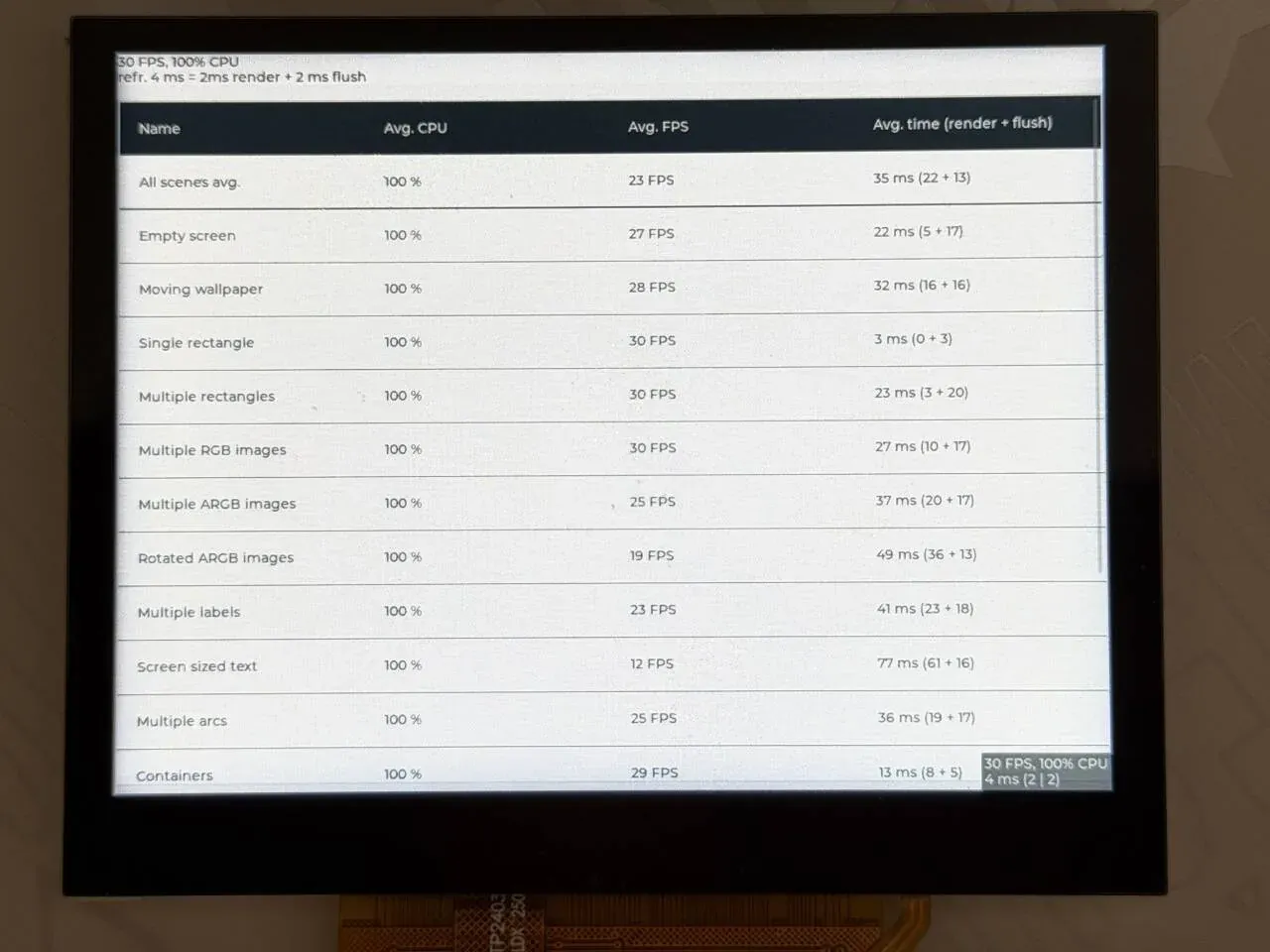
The first row of the summary table is the average over all scenes, and each row after that is one scene’s CPU usage, frame rate, and time per frame (render + flush). The small labels in the top-left and bottom-right corners are LVGL’s performance monitor, showing the current frame rate and CPU usage.
5. Running the widgets demo
Section titled “5. Running the widgets demo”west build -b yuzukineko -d build/lvgl-widgets zephyr/samples/modules/lvgl/demos -- -DCONFIG_LV_Z_DEMO_WIDGETS=yxfel ddr f101-s3xfel write 0x40000000 build/lvgl-widgets/zephyr/zephyr.binxfel exec 0x40000000The output after running, on the serial port (the last part is the LVGL memory pool usage the demo prints by calling lvgl_print_heap_info()):
[00:00:00.493,000] <inf> display_sunxi: 1024x768 @ 60 Hz, fb 0x400b8400, video plane 0[00:00:00.564,000] <inf> gt967: GT967 firmware 0x1040, 1024x768[00:00:00.570,000] <inf> gt967: configuration 0x63: 1024 x 768, up to 1 point(s), module switch 0x04*** Booting Zephyr OS build b6f3dfe1a1f4 ***Heap at 0x4023e568 contains 32767 units in 15 buckets
  bucket#    min units        total      largest      largest             threshold       chunks      (units)      (bytes)  -----------------------------------------------------------        0            1           22            1            8        2            4            1            4           32       14        16384            1        26946       215568
215776 free bytes, 46280 allocated bytes, overhead = 84 bytes (0.0%)
The memory pool is 262144 bytes; after the demo draws its first screen 46280 bytes are used and 215776 bytes are free.
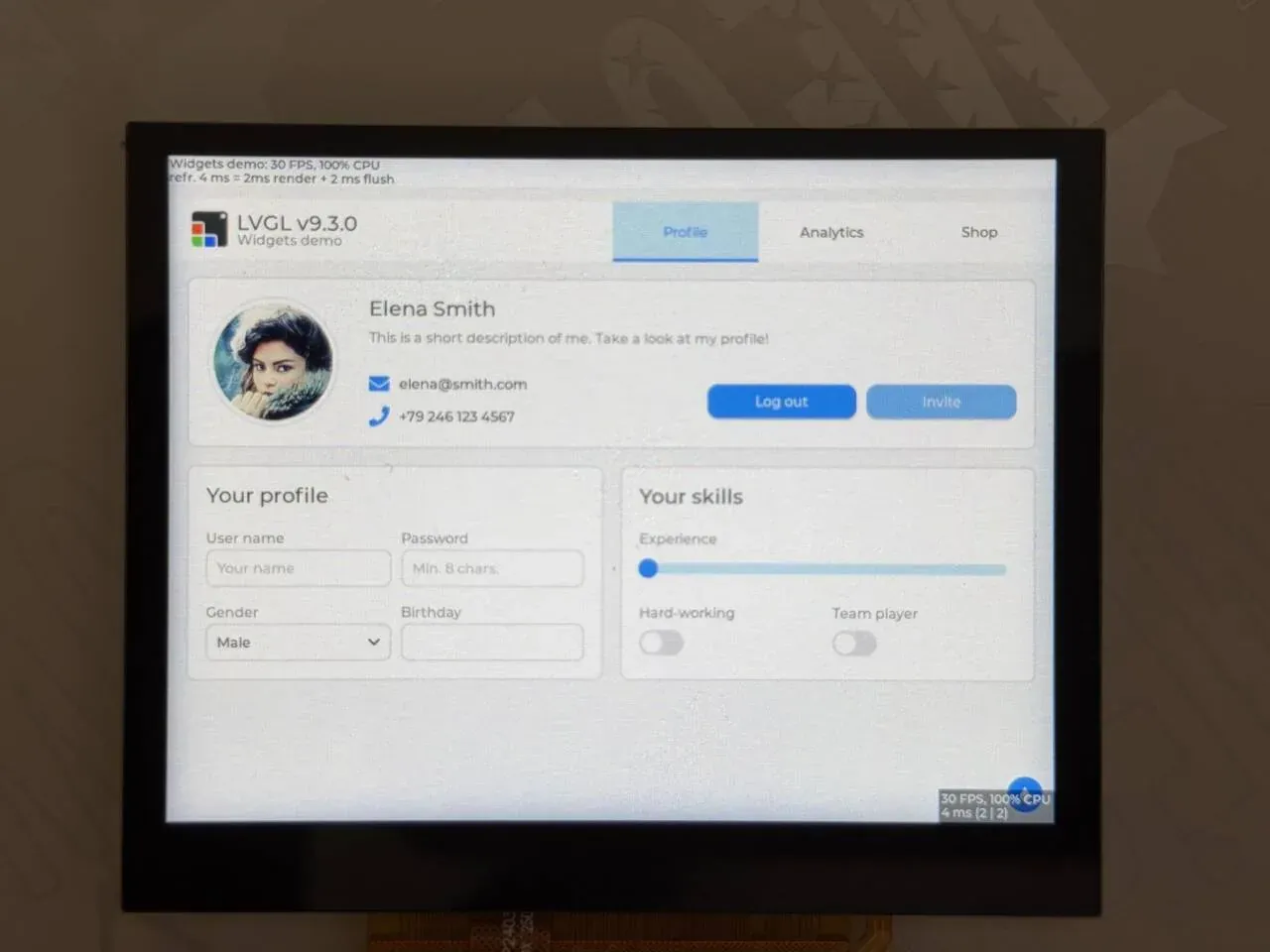
The screen shows the LVGL v9.3.0 widgets demo: the tabs Profile, Analytics, and Shop at the top, and below them an avatar with personal details, a text field, a drop-down, a slider, and a switch. The performance monitor is in the top-left and bottom-right corners.
6. Other samples
Section titled “6. Other samples”| Sample | Command | Description |
|---|---|---|
samples/subsys/display/lvgl | west build -b yuzukineko -d build/lvgl-sub zephyr/samples/subsys/display/lvgl | the sample’s boards/ has yuzukineko.conf and yuzukineko.overlay |
samples/modules/lvgl/screen_transparency | west build -b yuzukineko -d build/lvgl-trans zephyr/samples/modules/lvgl/screen_transparency | the sample requires a display that supports ARGB8888; its boards/yuzukineko.conf enables CONFIG_DISPLAY_SUNXI_ARGB8888 |
samples/modules/lvgl/multi_display | - | not applicable: it needs a zephyr,displays node in the devicetree, and the board has only one display |
samples/modules/lvgl/accelerometer_chart | - | not applicable: it needs an accel0 alias, and the board has no accelerometer |
How LVGL connects to the display
Section titled “How LVGL connects to the display”Data flow
Section titled “Data flow”LVGL itself does not touch the hardware. On the Zephyr side, zephyr/modules/lvgl/lvgl.c does these things during system startup (LV_Z_AUTO_INIT, on by default):
- it takes
zephyr,displayfromchosenand readsdisplay_get_capabilities()to get the resolution and pixel format; lv_display_create()creates an LVGL display whose resolution is the framebuffer resolution the display device reports;- it picks the flush callback by pixel format:
PIXEL_FORMAT_RGB_565useslvgl_flush_cb_16bit,PIXEL_FORMAT_ARGB_8888useslvgl_flush_cb_32bit; - it allocates the render buffer (covered below) and sets partial render mode;
- it registers an input device for every
zephyr,lvgl-*-inputnode in the devicetree.
The corresponding code (zephyr/modules/lvgl/lvgl_display.c, the RGB565 and ARGB8888 branches of set_lvgl_rendering_cb()):
case PIXEL_FORMAT_ARGB_8888: lv_display_set_color_format(display, LV_COLOR_FORMAT_ARGB8888); lv_display_set_flush_cb(display, lvgl_flush_cb_32bit); lv_display_add_event_cb(display, lvgl_rounder_cb, LV_EVENT_INVALIDATE_AREA, display); break;...case PIXEL_FORMAT_RGB_565:case PIXEL_FORMAT_BGR_565: lv_display_set_color_format(display, LV_COLOR_FORMAT_RGB565); lv_display_set_flush_cb(display, lvgl_flush_cb_16bit);The application only has to do two things: draw the UI, and call lv_timer_handler() periodically. It redraws the dirty areas, calls the flush callback once for each block it finishes, and the flush callback ends up in display_write().
display_write() in the F101 display driver (drivers/display/sunxi/display_sunxi.c) memcpys this block to the corresponding place in the framebuffer and then does a data cache write-back (sys_cache_data_flush_range); the display engine scans this memory at the refresh rate on its own:
for (row = 0; row < desc->height; row++) { dst = sunxi_fb + (size_t)(y + row) * data->stride + (size_t)x * SUNXI_BPP; memcpy(dst, src + row * src_pitch, row_bytes); sys_cache_data_flush_range(dst, row_bytes);}So every pixel exists twice in memory: one copy in the LVGL render buffer (temporary) and one in the framebuffer (long-lived). This is the standard approach of Zephyr’s LVGL glue; on the F101 there is no mode that renders directly into the framebuffer.
Display buffers: how to choose
Section titled “Display buffers: how to choose”Two areas of memory must be kept apart:
| Memory | Who allocates it | Size | Options that control it |
|---|---|---|---|
| Framebuffer | the display driver, a static array (it can be changed to runtime allocation) | width × height × bytes per pixel. For 1024×768, RGB565 is 1.5 MiB and ARGB8888 is 3 MiB | CONFIG_DISPLAY_SUNXI_RGB565 / ARGB8888, CONFIG_DISPLAY_SUNXI_FB_DIV, CONFIG_DISPLAY_SUNXI_FB_ALLOC |
| LVGL render buffer | modules/lvgl/lvgl.c, a static array by default | screen pixels × LV_Z_VDB_SIZE% × bytes per pixel. 10% of 1024×768 RGB565 is about 157 KiB | CONFIG_LV_Z_VDB_SIZE, CONFIG_LV_Z_DOUBLE_VDB, CONFIG_LV_Z_FULL_REFRESH, CONFIG_LV_Z_BUFFER_ALLOC_* |
LVGL’s render mode is fixed here at partial rendering (LV_DISPLAY_RENDER_MODE_PARTIAL); only with CONFIG_LV_Z_FULL_REFRESH does it become full-screen rendering. Three common combinations:
| Combination | Configuration | Characteristics |
|---|---|---|
| Default, partial rendering | LV_Z_VDB_SIZE=10 | the render buffer is small (about 157 KiB) and only the dirty areas are drawn, copied block by block. A static UI costs almost nothing; a full-screen animation is drawn in about 10 blocks. Recommended |
| Double buffering | plus LV_Z_DOUBLE_VDB=y and LV_Z_FLUSH_THREAD=y | one buffer is being rendered while the other is being copied. On the F101 the flush is just one memcpy, so the gain is limited and it is not the default |
| Full-screen rendering | LV_Z_FULL_REFRESH=y (LV_Z_VDB_SIZE automatically becomes 100) | the render buffer is as large as the framebuffer (1.5 MiB) and the whole screen is copied every time. Suits cases that need the whole frame to be consistent, at a greater cost in memory and time |
LV_Z_FLUSH_THREAD is off by default: the flush is done right there in the thread that calls lv_timer_handler(). When it is on, an extra thread calls display_write() specifically, with stack and priority set by LV_Z_FLUSH_THREAD_STACK_SIZE and LV_Z_FLUSH_THREAD_PRIORITY.
The driver has no double buffering and does not wait for vertical sync: display_write() changes the memory that is being scanned, so fast scrolling can tear.
Two pixel formats: RGB565 and ARGB8888
Section titled “Two pixel formats: RGB565 and ARGB8888”This is the most important item when choosing a configuration:
| RGB565 | ARGB8888 | |
|---|---|---|
| Display option | CONFIG_DISPLAY_SUNXI_RGB565=y (default) | CONFIG_DISPLAY_SUNXI_ARGB8888=y |
| LVGL option | CONFIG_LV_COLOR_DEPTH_16=y (LVGL default) | CONFIG_LV_COLOR_DEPTH_32=y |
| Framebuffer (1024×768) | 1.5 MiB | 3 MiB |
| Alpha | opaque, covering every layer below | the framebuffer plane blends with the video plane below per-pixel alpha |
| Use | a standalone UI application | a UI overlaid on video: the MP4 player’s statistics panel, the on-screen buttons of nes / doom / mgba |
The two options must go together: the LVGL render buffer size is computed from LV_Z_BITS_PER_PIXEL (which follows LV_COLOR_DEPTH), while the flush callback copies according to the format the display device reports. If the two bit depths do not match, the buffer size and the copied row width do not line up.
In ARGB mode the screen background must be set transparent so the video plane shows through:
lv_obj_set_style_bg_opa(lv_screen_active(), LV_OPA_TRANSP, 0);nes’s pad.c does exactly this: a transparent background and buttons that are white at 30% opacity. To cover only one corner, use CONFIG_DISPLAY_SUNXI_FB_WINDOW_WIDTH/HEIGHT to limit the framebuffer plane to the top-left corner; each refresh then reads much less memory and leaves bandwidth for the video plane, which is what the MP4 player does with 400×400.
Acceleration: G2D and RVV
Section titled “Acceleration: G2D and RVV”On the F101, LVGL is entirely software-rendered (LV_USE_DRAW_SW); neither G2D nor RVV is connected.
- G2D: the F101 has a G2D 2D accelerator and Zephyr has a driver for it, but LVGL 9.3 has no matching draw unit.
LV_USE_DRAW_G2Dis NXP’s G2D, which is not the same thing as the F101’s, and cannot be enabled. The fills, blends, and image scaling LVGL draws are never handed to G2D. - RVV: the RISC-V vector extension can be enabled with
CONFIG_SUN252I_F101_RVV=y, and nes’s configuration does so. But LVGL’s assembly acceleration optionLV_USE_DRAW_SW_ASMhas only four values,NONE,NEON,HELIUM, andCUSTOM, and no RVV implementation; onlyCUSTOMlets you supply assembly yourself, so if you need vector blend functions you write them yourself. - Render parallelism:
CONFIG_LV_Z_USE_OSALlets LVGL render with multiple threads; it is off by default.
No acceleration means the fills, blends, and text are all computed pixel by pixel by the C907 core. The frame rates in the benchmark below reflect this.
How LVGL connects to the touchscreen
Section titled “How LVGL connects to the touchscreen”The whole touch chain is standard Zephyr parts, with no F101-specific code:
- The GT967 driver (
drivers/input/input_gt967.c,CONFIG_INPUT_GT967, on by default when the devicetree has agoodix,gt967node) reads the coordinates over I2C after an interrupt on the INT pin, reportsINPUT_ABS_XandINPUT_ABS_Ywithinput_touchscreen_report_pos(), and reportsINPUT_BTN_TOUCHwithinput_report_key(). - A
zephyr,lvgl-pointer-inputnode is added to the devicetree, with itsinputproperty pointing at the touch node. - LVGL’s glue (
zephyr/modules/lvgl/input/lvgl_pointer_input.c) listens for events from this input device, converts the coordinates for the display orientation and clamps them to the screen, and puts them in a message queue; LVGL takes them out inlv_timer_handler()and treats them as a pointer device (LV_INDEV_TYPE_POINTER).
The board devicetree has no such node, so each application must add its own overlay (boards/yuzukineko.overlay):
/* LVGL reads the GT967 touch panel as a pointer *// { lvgl_pointer { compatible = "zephyr,lvgl-pointer-input"; input = <&touch>; };};At the same time, enable CONFIG_INPUT=y in prj.conf. CONFIG_LV_Z_POINTER_INPUT is y by default, and takes effect as long as the devicetree has this node.
The binding has three more properties, for when the touch orientation and the screen orientation do not match; they are written inside the lvgl_pointer node:
| Property | Purpose |
|---|---|
swap-xy | swaps X and Y |
invert-x | inverts the X direction |
invert-y | inverts the Y direction |
The GT967’s resolution is set in yuzukineko.dts as screen-width = <1024>; screen-height = <768>;, which matches the panel, so these three properties are not needed.
Limits:
- LVGL’s pointer device has only one finger. The GT967 driver reports only one point by default too (
CONFIG_INPUT_GT967_MAX_TOUCH_POINTS=1), and LVGL does not support multi-touch. For multiple points (game buttons, say) you must readinputevents yourself as nes’spad.cdoes and raiseCONFIG_INPUT_GT967_MAX_TOUCH_POINTSto 5. - The touch driver’s INT and RST are on PD2 and PD3, multiplexed in the same group as the LCD pins; check them when switching to another panel.
Creating a minimal UI
Section titled “Creating a minimal UI”Here is a complete hello program: a title, a button, a click counter, and a label showing the touch coordinates. The directory structure:
examples/lvgl_hello/├── CMakeLists.txt├── prj.conf├── boards/│ └── yuzukineko.overlay└── src/ └── main.cIt goes under ~/f101-zephyr/examples/, together with the demos from the Drivers chapter.
CMakeLists.txt:
cmake_minimum_required(VERSION 3.20.0)find_package(Zephyr REQUIRED HINTS $ENV{ZEPHYR_BASE})project(lvgl_hello)
target_sources(app PRIVATE src/main.c)prj.conf; the meaning of each line is in Configuration options below:
CONFIG_DISPLAY=yCONFIG_DISPLAY_SUNXI_RGB565=yCONFIG_INPUT=y
CONFIG_LVGL=yCONFIG_LV_COLOR_DEPTH_16=yCONFIG_LV_Z_MEM_POOL_SIZE=65536CONFIG_LV_Z_VDB_SIZE=10CONFIG_LV_FONT_MONTSERRAT_14=yCONFIG_LV_FONT_MONTSERRAT_28=yCONFIG_LV_USE_LABEL=yCONFIG_LV_USE_BUTTON=yCONFIG_LV_USE_SLIDER=yCONFIG_LV_Z_SHELL=n
CONFIG_MAIN_STACK_SIZE=8192CONFIG_PRINTK=yCONFIG_LOG_PRINTK=nCONFIG_SHELL=nCONFIG_DEVMEM_SHELL=nboards/yuzukineko.overlay: as in the previous section, wires the GT967 up as an LVGL pointer device.
src/main.c:
#include <stdio.h>#include <zephyr/kernel.h>#include <zephyr/device.h>#include <zephyr/devicetree.h>#include <zephyr/drivers/display.h>#include <lvgl.h>
static lv_obj_t *count_label;static lv_obj_t *touch_label;static uint32_t clicks;
static void btn_cb(lv_event_t *e){  char text[32];
  ARG_UNUSED(e);  snprintf(text, sizeof(text), "clicked %u times", ++clicks);  lv_label_set_text(count_label, text);  printk("button clicked, count %u\n", clicks);}
static void screen_cb(lv_event_t *e){  lv_indev_t *indev = lv_indev_active();  lv_point_t p;  char text[32];
  if (indev == NULL) {    return;  }  lv_indev_get_point(indev, &p);  snprintf(text, sizeof(text), "touch %d, %d", (int)p.x, (int)p.y);  lv_label_set_text(touch_label, text);}
int main(void){  const struct device *disp = DEVICE_DT_GET(DT_CHOSEN(zephyr_display));  lv_obj_t *scr = lv_screen_active();  lv_obj_t *title, *btn, *btn_label;
  if (!device_is_ready(disp)) {    printk("display not ready\n");    return 0;  }
  title = lv_label_create(scr);  lv_obj_set_style_text_font(title, &lv_font_montserrat_28, 0);  lv_label_set_text(title, "Hello YuzukiNeko");  lv_obj_align(title, LV_ALIGN_TOP_MID, 0, 80);
  btn = lv_button_create(scr);  lv_obj_set_size(btn, 300, 100);  lv_obj_align(btn, LV_ALIGN_CENTER, 0, 0);  lv_obj_add_event_cb(btn, btn_cb, LV_EVENT_CLICKED, NULL);  btn_label = lv_label_create(btn);  lv_label_set_text(btn_label, "Click me");  lv_obj_center(btn_label);
  count_label = lv_label_create(scr);  lv_label_set_text(count_label, "clicked 0 times");  lv_obj_align(count_label, LV_ALIGN_CENTER, 0, 90);
  touch_label = lv_label_create(scr);  lv_label_set_text(touch_label, "touch -, -");  lv_obj_align(touch_label, LV_ALIGN_BOTTOM_MID, 0, -40);  lv_obj_add_event_cb(scr, screen_cb, LV_EVENT_PRESSING, NULL);
  lv_timer_handler();  display_blanking_off(disp);  printk("lvgl hello: %d x %d\n", (int)lv_display_get_horizontal_resolution(NULL),         (int)lv_display_get_vertical_resolution(NULL));
  while (1) {    uint32_t next = lv_timer_handler();
    k_msleep(MIN(next, 1000U));  }  return 0;}
Key points (line numbers refer to the file above):
- Lines 38–45: take the display device from
chosenand exit if it is not ready. LVGL is already initialized at startup (LV_Z_AUTO_INIT), somain()does not need to calllv_init()orlv_display_create(). - Lines 47–67: create the widgets.
lv_screen_active()is the current screen, and every widget hangs below it or below one of its children.lv_obj_align()aligns relative to the parent. - Line 55:
lv_obj_add_event_cb(btn, btn_cb, LV_EVENT_CLICKED, NULL)registers the click callback. The click event is the end of the touch chain: GT967 → input →lvgl_pointer→ LVGL pointer → hits the button →LV_EVENT_CLICKED. - Line 67: it listens for
LV_EVENT_PRESSINGon the screen itself and reads the coordinates fromlv_indev_active(). Events are sent only to the widget being pressed, so this callback is not called when you press the button; the coordinates are updated only when you press empty space. - Lines 69–70: render once and then call
display_blanking_off(), to avoid a flash of old content when the screen comes on. The official demo uses the same order. - Lines 74–78: the main loop.
lv_timer_handler()returns the number of milliseconds until the next call, and it sleeps that long (at most 1 second). Animations and events are driven by it, so do not starve it.
Fonts: using lv_font_montserrat_28 requires CONFIG_LV_FONT_MONTSERRAT_28=y; the build fails without it. The Montserrat fonts bundled with LVGL contain only ASCII and a few symbols, and no Chinese. To display Chinese you must generate a C font file with LVGL’s font converter and add it to the project.
Configuration options
Section titled “Configuration options”The main LVGL-related options in prj.conf, one per row:
| Option | Default | Description |
|---|---|---|
CONFIG_LVGL | n | enables LVGL |
CONFIG_DISPLAY | n | display subsystem; a prerequisite for LVGL |
CONFIG_INPUT | n | input subsystem; needed for touch |
CONFIG_LV_Z_MEM_POOL_SIZE | 2048 | LVGL’s own memory pool; every widget, style, and image cache is allocated from it. hello uses 65536, and the 1024×768 widgets / benchmark use 262144. When the pool is full LVGL crashes or draws nothing |
CONFIG_LV_Z_MEM_POOL_SYS_HEAP | y (default) | the pool uses a private sys_heap; it can be changed to LV_Z_MEM_POOL_HEAP_LIB_C to use the C library heap |
CONFIG_LV_Z_VDB_SIZE | 10 | render buffer as a percentage of the screen (1–100). 10% of 1024×768 RGB565 is about 157 KiB |
CONFIG_LV_Z_DOUBLE_VDB | n | use two render buffers |
CONFIG_LV_Z_FULL_REFRESH | n | full-screen rendering; LV_Z_VDB_SIZE becomes 100 |
CONFIG_LV_Z_BUFFER_ALLOC_STATIC | y (default) | the render buffer is a static array; LV_Z_BUFFER_ALLOC_DYNAMIC allocates it from the LVGL memory pool at runtime |
CONFIG_LV_Z_FLUSH_THREAD | n | calls display_write() from a separate thread |
CONFIG_LV_Z_AUTO_INIT | y | initializes LVGL automatically at startup |
CONFIG_LV_COLOR_DEPTH_16 / _32 | 16 | color depth; must match the display driver’s pixel format |
CONFIG_DISPLAY_SUNXI_RGB565 / ARGB8888 | RGB565 | the display driver’s pixel format |
CONFIG_DISPLAY_SUNXI_FB_WINDOW_WIDTH / HEIGHT | 0 | shows only a window at the top-left of the framebuffer (0 is the whole screen); used when overlaying on video |
CONFIG_DISPLAY_SUNXI_FB_DIV | 1 | the framebuffer is reduced by 1/N in each direction and enlarged by the display engine; saves memory but blurs the UI |
CONFIG_DISPLAY_SUNXI_FB_ALLOC | n | allocates the framebuffer at runtime; requires COMMON_LIBC_MALLOC_ARENA_SIZE to be non-zero |
CONFIG_LV_FONT_MONTSERRAT_<size> | all n (the default font is below) | which font sizes to enable; enable the ones you use |
CONFIG_LV_USE_<widget> | varies | enables the widgets you use, such as LV_USE_CHART and LV_USE_SLIDER. A widget that is not enabled has no functions |
CONFIG_LV_Z_POINTER_INPUT | y | pointer input; takes effect only when the devicetree has a zephyr,lvgl-pointer-input node |
CONFIG_LV_Z_POINTER_INPUT_MSGQ_COUNT | 10 | pointer event queue length |
CONFIG_INPUT_GT967_MAX_TOUCH_POINTS | 1 | how many points the touch driver reports at once; LVGL uses only one |
CONFIG_LV_USE_LOG | n | enables the LVGL log |
CONFIG_LV_Z_SHELL | per sample | LVGL’s shell commands; requires CONFIG_SHELL=y |
CONFIG_MAIN_STACK_SIZE | 1024 | main thread stack. LVGL renders in the thread that calls lv_timer_handler(), so give it enough stack; hello uses 8192 |
CONFIG_HEAP_MEM_POOL_SIZE | board 262144 | kernel heap. The display driver’s command queue is allocated from it; do not shrink it |
About LV_FONT_MONTSERRAT_<size>: LVGL’s own default font is Montserrat 14, and it must be enabled explicitly in Zephyr’s Kconfig. When you use lv_obj_set_style_text_font() to specify another size, the matching font must be enabled, otherwise the build reports an unresolved symbol.
Recommended configurations
Section titled “Recommended configurations”| Scenario | Configuration |
|---|---|
| Standalone UI application (what hello does) | RGB565, LV_COLOR_DEPTH_16, LV_Z_MEM_POOL_SIZE from 65536, LV_Z_VDB_SIZE=10, main thread stack 8192 |
| Complex UI, official demos | as above, LV_Z_MEM_POOL_SIZE=262144 |
| Overlaid on video (mp4, nes, doom, mgba) | DISPLAY_SUNXI_ARGB8888, LV_COLOR_DEPTH_32, LV_Z_VDB_SIZE=4, FB_WINDOW_* limited to the area of the UI, LV_Z_MEM_POOL_SIZE=131072 |
The last row comes straight from these players’ prj.conf. LV_Z_VDB_SIZE=4 is because ARGB is 4 bytes per pixel, so the buffer is smaller.
How to size the memory pool: start generous, then after running on the board look at the free bytes / allocated bytes that LVGL prints at startup (lvgl_print_heap_info(), which the demo calls), and shrink it if there is too much free. At benchmark startup it is 254184 bytes free and 7872 bytes allocated, and it grows with the scenes after that.
Code locations
Section titled “Code locations”| File | Contents |
|---|---|
zephyr/modules/lvgl/lvgl.c | LVGL initialization: take the display, create the render buffer, register input |
zephyr/modules/lvgl/lvgl_display.c | flush callback selection, flush thread |
zephyr/modules/lvgl/lvgl_display_16bit.c, lvgl_display_32bit.c | the RGB565 and ARGB8888 flush callbacks, ending in display_write() |
zephyr/modules/lvgl/lvgl_mem.c | LVGL memory pool |
zephyr/modules/lvgl/input/lvgl_pointer_input.c | touch (pointer) input |
zephyr/modules/lvgl/Kconfig, Kconfig.memory, Kconfig.input | all the LV_Z_* options above |
drivers/display/sunxi/display_sunxi.c | display driver: display_write() copies to the framebuffer |
drivers/input/input_gt967.c | GT967 touch driver |
samples/modules/lvgl/demos/ | the Zephyr wrapper for the official demos |
modules/lib/gui/lvgl/ | LVGL itself (9.3.0) |
examples/lvgl_hello/ | the hello program from this page |
samples/drivers/vdec/h264_player/src/overlay.c | overlay usage: the MP4 player’s statistics panel, a line chart |
zephyr-components/nes/samples/nes_player/src/pad.c | overlay usage: on-screen buttons |
- G2D and RVV: LVGL is entirely software-rendered. LVGL 9.3 has no draw unit for the F101 G2D; when you need vector acceleration, set
LV_USE_DRAW_SW_ASMtoCUSTOMand supply the assembly yourself. - Touch: LVGL’s pointer has only one finger. For multiple points (game buttons, say), read
inputevents yourself as nes’spad.cdoes and raiseCONFIG_INPUT_GT967_MAX_TOUCH_POINTSto 5. - Display: the board has only one display; multiple displays are not supported.
- Pixel format: chosen at build time with
CONFIG_DISPLAY_SUNXI_RGB565orARGB8888; it cannot be switched at runtime, and it cannot be rotated. - Refresh: the driver has no double buffering and no vertical sync, so fast scrolling can tear.
- Fonts: the bundled fonts contain no Chinese; when you need Chinese, generate a C font file with LVGL’s font converter and add it to the project.