Bilibili - video client
Bilibili is a client of the Bilibili video site for the YuzukiNeko: a touch user interface (LVGL, 1024×768) with cover cards, search with a pinyin input method, a player that starts while the file is still downloading, scrolling comments (danmaku), a QR code login and the Wi-Fi settings. It is an application, not a module, and it runs in place from the SPI NOR flash (XIP) like NekoBox, whose player files it is built from. The code is in zephyr-components/bilibili-tv.
This page explains how it is built, module by module, with the code of each one: the threads and the command queue, the HTTP and TLS client, the signed web interface, how the video stream is found and downloaded, the player, the comments, and every part of the user interface.
| Part | Files | What it does |
|---|---|---|
| Commands and threads | src/main.c, src/core/app.h | the worker thread, the command queue, the lists |
| HTTP client | src/net/http.c, http_parse.c | GET with Range, TLS, chunked bodies, cookies |
| Web interface | src/api/bili_api.c, src/net/wbi.c, bili_parse.c, src/net/json.c | signed requests, parsers |
| Download | src/net/download.c | a file that grows on the card while it is played |
| Player | src/player/ | MP4 demux, H.264 and AAC decode, the clock |
| Comments | src/net/inflate.c, src/api/danmaku.c, src/ui/ui_danmaku.c, src/gfx/shift.c | fetch, parse, draw, move |
| User interface | src/ui/ | home, cards, covers, search, player page, account, settings |
| Account and Wi-Fi | src/api/account.c, src/net/wifi.c | QR login, join, forget |
Before you start, first complete Setting up the development environment and Getting the Zephyr source.
Build and run
Section titled “Build and run”flowchart LR
A["env.sh: toolchain and ZEPHYR_BASE"] --> B["west build -b yuzukineko"]
B --> C["build/bili/zephyr/zephyr.bin"]
. ~/f101-zephyr/env.shwest build -b yuzukineko -d build/bili zephyr-components/bilibili-tvThe image runs from the flash window, so the development flow is the one of NekoBox: write zephyr.bin at flash 0x80000 and run the XIP loader from RAM (see Building and running). This replaces NekoBox in that place; no boot stub has to be written while you develop.
flowchart LR
    A["power cycle: FEL"] --> B["xfel spinor write 0x80000<br/>zephyr.bin"]
    B --> C["xfel write 0x20000<br/>xip-boot_fel.bin"]
    C --> D["xfel exec 0x20000"]
    D --> E["loader maps the flash and starts the app"]
xfel spinor write 0x80000 zephyr.binxfel write 0x20000 xip-boot_fel.binxfel exec 0x20000What the card needs:
| File | Content |
|---|---|
/SD:/wifi.cfg | the network name on the first line, the password on the second (the settings screen writes it too) |
/SD:/bilibili/ | the downloaded videos, <BV id>.mp4; a complete file is played again without a download |
/SD:/bilibili/auth.cfg | the login, written after the QR code was confirmed |
/SD:/bilibili/settings.cfg | volume and brightness |
Overall structure
Section titled “Overall structure”flowchart TB
subgraph UI["UI thread (LVGL)"]
HOME["home / search / me / settings"]
PLAY["player page + danmaku layer"]
end
subgraph WORK["worker thread"]
API["bili_api: signed requests,<br/>parsers, login"]
DL["download thread<br/>(HTTP Range into a file)"]
end
subgraph PL["player"]
VID["pl_video: H.264 decode"]
AUD["pl_audio: AAC decode"]
end
HOME -- "commands (message queue)" --> API
API -- "lists, status" --> HOME
API --> NET["HTTPS client (mbedTLS)"]
DL --> NET
NET --> WIFI["AIC8800 Wi-Fi"]
DL -- "file grows" --> SD["TF card"]
SD -- "read behind the download" --> VID
SD --> AUD
VID --> VP["video plane"]
HOME --> AP["ARGB plane"]
PLAY --> AP
AUD -- "the clock" --> VID
| Thread | Priority | Job |
|---|---|---|
audio (pl_audio) | 3 | decodes AAC, feeds the codec ring; its position is the clock of the player |
display (disp) | 5 | commits the pictures to the display and waits for the flip |
video (pl_video) | 6 | demuxes and decodes H.264, shows a picture when the clock reaches its time |
| user interface | 8 on the player page | LVGL, a fixed beat of 33 ms while comments run |
| download, covers | 8 and 9 | network and card |
| worker | lower | requests, parsing, login, the play sequence |
On the player page the interface runs below the video thread: at the same priority the redraws cost 2 to 10 late pictures per 5 seconds, at priority 8 it is zero or one.
Commands and the worker thread
Section titled “Commands and the worker thread”The user interface never waits for the network. Every action is a command in a message queue (app_cmd() may be called from any thread), and the worker thread takes them one by one. The commands are declared in src/core/app.h:
flowchart LR
    subgraph lists["lists"]
        R["CMD_REFRESH / CMD_MORE / CMD_SEARCH"] --> L["load()"]
    end
    P["CMD_PLAY"] --> PL["play()"]
    S["CMD_STOP"] --> F["stop_req flag"]
    PA["CMD_PAUSE"] --> PP["player_pause / player_play"]
    Q["CMD_QR_START / QR_POLL / LOGOUT"] --> AC["login and account"]
    W["CMD_WIFI*"] --> WF["wifi.c"]
enum app_cmd_type { CMD_REFRESH, /**< arg: list, load its first page again */ CMD_MORE, /**< arg: list, append the next page */ CMD_SEARCH, /**< keyword in the command: a new search */ CMD_PLAY, /**< arg: list << 16 | index */ CMD_STOP, /**< back from the player */ CMD_PAUSE, /**< toggles */ CMD_WIFI, /**< join the network in ssid / psk */ CMD_QR_START, /**< ask for a new login code */ CMD_QR_POLL, /**< ask how the scan of the code is going */ CMD_LOGOUT, /**< forget the login */ /* ... scan, disconnect, forget, settings, account numbers */};flowchart TD
A["app_cmd(type, arg)"] --> B{"type == CMD_STOP ?"}
B -- "yes" --> C["atomic_set(stop_req, 1)"]
B -- "no" --> D["k_msgq_put(cmd_q, K_NO_WAIT)"]
D --> E{"queue full?"}
E -- "yes" --> F["print and drop"]
E -- "no" --> G["worker takes it"]
K_MSGQ_DEFINE(cmd_q, sizeof(struct cmd), 8, 4);
void app_cmd(enum app_cmd_type type, int arg){  struct cmd c = {.type = type, .arg = arg};
  if (type == CMD_STOP) {    /* the flag is the whole command: a message left in the queue would stop the next     * video as soon as it opens */    atomic_set(&stop_req, 1);    return;  }  if (k_msgq_put(&cmd_q, &c, K_NO_WAIT) != 0) {    printk("app: command queue full\n");  }}
CMD_STOP is special: the worker is busy inside play() while a video runs, so a stop cannot wait in the queue. It is a flag that the play loop and the download both look at. The worker itself is one loop:
flowchart TD
    A["worker_main"] --> B["wait for the card"]
    B --> C["read wifi.cfg, login, settings"]
    C --> D["join the network, check the login"]
    D --> E["k_msgq_get(cmd_q, K_FOREVER)"]
    E --> F{"cmd.type"}
    F --> G["load / play / qr_start / qr_poll / ..."]
    G --> E
static void worker_main(void *a, void *b, void *c){ struct cmd cmd; /* ... wait for the card, read wifi.cfg, load the login and the settings, join the network */ for (;;) { k_msgq_get(&cmd_q, &cmd, K_FOREVER); switch (cmd.type) { case CMD_REFRESH: load(cmd.arg, 1); break; case CMD_MORE: /* load(list, next_page) */ break; case CMD_SEARCH: /* store the keyword */ load(LIST_SEARCH, 1); break; case CMD_PLAY: play(cmd.arg >> 16, cmd.arg & 0xffff); break; case CMD_QR_START: qr_start(); break; case CMD_QR_POLL: qr_poll(); break; /* ... */ } }}A list is a fixed array the worker fills and the user interface reads, protected by a mutex. gen counts how often the list was replaced, so the interface knows when to rebuild its cards:
flowchart TD
    A["list_store(list, page, v, n)"] --> B{"page == 1 ?"}
    B -- "yes" --> C["count = 0, gen++"]
    B -- "no" --> D["keep the list"]
    C --> E["append videos, skip the bvid already there"]
    D --> E
    E --> F["next_page = page + 1<br/>more = page was full and below 100"]
    F --> G["loading = false"]
struct vlist {  struct bili_video v[MAX_VIDEOS];  /* MAX_VIDEOS = 100 */  int count, next_page, pages;  bool more, loading;  int error;    /* what the last page request returned, 0 when it worked */  uint32_t gen;  char keyword[96];};
/* the first page replaces the list, the others are appended without the videos already there */static void list_store(enum list_id list, int page, const struct bili_video *v, int n, int pages){  struct vlist *l = &lists[list];
  k_mutex_lock(&lists_lock, K_FOREVER);  if (page == 1) {    l->count = 0;    l->gen++;  }  for (int i = 0; i < n && l->count < MAX_VIDEOS; i++) {    bool dup = false;
    for (int j = 0; j < l->count && !dup; j++) {      dup = strcmp(l->v[j].bvid, v[i].bvid) == 0;    }    if (!dup) {      l->v[l->count++] = v[i];    }  }  l->next_page = page + 1;  l->pages = pages;  l->more = n >= PAGE_SIZE / 2 && l->count < MAX_VIDEOS && (pages == 0 || page < pages);  l->loading = false;  k_mutex_unlock(&lists_lock);}
load() picks the interface by list (bili_api_feed, bili_api_popular, bili_api_follow, bili_api_search), stores the result and puts a status text for the interface.
From the worker to the interface
Section titled “From the worker to the interface”The worker never touches an LVGL object. It writes into a small block of pending state under a mutex and the UI thread takes it at the start of every round (ui_run() in src/ui/ui.c):
sequenceDiagram
    participant W as worker
    participant P as pend (mutex)
    participant U as UI thread
    W->>P: lock, write status, dirty = true, unlock
    W->>P: a second text overwrites the first
    U->>P: round start: lock, copy, unlock
    U->>U: set the LVGL label
static K_MUTEX_DEFINE(lock);static struct {  bool status_dirty, hot_dirty, play_dirty, pos_dirty;  char status[128];  /* ... trending words, title, duration, position, paused */} pend;
void ui_set_status(const char *fmt, ...){  va_list ap;
  k_mutex_lock(&lock, K_FOREVER);  va_start(ap, fmt);  vsnprintf(pend.status, sizeof(pend.status), fmt, ap);  va_end(ap);  pend.status_dirty = true;  k_mutex_unlock(&lock);}
flowchart TD
A["ui_run()"] --> B["copy the dirty parts of pend"]
B --> C{"play_dirty ?"}
C -- "playing" --> D["ui_nav(PAGE_PLAY)<br/>cover_pause(true)"]
C -- "ended" --> E["ui_danmaku_set(NULL)<br/>ui_nav(return_page)"]
C -- "position only" --> F["ui_play_position()"]
D --> G["ui_home_run / ui_search_run / ui_danmaku_run"]
E --> G
F --> G
G --> H["lv_timer_handler()"]
H --> I["return the time to sleep: 33 ms beat on the player page"]
uint32_t ui_run(void){ /* ... copy the dirty parts of pend under the lock, then, without it: */ if (status_dirty) { ui_set_status_label(status); } if (play_dirty) { if (playing) { ui_play_set(title, dur); cover_pause(true); /* the covers give their memory to the decoder */ ui_nav(PAGE_PLAY); } else { cover_pause(false); ui_danmaku_set(NULL); ui_nav(return_page); } } else if (pos_dirty && cur == PAGE_PLAY) { ui_play_position(pos, paused); ui_play_buffered(buffered_permille); } ui_home_run(cur == PAGE_HOME); ui_search_run(cur == PAGE_SEARCH); if (cur == PAGE_PLAY && ui_danmaku_active()) { ui_danmaku_run(round_us); } uint32_t next = lv_timer_handler(); /* ... */}A status text that is set twice before the interface looks at it shows only the last one, which is what a status line should do. The return value of ui_run() is how long the caller may sleep: on the player page with comments it is a fixed beat (beat += 33), not “40 ms after the work”, because even steps look smooth.
The HTTP client
Section titled “The HTTP client”src/net/http.c is a small HTTP/1.1 client on Zephyr sockets. It exists because the answers must be streamed: a video is megabytes, the heap is not, so the body goes to a callback as it arrives.
flowchart LR
    A["caller"] -- "url, opts, fn, ctx" --> B["http_get()"]
    B --> C["connect, send request"]
    C --> D["receive blocks"]
    D -- "body bytes" --> E["fn(ctx, data, len)"]
    B -. "http_get_text()" .-> F["body copied into one buffer"]
typedef int (*http_body_fn)(void *ctx, const uint8_t *data, size_t len);
struct http_opts {  const char *headers;  /**< extra header lines, each ending in CRLF, may be NULL */  int64_t range_start;  /**< >= 0 asks for the bytes from this offset on */  int timeout_ms;    /**< no data for this long ends the request, 0 is 15 s */  int tls_verify;};
int http_get(const char *url, const struct http_opts *opts, http_body_fn fn, void *ctx,       struct http_result *res);int http_get_text(const char *url, const struct http_opts *opts, char *buf, size_t size,      struct http_result *res);  /* the whole body in one buffer */
The connection
Section titled “The connection”For https the socket is a native Zephyr TLS socket: the protocol is chosen when the socket is made and the host name goes in as an option:
flowchart TD
    A["tcp_connect(host, port, tls, verify)"] --> B["zsock_getaddrinfo"]
    B --> C{"tls ?"}
    C -- "yes" --> D["socket(IPPROTO_TLS_1_2)"]
    C -- "no" --> E["socket(IPPROTO_TCP)"]
    D --> F["TLS_PEER_VERIFY, TLS_HOSTNAME"]
    F --> G["zsock_connect"]
    E --> G
    G --> H["socket fd"]
static int tcp_connect(const char *host, const char *port, int tls_native, int verify){  struct zsock_addrinfo hints = {.ai_family = AF_INET, .ai_socktype = SOCK_STREAM};  struct zsock_addrinfo *res;  int sock, ret;
  ret = zsock_getaddrinfo(host, port, &hints, &res);  if (ret != 0) {    return -EHOSTUNREACH;  }  sock = zsock_socket(res->ai_family, res->ai_socktype, tls_native ? IPPROTO_TLS_1_2 : IPPROTO_TCP);  if (sock < 0) {    ret = -errno;    zsock_freeaddrinfo(res);    return ret;  }  if (tls_native) {    int v = verify ? TLS_PEER_VERIFY_REQUIRED : TLS_PEER_VERIFY_NONE;
    zsock_setsockopt(sock, SOL_TLS, TLS_PEER_VERIFY, &v, sizeof(v));    zsock_setsockopt(sock, SOL_TLS, TLS_HOSTNAME, host, strlen(host) + 1);  }  ret = zsock_connect(sock, res->ai_addr, res->ai_addrlen);  /* ... close and report on failure */  zsock_freeaddrinfo(res);
  return sock;}
The request
Section titled “The request”The headers are the ones a browser sends: the CDN refuses a request without the Referer. A Range header is added when the caller wants to continue a file, and the caller’s own lines (the cookies) go last:
flowchart TD
    A["GET path HTTP/1.1 + Host"] --> B["User-Agent, Referer, Accept, Connection: close"]
    B --> C{"range_start > 0 ?"}
    C -- "yes" --> D["Range: bytes=N-"]
    C -- "no" --> E["no Range"]
    D --> F["caller header lines: Cookie"]
    E --> F
    F --> G["CRLF and send"]
ret = snprintf(req, REQ_SIZE, "GET %s HTTP/1.1\r\nHost: %s\r\n", u.path, u.host);ret += snprintf(req + ret, REQ_SIZE - ret, "User-Agent: " USER_AGENT "\r\n" "Referer: https://www.bilibili.com/\r\nAccept: */*\r\nConnection: close\r\n");if (opts != NULL && opts->range_start > 0) { ret += snprintf(req + ret, REQ_SIZE - ret, "Range: bytes=%lld-\r\n", (long long)opts->range_start);}if (opts != NULL && opts->headers != NULL) { ret += snprintf(req + ret, REQ_SIZE - ret, "%s", opts->headers);}strcpy(req + ret, "\r\n");Connection: close keeps the client simple: every request is its own connection and the end of the body is the end of the connection or the length the server announced. The connection time, the time to the first byte and the total are measured and returned in struct http_result (they are what the logs print when a download is slow).
The parser
Section titled “The parser”The answer is read in blocks of RECV_SIZE and given to a state machine (src/net/http_parse.c) that knows the header, a body with a length, a body until close and chunked bodies. It is a separate file so that it can be tested on the host:
stateDiagram-v2
    [*] --> HP_HEADER
    HP_HEADER --> HP_BODY_LENGTH: Content-Length
    HP_HEADER --> HP_BODY_CLOSE: no length
    HP_HEADER --> HP_CHUNK_SIZE: chunked
    HP_CHUNK_SIZE --> HP_CHUNK_EXT
    HP_CHUNK_EXT --> HP_CHUNK_DATA
    HP_CHUNK_DATA --> HP_CHUNK_CR
    HP_CHUNK_CR --> HP_CHUNK_SIZE
    HP_CHUNK_SIZE --> HP_TRAILER: size 0
    HP_BODY_LENGTH --> HP_DONE
    HP_TRAILER --> HP_DONE
    HP_DONE --> [*]
enum http_parse_state {  HP_HEADER, HP_BODY_LENGTH, HP_BODY_CLOSE,  HP_CHUNK_SIZE, HP_CHUNK_EXT, HP_CHUNK_DATA, HP_CHUNK_CR, HP_TRAILER,  HP_DONE,};
/* returns 1 when the body is complete, 0 for more, negative on a malformed answer */int http_parser_feed(struct http_parser *p, const uint8_t *data, size_t len,         http_body_fn fn, void *ctx);
The receive loop is the glue between the socket and the parser:
flowchart TD
    A["conn_recv()"] --> B{"n"}
    B -- "n < 0" --> C["error, stop"]
    B -- "n == 0" --> D{"http_parser_eof == 1 ?"}
    D -- "yes" --> E["complete"]
    D -- "no" --> F["-ECONNRESET"]
    B -- "n > 0" --> G["http_parser_feed()"]
    G -- "1" --> E
    G -- "< 0" --> C
    G -- "0" --> A
for (;;) {  ssize_t n = conn_recv(c, rx, RECV_SIZE);
  if (n < 0) { ret = n; break; }  if (n == 0) { ret = http_parser_eof(p) == 1 ? 0 : -ECONNRESET; break; }  ret = http_parser_feed(p, rx, n, gate_body, &g);  /* gate_body calls fn for 2xx only */  if (ret == 1) { ret = 0; break; }  if (ret < 0) { break; }}
The Set-Cookie fields of the answer are collected into res->set_cookie; the login needs them.
The signed web interface
Section titled “The signed web interface”All of it is in src/api/bili_api.c, with the signature in src/net/wbi.c, the MD5 in src/net/md5.c, and the parsers in src/api/bili_parse.c.
The signing key
Section titled “The signing key”Most list and play interfaces want a signature (WBI). The key is not secret: the answer of /x/web-interface/nav carries two image addresses (wbi_img.img_url and sub_url) even when nobody is logged in (the answer code is -101, the data is still there). The 32 characters in front of the extension of each file name are joined to 64 characters and shuffled with a fixed table of 64 positions; the first 32 characters of the result are the key:
flowchart LR
    A["img_url<br/>32 chars of the file name"] --> C["join: 64 chars"]
    B["sub_url<br/>32 chars"] --> C
    C --> D["reorder with the mixin table"]
    D --> E["first 32 chars"]
    E --> F["wbi_key"]
static const uint8_t mixin[64] = {  46, 47, 18, 2, 53, 8, 23, 32, 15, 50, 10, 31, 58, 3, 45, 35, 27, 43, 5, 49, 33, 9, 42, 19, 29, 28,  14, 39, 12, 38, 41, 13, 37, 48, 7, 16, 24, 55, 40, 61, 26, 17, 0, 1, 60, 51, 30, 4, 22, 25, 54,  21, 56, 59, 6, 63, 57, 62, 11, 36, 20, 34, 44, 52,};
/* the 32 characters in front of the extension of the last path segment */static int image_key(const char *url, char out[32]){  const char *name = strrchr(url, '/');  const char *dot;
  name = name != NULL ? name + 1 : url;  dot = strchr(name, '.');  if (dot == NULL || dot - name != 32) {    return -EINVAL;  }  memcpy(out, name, 32);
  return 0;}
int wbi_make_key(const char *img_url, const char *sub_url, char key[33]){  char raw[64];
  if (image_key(img_url, raw) != 0 || image_key(sub_url, raw + 32) != 0) {    return -EINVAL;  }  for (int i = 0; i < 32; i++) {    key[i] = raw[mixin[i]];  }  key[32] = '\0';
  return 0;}
sequenceDiagram
participant B as board
participant A as api.bilibili.com
B->>A: GET /x/web-interface/nav
A-->>B: code -101, wbi_img still there
B->>B: bili_parse_nav → wbi_make_key
Note over B: wbi_key[33]
static int load_key(void){  char *a = fetch(API "/x/web-interface/nav");  int ret;
  if (a == NULL) {    return -EIO;  }  ret = bili_parse_nav(a, wbi_key);  /* wbi_make_key() of the two addresses in the answer */  free(a);
  return ret;}
Signing a request
Section titled “Signing a request”wbi_query() takes the parameters as name=value strings and writes the query with its signature:
- add
wts=<time stamp>; - sort by name;
- percent-encode the values (the characters
!'()*are dropped first, as the server does); - join as
a=1&b=2, append the key, MD5 of that text isw_rid; - return the sorted query followed by
&w_rid=<hash>.
flowchart LR
    A["parameters"] --> B["+ wts"]
    B --> C["sort by name"]
    C --> D["percent-encode values, drop !'()*"]
    D --> E["a=1&b=2"]
    E --> F["+ wbi_key"]
    F --> G["MD5"]
    G --> H["w_rid"]
    E --> I["query&w_rid=hash"]
    H --> I
/* order by name: the text up to the '=' */static int name_cmp(const char *a, const char *b){  for (;; a++, b++) {    unsigned char x = *a == '=' ? 0 : *a, y = *b == '=' ? 0 : *b;
    if (x != y || x == 0) {      return (int)x - (int)y;    }  }}
/* percent encoding of everything but the unreserved characters, after the server's filter */static int encode(const char *s, char *out, size_t size){  size_t n = 0;
  for (; *s != '\0'; s++) {    unsigned char c = *s;
    if (strchr("!'()*", c) != NULL) {      continue;    }    if ((c >= '0' && c <= '9') || (c >= 'a' && c <= 'z') || (c >= 'A' && c <= 'Z') ||        c == '-' || c == '_' || c == '.' || c == '~') {      out[n++] = c;    } else {      n += snprintf(out + n, size - n, "%%%02X", c);    }  }  out[n] = '\0';
  return n;}
Sorting is an insertion sort over the pointers: the lists are a handful of entries. The server does not check the time stamp, so the board, which has no network time at that point, uses a fixed base plus its uptime:
flowchart LR
    A["1700000000"] --> C["wts"]
    B["uptime in seconds"] --> C
    C --> D["the server does not check it"]
static int64_t stamp(void){ return 1700000000 + k_uptime_get() / 1000;}One call, with the two kinds of retry
Section titled “One call, with the two kinds of retry”call() is the only way a signed request is made. It signs, sends, reads the code of the answer and recovers from the two failures the site is known for, once each:
flowchart TD
    A["call(path, params)"] --> B{"key empty?"}
    B -- "yes" --> C["load_key()"]
    B -- "no" --> D["wbi_query → fetch"]
    C --> D
    D --> E{"code"}
    E -- "0" --> F["return the answer"]
    E -- "-403 / -352" --> G{"first time?"}
    G -- "yes" --> H["clear the key"] --> B
    G -- "no" --> X["NULL"]
    E -- "-412" --> I{"first time?"}
    I -- "yes" --> J["load_cookie() buvid3/4"] --> B
    I -- "no" --> X
    E -- "other" --> X
#define CODE_RISK  (-412)  /* too many requests / no browser identity */#define CODE_SIGN_1  (-403)  /* the signature or its key is wrong */#define CODE_SIGN_2  (-352)
static char *call(const char *path, const char *const *params, int count, int *code){  bool new_key = false, new_cookie = false;
  for (;;) {    char url[800], query[600], *a;
    *code = 0;    if (wbi_key[0] == '\0' && load_key() != 0) {      return NULL;    }    if (wbi_query(params, count, wbi_key, stamp(), query, sizeof(query)) < 0) {      return NULL;    }    snprintf(url, sizeof(url), API "%s?%s", path, query);    a = fetch(url);    if (a == NULL) {      return NULL;    }    *code = bili_parse_code(a);    if (*code == 0) {      return a;    }    free(a);    if ((*code == CODE_SIGN_1 || *code == CODE_SIGN_2) && !new_key) {      new_key = true;      wbi_key[0] = '\0';    /* load the key again */    } else if (*code == CODE_RISK && !new_cookie) {      new_cookie = true;      if (load_cookie() != 0) {  /* /x/frontend/finger/spi */        return NULL;      }    } else {      return NULL;    }  }}
load_cookie() asks /x/frontend/finger/spi for two ids and keeps them as buvid3=...; buvid4=.... headers() builds the Cookie: line of every request from these ids and, when there is a login, the login cookies of account.c:
flowchart LR
    A["buvid3; buvid4"] --> C["join with a semicolon and a space"]
    B["SESSDATA; bili_jct; DedeUserID"] --> C
    C --> D["Cookie: ...\r\n"]
    D --> E["http_opts.headers"]
static const char *headers(void){  char acc[460];
  account_cookie(acc, sizeof(acc));  if (buvid[0] == '\0' && acc[0] == '\0') {    return NULL;  }  snprintf(cookie_hdr, sizeof(cookie_hdr), "Cookie: %s%s%s\r\n", buvid,     buvid[0] && acc[0] ? "; " : "", acc);
  return cookie_hdr;}
The interfaces
Section titled “The interfaces”| Function | Interface |
|---|---|
bili_api_feed() | /x/web-interface/wbi/index/top/feed/rcmd (personalised when logged in) |
bili_api_popular() | /x/web-interface/popular |
bili_api_search() | /x/web-interface/wbi/search/type |
bili_api_hot_words() | /x/web-interface/wbi/search/square |
bili_api_follow() | /x/polymer/web-dynamic/v1/feed/all?type=video (login needed; 512 KiB buffer, the answer for 20 posts is over 128 KiB) |
bili_api_stream() | /x/player/wbi/playurl (after /x/player/pagelist when there is no cid) |
bili_api_danmaku() | /x/v1/dm/list.so?oid=<cid> |
bili_api_qr_new(), bili_api_qr_poll() | passport.bilibili.com/x/passport-login/web/qrcode/generate and /poll |
bili_api_user(), bili_api_user_stats() | /x/web-interface/nav, /x/web-interface/nav/stat |
For example the recommendations:
sequenceDiagram
    participant W as worker
    participant C as call()
    participant P as bili_parse_feed
    W->>C: bili_api_feed(page)
    C->>C: sign and fetch rcmd
    C-->>W: JSON
    W->>P: data.item array
    P-->>W: struct bili_video[]
int bili_api_feed(int page, struct bili_video *out, int max){ char ps[16], idx[24]; const char *params[] = {ps, "fresh_type=4", idx, "web_location=1430650"}; char *a; /* ps=<max>, fresh_idx=<page> ... */ a = call("/x/web-interface/wbi/index/top/feed/rcmd", params, ARRAY_SIZE(params), &code); /* ... bili_parse_feed(a, out, max) */}Reading JSON without a tree
Section titled “Reading JSON without a tree”The answers are 10 to 500 KiB of JSON and the heap is small, so src/net/json.c does not build a tree. A value is a pointer to its first character in the answer; nothing is copied until a string is asked for:
flowchart LR
    A["JSON text in memory"] --> B["js_path(v, 'data.owner.name')"]
    B --> C["js_get per segment"]
    C --> D["js_skip the values not wanted"]
    C --> E["pointer to the value"]
    E --> F["js_str / js_int copy out"]
    E --> G["js_first / js_next iterate an array"]
const char *js_get(const char *obj, const char *key); /* value of a key of an object */const char *js_path(const char *v, const char *path); /* "data.owner.name" */const char *js_first(const char *arr); /* first and next element of an array */const char *js_next(const char *elem);int js_str(const char *v, char *out, size_t size); /* decodes escapes and \uXXXX to UTF-8 */long long js_int(const char *v, long long def);js_get() walks the keys of one object and skips the values it does not want with js_skip(); js_path() calls it once per dotted segment. The parsers in bili_parse.c are loops over arrays that copy out only what a card shows:
flowchart TD
    A["bili_parse_feed"] --> B["js_first(data.item)"]
    B --> C{"element?"}
    C -- "yes" --> D["parse_video → out[n++]"] --> E["js_next"] --> C
    C -- "no" --> F["return n"]
    G["bili_parse_playurl"] --> H["data.durl[0]"]
    H --> I["url, size, length_ms, quality"]
int bili_parse_feed(const char *json, struct bili_video *out, int max){  int n = 0;
  for (const char *it = js_first(js_path(json, "data.item")); it != NULL && n < max;       it = js_next(it)) {    if (parse_video(it, &out[n]) == 0) {      n++;    }  }
  return n;}
int bili_parse_playurl(const char *json, struct bili_stream *out){  const char *d = js_first(js_path(json, "data.durl"));
  if (d == NULL || js_str(js_get(d, "url"), out->url, sizeof(out->url)) <= 0) {    return -ENOENT;  }  out->size = js_int(js_get(d, "size"), 0);  out->length_ms = js_int(js_get(d, "length"), 0);  out->quality = js_int(js_path(json, "data.quality"), 0);
  return 0;}
The text must be valid JSON; every function returns NULL instead of walking past the end of a cut-off answer. The parsers have host tests with recorded answers (see the test aids below).
Finding the video stream
Section titled “Finding the video stream”sequenceDiagram
participant B as board
participant A as api.bilibili.com
participant C as CDN (bilivideo.com)
B->>A: GET /x/web-interface/nav
A-->>B: wbi_img.img_url, sub_url (even when "not logged in")
Note over B: signing key from the two file names
B->>A: GET /x/web-interface/wbi/index/top/feed/rcmd?...&w_rid=...
A-->>B: list of videos (bvid, title, cover, owner, stat)
B->>A: GET /x/player/pagelist?bvid=... (when there is no cid)
A-->>B: cid
B->>A: GET /x/player/wbi/playurl?bvid&cid&qn=16&fnval=0&platform=html5&w_rid=...
A-->>B: durl[0].url (one MP4: H.264 + AAC), size, length
B->>C: GET url, Range: bytes=0-
C-->>B: the file, streamed
flowchart TD
    A["bili_api_stream(v)"] --> B{"cid == 0 ?"}
    B -- "yes" --> C["resolve_cid: /x/player/pagelist"]
    B -- "no" --> D["bvid, cid, qn=16, fnval=0, platform=html5"]
    C --> D
    D --> E["call(/x/player/wbi/playurl)"]
    E --> F["bili_parse_playurl"]
    F --> G["url, size, length"]
int bili_api_stream(const struct bili_video *v, struct bili_stream *out){  char bvid[32], cid[32], qn[16];  const char *params[] = {bvid, cid, qn, "fnval=0", "fnver=0", "fourk=0", "platform=html5",        "high_quality=1"};  uint64_t id = v->cid;  char *a;  int ret, code;
  if (id == 0) {    ret = resolve_cid(v->bvid, &id);  /* a search result has no cid */    if (ret != 0) {      return ret;    }  }  snprintf(bvid, sizeof(bvid), "bvid=%s", v->bvid);  snprintf(cid, sizeof(cid), "cid=%llu", (unsigned long long)id);  snprintf(qn, sizeof(qn), "qn=%d", QN_360P);    /* QN_360P is 16 */  a = call("/x/player/wbi/playurl", params, ARRAY_SIZE(params), &code);  if (a == NULL) {    return code != 0 ? -EACCES : -EIO;  }  ret = bili_parse_playurl(a, out);  out->cid = id;  free(a);  /* the address of the answer is used as it is, over HTTPS (CONFIG_BILI_CDN_HTTPS) */
return ret;}qn=16is 360P. A video of that quality is one MP4 file with the H.264 video and the AAC audio interleaved:fnval=0asks for the olddurlformat, not for the separate DASH streams. The board needs a demuxer for one file and no merging of audio and video, and the bit rate is low enough for Wi-Fi and the SD card.- Higher qualities (720P and up) need a login with more rights and use DASH; they are not used. The login of this client only personalises the lists.
- The answer carries
durl[0].url(a CDN address with a signature and a deadline), the size in bytes and the length in milliseconds.
Playing while downloading
Section titled “Playing while downloading”The sequence
Section titled “The sequence”play() in src/main.c is the whole sequence, run by the worker thread:
flowchart TD
    A["play(list, index)"] --> B["open the player page, drop covers"]
    B --> C["bili_api_stream"]
    C --> D["bili_api_danmaku"]
    D --> E{"complete file on the card?"}
    E -- "yes" --> F["player_open"]
    E -- "no" --> G["dl_start + player_open_growing"]
    G --> H["prebuffer"]
    F --> I["player_play"]
    H --> I
    I --> J["play_loop until the end or a stop"]
static void play(enum list_id list, int index){  /* ... */  ui_set_playing(v.title, 0);      /* the player page opens at once */  for (int i = 0; i < 50 && cover_in_use() > 0; i++) {    k_msleep(20);  }  cover_flush();          /* the decoder needs the memory the covers hold */
  ret = bili_api_stream(&v, &s);      /* the address of the file */  /* the comments: nothing to wait for when they cannot be had */  n = bili_api_danmaku(s.cid, dm);  ui_set_danmaku(dm);
  snprintf(path, sizeof(path), CONFIG_BILI_CACHE_DIR "/%s.mp4", v.bvid);  if (cached(path, s.size)) {    ret = player_open(path, &info);    /* a complete file from an earlier time */  } else {    static struct player_growing g;
    g = (struct player_growing){.total = s.size, .avail = dl_avail};    ret = dl_start(s.url, path, s.size, on_progress, NULL);    ret = player_open_growing(path, &g, &info);    prebuffer(&s, &info);      /* wait for a few seconds of the stream */  }  player_play();  play_loop(&v, &info, growing);      /* until the end or a stop */}
The page opens first, then the covers are thrown out, because the 640×360 decoder needs about 6 MB and the covers held them. player_growing is static because the player keeps the pointer until it is closed: a variable of an inner block would be gone by then (that was a real bug: the board froze at the first pause).
The download thread
Section titled “The download thread”src/net/download.c downloads into a file of the card in blocks of 64 KiB. The file is written through a stage buffer, synced after every block, and the number of bytes that are in the file and in its directory entry is published for the player to read:
flowchart TD
    A["sink(data)"] --> B["copy into the 64 KiB stage"]
    B --> C{"stage full?"}
    C -- "no" --> A
    C -- "yes" --> D["fs_write"]
    D --> E["fs_sync"]
    E --> F["atomic_set(synced, written)"]
    F --> G["player may read up to here"]
#define STAGE_SIZE  (64 * 1024)#define ATTEMPTS  6
static int flush(struct dl *d){  ssize_t n = fs_write(d->fp, d->stage, d->used);
  if (n != (ssize_t)d->used) {    return n < 0 ? (int)n : -EIO;  }  d->written += d->used;  d->used = 0;  if (d->synced != NULL) {    /* a reader opens the file by its own handle: the size must be in the directory entry */    int ret = fs_sync(d->fp);
    if (ret != 0) {      return ret;    }    atomic_set(d->synced, (atomic_val_t)d->written);  }
  return 0;}
The body callback copies into the stage and flushes when it is full; it also reports progress every 250 ms and returns -ECANCELED when the user went back. The retry loop continues a broken transfer from the byte it has:
flowchart TD
    A["http_get(Range: done-)"] --> B{"result"}
    B -- "5xx / 429" --> C["wait 1 s, 2 s, ... and ask again"] --> A
    B -- "other non-2xx" --> D["fail: 403/404 -EACCES"]
    B -- "200 when continuing" --> E["-EPROTO"]
    B -- "all bytes in" --> F["done"]
    B -- "connection broke" --> G["wait 0.5 s, continue from done"] --> A
for (attempt = 0; attempt < ATTEMPTS; attempt++) {  struct http_opts o = {.range_start = d.done, .timeout_ms = 10000};  struct http_result r;
  ret = http_get(url, &o, sink, &d, &r);  /* ... flush what is staged ... */  if (ret == 0 && (r.status >= 500 || r.status == 429) && attempt + 1 < ATTEMPTS) {    /* the cache server is busy or has none of the file yet: a new request often works */    k_msleep(1000 * (attempt + 1));    continue;  }  if (ret == 0 && r.status / 100 != 2) {    ret = r.status == 403 || r.status == 404 ? -EACCES : -EIO;    break;  }  if (ret == 0 && d.done > 0 && o.range_start > 0 && r.status != 206) {    ret = -EPROTO;  /* the server does not do ranges: cannot continue */    break;  }  if (ret == 0 && (total == 0 || d.done >= total)) {    break;      /* complete */  }  k_msleep(500);      /* the connection broke: again from d.done */}
In the background form (dl_start()) the same run() is the body of a thread (priority 8) and its state is two atomics the player reads through dl_avail():
stateDiagram-v2
    [*] --> Running: dl_start
    Running --> Done: all bytes
    Running --> Failed: negative errno
    Running --> Failed: cancelled
    note right of Running: dl_avail → state 0, bg_synced
static atomic_t bg_synced, bg_state;  /* state: 0 running, 1 done, negative errno */
uint64_t dl_avail(void *ctx, int *state){  *state = (int)atomic_get(&bg_state);
  return (uint64_t)(uint32_t)atomic_get(&bg_synced);}
Reading a file that is not complete
Section titled “Reading a file that is not complete”The player (src/player/player.c, built from the NekoBox player with this one addition) reads the file through one function. When a read needs bytes that are not in the file yet, it waits for the download and then opens its own handle again, because a FAT file handle keeps the size it saw when it was opened:
flowchart TD
    A["pl_file_read(off, len)"] --> B{"inside the window?"}
    B -- "yes" --> R["read the window"]
    B -- "no" --> C["pl_grow_wait"]
    C --> D{"avail >= off + len ?"}
    D -- "no, state < 0" --> X["-EIO"]
    D -- "no" --> E["k_msleep(20)"] --> C
    D -- "yes" --> F{"handle older than the data?"}
    F -- "yes" --> G["fs_close, fs_open"]
    F -- "no" --> R
    G --> R
/* waits until [off, off + len) is in the file; reopens the handle when it is older than the data */static int pl_grow_wait(struct reader *r, uint64_t off, size_t len){  uint64_t need = off + len, av;  int st;
  for (;;) {    av = pl_grow->avail(pl_grow->ctx, &st);    if (st == 1) {      av = pl_grow->total;    /* the download is complete */    }    if (av >= need) {      break;    }    if (st < 0) {      return -EIO;      /* the download failed */    }    k_msleep(20);  }  if (need > r->known) {    fs_close(&r->f);    fs_file_t_init(&r->f);    int ret = fs_open(&r->f, pl_path, FS_O_READ);
    if (ret != 0) {      return ret;    }    r->known = st == 1 ? UINT64_MAX : av;  }
  return 0;}
int pl_file_read(void *ctx, uint64_t off, void *buf, size_t len){  struct reader *r = ctx;  /* ... */  if (pl_grow != NULL && !(r->win_len > 0 && off >= r->win_off && off + len <= r->win_off + r->win_len)) {    ret = pl_grow_wait(r, off, len);  /* only when the read is not in the window */    if (ret != 0) {      return ret;    }  }  /* ... read through a 128 KiB window (video) or a 32 KiB one (audio) */}
The moov box of the files of this site is at the front, so the demuxer can read the track tables after the first few kilobytes. The player opens the video and the audio with a reader each; both go through pl_file_read().
Waiting for a first stock
Section titled “Waiting for a first stock”A file that is still downloading is opened held on its first picture (PLAYER_PAUSED: the first picture is shown and nothing plays), and the application waits for some seconds of the stream before it starts the sound and the video with player_play(), so the slow start of the connection does not eat the first seconds:
flowchart TD
    A["open_impl(path, g)"] --> B{"g != NULL ?"}
    B -- "growing file" --> C["PLAYER_PAUSED<br/>request(play = false)"]
    B -- "complete file" --> D["PLAYER_PLAYING<br/>request(play = true)"]
    C --> E["first picture shown, nothing plays"]
    E --> F["player_play() after the prebuffer"]
/* player.c, open_impl() */pl_state = g != NULL ? PLAYER_PAUSED : PLAYER_PLAYING;pl_req.seq = 0;pl_req_post(0, g == NULL);flowchart TD
A["prebuffer"] --> B["want = 6 s of the average bit rate, at least 256 KiB"]
B --> C["av = dl_avail()"]
C --> D["show buffering percent of the stock"]
D --> E{"done, failed, stop, av ≥ want or 20 s?"}
E -- "no" --> F["k_msleep(50)"] --> C
E -- "yes" --> G["return"]
static void prebuffer(const struct bili_stream *s, const struct player_info *info){  uint64_t want, av;  int64_t t0 = k_uptime_get();  int state;
  if (CONFIG_BILI_PREBUFFER_SEC <= 0 || info->duration_ms == 0 || s->size == 0) {    return;  }  want = s->size * (CONFIG_BILI_PREBUFFER_SEC * 1000ULL) / info->duration_ms;  want = MIN(MAX(want, 256 * 1024ULL), s->size);  for (;;) {    av = dl_avail(NULL, &state);    ui_set_status("buffering %u%%", (unsigned int)MIN(av * 100 / want, 99ULL));    if (state != 0 || av >= want || atomic_get(&stop_req) ||        k_uptime_get() - t0 > CONFIG_BILI_PREBUFFER_TIMEOUT_SEC * 1000) {      break;    }    k_msleep(50);  }}
want is BILI_PREBUFFER_SEC seconds (6) of the average bit rate of the file, at least 256 KiB; the wait ends at once when the download is over, failed, cancelled, or after BILI_PREBUFFER_TIMEOUT_SEC (20 s). The percentage is the one of the stock, not of the file: the file has megabytes and its percentage would stand at 1 or 2 for the whole wait. In play_loop() the message buffering... comes back when the picture stands for more than 1.5 seconds later on, which means the download fell behind.
The player threads
Section titled “The player threads”Three threads run the player. They talk through a request that carries a sequence number; a new request (a seek, a pause) makes the running session end and the next one start at the requested position:
sequenceDiagram
    participant U as UI / worker
    participant R as pl_req (seq)
    participant V as pl_video
    U->>R: player_seek / pause / play → seq + 1
    V->>R: pl_req_changed(seq)?
    R-->>V: yes
    V->>V: end the session, release pictures
    V->>R: read the new request
    V->>V: start a session at pos_us, play or hold
struct request {  uint32_t seq;  int64_t pos_us;  bool play;};
bool pl_req_changed(uint32_t seq){  return pl_quit || pl_req_get().seq != seq;}
Pause is not “stop the clock”: it is a request for a session at the current position that is not playing. That session decodes from the key frame before the position, shows the picture at the position and holds it (held = true); resuming is a request for a playing session at the same position. This is also why a seek and a pause cost about the same, and why the video should have a key frame every second or two.
The clock. The audio position is the clock of the player: the number of blocks the codec has played, times the length of a block, plus the time since the last block:
flowchart LR
    A["pl_audio_base_us"] --> S["+"]
    B["blocks played × block length"] --> S
    C["time since the last block"] --> S
    S --> D["audio clock in us"]
int64_t pl_audio_clock_us(void){  uint32_t blocks, cycle;
  if (!pl_audio_running) {    return -1;  }  i2s_sunxi_codec_tx_position(pl_codec_i2s, &blocks, &cycle);
  return pl_audio_base_us + (int64_t)blocks * AAC_FRAMES * 1000000 / pl_mp4.audio.sample_rate +         (int64_t)k_cyc_to_us_floor64(k_cycle_get_32() - cycle);}
Waiting for a picture. The video thread decodes, then waits until the clock reaches the time of the picture. A picture more than two frames late is not shown (WAIT_LATE, which the log counts as late):
flowchart TD
    A["diff = pts - clock"] --> B{"diff"}
    B -- "< -2 frames" --> C["WAIT_LATE drop, counted as late"]
    B -- "within the lead" --> D["WAIT_ON_TIME show"]
    B -- "too early" --> E["k_msleep(1..20 ms)"] --> A
    F["request changed"] --> G["WAIT_ABORT"]
#define DROP_US    (2 * 33367)
enum wait_result pl_wait_for(uint32_t seq, int64_t pts_us, int64_t start_us, int64_t start_ms){  for (;;) {    int64_t now = pl_audio_clock_us(), diff;
    if (pl_req_changed(seq)) {      return WAIT_ABORT;    }    if (now < 0) {      /* no sound running: the wall clock from the start of the session */      now = start_us + (k_uptime_get() - start_ms) * 1000;    }    diff = pts_us - now;    if (diff < -DROP_US) {      return WAIT_LATE;    }    if (diff <= LEAD_US) {      return WAIT_ON_TIME;    }    k_msleep(CLAMP((int)((diff - LEAD_US) / 1000), 1, 20));  }}
The session loop. Each H.264 sample is read from the file (through pl_file_read()), converted from AVCC (length prefixed) to Annex B (start codes), and fed to the video engine. The decoder says what it needs by its return code:
flowchart TD
    A["vdec_stream_get_frame"] --> B{"ret"}
    B -- "0" --> C["pl_wait_for"]
    C -- "ON_TIME" --> D["disp_q → display thread"]
    C -- "LATE" --> E["release the picture"]
    B -- "-EBUSY" --> F["k_msleep(2)"]
    B -- "-EAGAIN" --> G["pl_file_read → avcc_to_annexb"]
    G --> H["vdec_stream_feed"]
ret = vdec_stream_get_frame(pl_vdec_dev, stream, &frame);if (ret == 0) { /* the pictures from the key frame up to the position are not shown */ w = r->play ? pl_wait_for(r->seq, pts_us, r->pos_us, start_ms) : WAIT_ON_TIME; if (w == WAIT_ON_TIME) { k_msgq_put(&disp_q, &frame, K_FOREVER); /* to the display thread */ pl_pos_publish(r->seq, pts_us / 1000); if (!r->play) { held = true; /* a paused session shows one picture and holds */ break; } } else { vdec_frame_release(pl_vdec_dev, &frame); /* late */ } continue;}if (ret == -EBUSY) { /* the decoder is working */ k_msleep(2); continue;}/* -EAGAIN: it wants data */if (pl_file_read(&pl_vfile, s.offset, raw, s.size) == 0) { ab_len = avcc_to_annexb(raw, s.size, ab, first || s.sync); ret = vdec_stream_feed(pl_vdec_dev, stream, ab + ab_used, ab_len - ab_used, pending_pts, &used);}The display thread. Committing a picture waits for the flip of the one before it, which would stall the decoder, so a thread of its own does it. It hands a picture back only when the next one is up, and the video thread releases it (so the decoder stays single threaded):
sequenceDiagram
    participant V as pl_video
    participant Q as disp_q
    participant D as disp thread
    participant E as done_q
    V->>Q: decoded picture
    Q->>D: k_msgq_get
    D->>D: show() returns when the picture is up
    D->>E: the picture before
    V->>E: pl_release_done → vdec_frame_release
K_MSGQ_DEFINE(disp_q, sizeof(struct vdec_frame), 1, 4);K_MSGQ_DEFINE(done_q, sizeof(struct vdec_frame), 4, 4);
static void disp_main(void *a, void *b, void *c){  struct vdec_frame f, shown = {0};
  for (;;) {    k_msgq_get(&disp_q, &f, K_FOREVER);    /* ... a frame without a buffer ends the session ... */    show(&f);      /* display_sunxi_show_yuv(): returns when the picture is up */    if (shown.priv != NULL) {      k_msgq_put(&done_q, &shown, K_FOREVER);    }    shown = f;  }}
The picture goes to the video plane as NV12 with the BT.709 matrix (display_sunxi_show_yuv()); the video engine and the display engine read the same memory and the CPU never touches the pixels.
The comments
Section titled “The comments”Fetch and inflate
Section titled “Fetch and inflate”The comments of a video are one XML file (/x/v1/dm/list.so?oid=<cid>) that the server sends as raw deflate. Neither is kept whole: the body goes through a streaming inflater (src/net/inflate.c, a deflate decoder of our own) into a streaming XML scanner (src/api/danmaku.c), in blocks as the TLS records arrive:
flowchart TD
    A["dm_body(data)"] --> B{"first byte is '<'?"}
    B -- "yes: plain XML" --> D["dm_parser_feed"]
    B -- "no: raw deflate" --> C["inflate_feed"]
    C -- "output blocks" --> D
    C -- "1: stream complete" --> E["ignore the rest"]
/* the bytes of the answer: raw deflate as the server sends it, or the XML itself */static int dm_body(void *ctx, const uint8_t *d, size_t n){  struct dm_sink *s = ctx;  int ret;
  if (!s->started) {    s->started = true;    s->plain = n > 0 && d[0] == '<';  }  if (s->plain) {    return dm_parser_feed(s->parser, d, n);  }  ret = inflate_feed(s->inf, d, n);
  return ret < 0 ? ret : 0;  /* 1: the stream is complete, what follows is of no interest */}
The scanner and the set
Section titled “The scanner and the set”The scanner is a small state machine: text outside a tag, a tag, and the text of a <d p="..."> element. The attribute p is time,mode,size,color,...:
stateDiagram-v2
    [*] --> P_OUT
    P_OUT --> P_TAG: tag starts
    P_TAG --> P_OUT: tag ends: tag_done
    note right of P_TAG: start of d, read time, mode, colour, in_d = true
    note right of P_OUT: end of d, add_item with the text collected between the tags
static int tag_done(struct dm_parser *p){  p->state = P_OUT;  p->tag[p->tag_n] = '\0';  if (strncmp(p->tag, "d p=\"", 5) == 0) {    p->raw_n = 0;    p->in_d = true;    parse_p(p, p->tag + 5);      /* time, mode, colour */  } else if (strcmp(p->tag, "/d") == 0 && p->in_d) {    p->in_d = false;    return add_item(p);      /* unescape the text, store it */  }
  return 0;}
The set is two arrays: items (time in milliseconds, colour, offset of the text, mode, length) and one pool for all the texts. Texts are cut on a character boundary at 90 bytes, and the set is capped (BILI_DM_MAX_ITEMS, BILI_DM_POOL_KB). After the last byte the items are sorted by time and a position is found by bisection:
flowchart LR
    A["XML items"] --> B["dm_item<br/>t_ms, rgb, off, mode, len"]
    A --> C["text pool"]
    B --> D["qsort by time"]
    D --> E["dm_find(t_ms) bisection"]
    E --> F["index of the next comment"]
struct dm_item {  uint32_t t_ms;  uint32_t rgb;    /* 0xRRGGBB */  uint32_t off;    /* position of the text in the pool */  uint8_t mode;    /* 1 scroll, 4 bottom, 5 top, 6 reverse */  uint8_t len;};
uint32_t dm_find(const struct dm_set *set, uint32_t t_ms){  uint32_t lo = 0, hi = set->count;
  while (lo < hi) {    uint32_t mid = (lo + hi) / 2;
    if (set->items[mid].t_ms < t_ms) {      lo = mid + 1;    } else {      hi = mid;    }  }
  return lo;}
Showing them
Section titled “Showing them”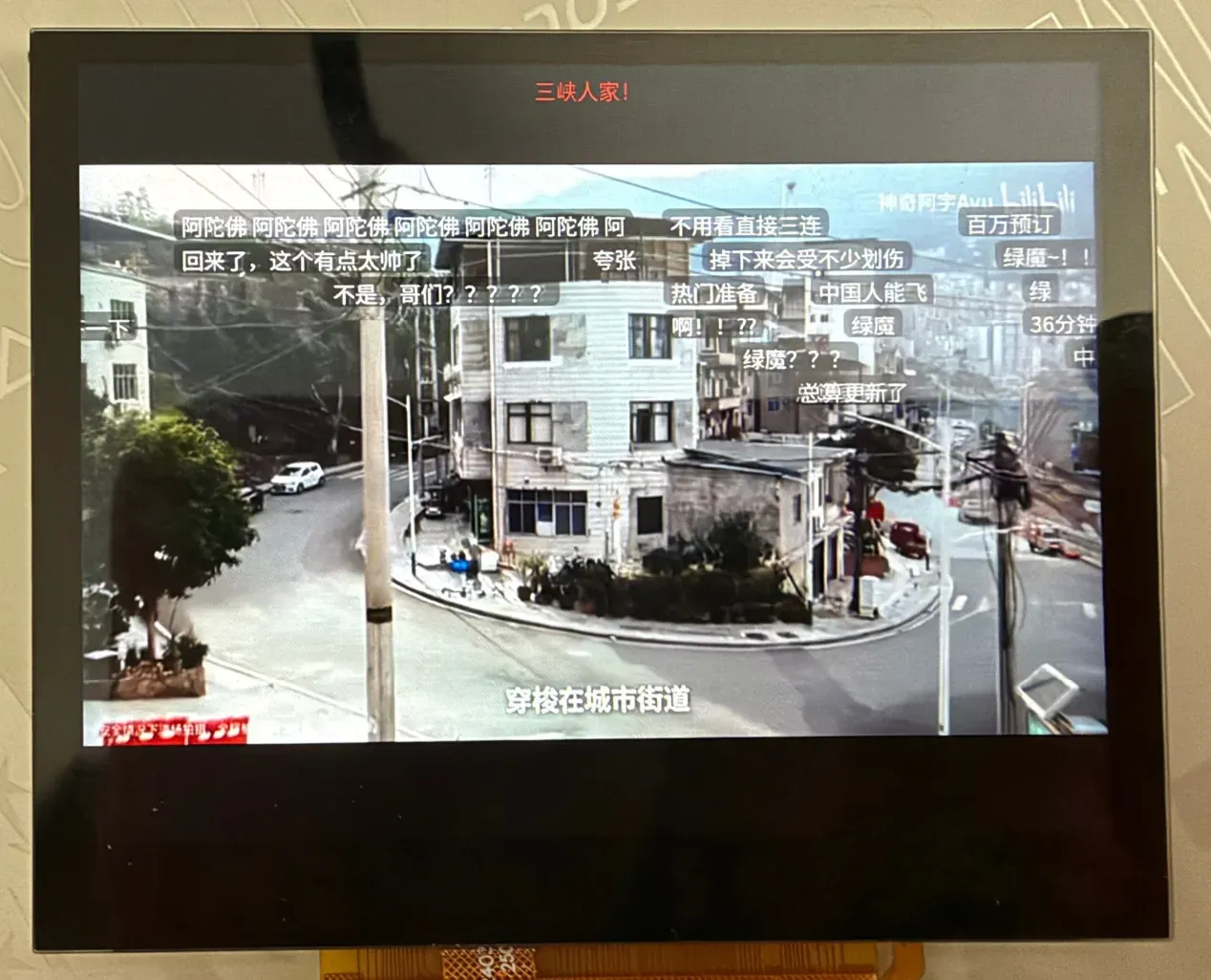
A video with the scrolling comments over it. The title is at the top, the picture is on the video plane, and the comments are the LVGL labels that move over it, in several lanes, in white with a dark backing so that they can be read on any picture.
ui_danmaku_run() is called by the interface once a round. It holds a pool of BILI_DM_ACTIVE (20) LVGL labels over the video. A comment takes a free label; a scrolling one also needs a lane that it will not catch up with:
flowchart TD
    A["spawn(item, p)"] --> B{"free label?"}
    B -- "no" --> X["false"]
    B -- "yes" --> C{"mode"}
    C -- "scroll" --> D["lane with p >= free_at"]
    D --> E["free_at = p + (w + GAP) / SPEED"]
    E --> F["x = SCREEN_W, y = lane"]
    C -- "top / bottom" --> G["row free for 4 s"]
    G --> H["x = centred"]
    F --> I["set text, colour, size, position; show"]
    H --> I
#define LANE_H    34#define SPEED    170    /* pixels per second */#define GAP    28#define TOP_ROWS  4#define BOTTOM_ROWS  4#define FIXED_MS  4000
/* where a scrolling comment is at the time p: all of them move at one speed */static int32_t scroll_px(uint32_t p){  return (int32_t)((uint64_t)p * SPEED / 1000);}
static bool spawn(const struct dm_item *it, uint32_t p){  /* ... */  w = lv_text_get_width(text, it->len, ui_font_m, 0) + 16;  if (kind == K_SCROLL) {    for (int i = 0; i < SCROLL_ROWS; i++) {      if (p >= scroll_free_at[i]) {  /* the lane is free again */        row = i;        break;      }    }    if (row < 0) {      return false;    }    /* the next one may enter when the tail of this one has come in, plus a gap */    scroll_free_at[row] = p + (uint32_t)(w + GAP) * 1000 / SPEED;    x = SCREEN_W;    y = 4 + (TOP_ROWS + row) * LANE_H;  } else {    /* top and bottom: a row that is free for FIXED_MS */  }  /* set the text, the colour, the size and the place, show the label */}
Because every scrolling comment moves at the same speed, the x of every label is a function of one number: x = SCREEN_W + s0 - scroll_px(now), with s0 = scroll_px(t0) taken when the comment was shown. A very dark text colour is made white so it can be read over a picture (readable()), and the labels have a 40% black background.
The clock that drives p follows the position of the video but is smoothed, so the text does not move in steps when the position is reported late:
flowchart TD
    A["video position pos, now"] --> B["err = (pos - now) - clk_off"]
    B --> C{"sync needed or abs(err) > 400 ms?"}
    C -- "yes" --> D["clk_off = pos - now"]
    C -- "no" --> E["clk_off += err / 8"]
    D --> F["p = now + clk_off"]
    E --> F
    F --> G["clamp: not far ahead, not backwards"]
if (playing) {  int32_t err = (int32_t)(pos - now) - clk_off;
  if (clk_sync || err > CLK_SNAP_MS || err < -CLK_SNAP_MS) {    clk_off = (int32_t)(pos - now);    /* jump: after a seek or a stall */    clk_sync = false;  } else {    clk_off += err / 8;      /* otherwise follow slowly */  }}p = now + clk_off;/* never far ahead of the video (a stall), and never backwards */
When a round took longer than 60 ms, density_div becomes 2 and every second comment is left out until the rounds are fast again.
Moving them as a picture
Section titled “Moving them as a picture”Moving 20 labels makes LVGL draw the old and the new place of each, 20 small redraws of text over a video. Because they all move by the same distance, ui_danmaku.c moves the layer instead as one picture, with the 2D accelerator, and lets LVGL draw only the strip that came in at the right. LVGL’s own refresh calls dm_strips() at its start (LV_EVENT_REFR_START):
flowchart TD
    A["REFR_START"] --> B{"pend_dx == 0 ?"}
    B -- "yes" --> X["return"]
    B -- "no" --> C{"other dirty area in the lanes?"}
    C -- "yes" --> D["draw all lanes"]
    C -- "no" --> E["shift_cols(G2D)"]
    E -- "ok" --> F["draw only the new columns"]
    E -- "failed" --> D
    D --> G["lv_inv_area"]
    F --> G
static void dm_strips(lv_event_t *e){  lv_display_t *d = lv_display_get_default();  lv_area_t lanes = {0, LANES_Y, SCREEN_W - 1, LANES_Y + LANES_H - 1}, x;  bool other = false;
  if (pend_dx == 0) {    return;  }  /* is anything else going to be drawn in the lanes (a button, the message)? */  for (uint32_t i = 0; i < d->inv_p && !other; i++) {    other = !d->inv_area_joined[i] && lv_area_intersect(&x, &d->inv_areas[i], &lanes);  }  if (other) {    n_other++;      /* then the lanes are drawn whole */  } else if (shift_cols(0, LANES_Y, SCREEN_W, LANES_H, pend_dx, false) != 0) {    n_failed++;  } else {    lanes.x1 = SCREEN_W - pend_dx;  /* only the new columns are drawn */    n_shifted++;  }  lv_inv_area(d, &lanes);  pend_dx = 0;}
shift_cols() (src/gfx/shift.c) is a blit inside the frame buffer, from x+dx to x, then a fill of the columns that are left over on the right with transparent black:
flowchart TD
    A["shift_cols(x, y, w, h, dx)"] --> B["cache flush of the rows"]
    B --> C["g2d_blit: from x+dx to x, same buffer"]
    C --> D["g2d_fill: the strip on the right"]
    D --> E["cache invalidate"]
    F["cols_check() first use"] -. "pattern test" .-> A
int shift_cols(int x, int y, int w, int h, int dx, bool sync){  struct g2d_surface f, b;  struct g2d_rect src, dst, strip;  int ret;
  /* ... checks: ready, 0 < dx < w, inside the frame buffer, self check passed ... */  surfaces(&f, &b);  sys_cache_data_flush_range(fb + (size_t)y * stride, (size_t)h * stride);  src = (struct g2d_rect){x + dx, y, w - dx, h};  dst = (struct g2d_rect){x, y, w - dx, h};  ret = g2d_blit(g2d, &f, &src, &f, &dst, G2D_ROTATE_0, G2D_FLAG_NO_CACHE_OPS);  if (ret == 0) {    strip = (struct g2d_rect){x + w - dx, y, dx, h};    g2d_fill(g2d, &f, &strip, 0);  }  sys_cache_data_invd_range(fb + (size_t)y * stride, (size_t)h * stride);
  return ret;}
A copy to the left inside one buffer has overlapping source and destination; the first time it is used, cols_check() draws a test pattern, moves it and compares, so a G2D that does not do it right turns the feature off instead of drawing garbage.
The labels themselves still have to end up at their new x for the next round, but moving a label is a style change that LVGL applies at the layout update, and that would invalidate the old and the new place again. So the move is made in a window where the invalidation is off:
sequenceDiagram
    participant D as danmaku round
    participant L as LVGL
    D->>L: lv_display_enable_invalidation(false)
    D->>L: lv_obj_set_x(label) ×N
    D->>L: lv_obj_update_layout(layer)
    Note over L: the style change is applied, nothing is marked dirty
    D->>L: lv_display_enable_invalidation(true)
lv_display_t *d = lv_display_get_default();
lv_display_enable_invalidation(d, false);for (int i = 0; i < CONFIG_BILI_DM_ACTIVE; i++) {  if (slots[i].used && slots[i].kind == K_SCROLL) {    lv_obj_set_x(slots[i].lbl, slots[i].x);  }}lv_obj_update_layout(layer);    /* the style change is applied now, with nothing marked dirty */lv_display_enable_invalidation(d, true);
The user interface
Section titled “The user interface”Fonts and colours
Section titled “Fonts and colours”The screen is 1024×768. LVGL draws on the ARGB plane and the display engine blends it over the video plane. The palette is dark (src/ui/ui_priv.h):
flowchart LR
    BG["C_BG 0b0f14"]:::bg --- BAR["C_BAR 141a21"]:::bar --- CARD["C_CARD 1c232c"]:::card --- PRESS["C_CARD_PRESS 2a3643"]:::press
    ACC["C_ACCENT 00a1d6"]:::acc --- TXT["C_TEXT e8edf2"]:::txt --- DIM["C_DIM 8a97a6"]:::dim
    classDef bg fill:#0b0f14,color:#e8edf2
    classDef bar fill:#141a21,color:#e8edf2
    classDef card fill:#1c232c,color:#e8edf2
    classDef press fill:#2a3643,color:#e8edf2
    classDef acc fill:#00a1d6,color:#0b0f14
    classDef txt fill:#e8edf2,color:#0b0f14
    classDef dim fill:#8a97a6,color:#0b0f14
#define C_BG lv_color_hex(0x0b0f14)#define C_BAR lv_color_hex(0x141a21)#define C_CARD lv_color_hex(0x1c232c)#define C_CARD_PRESS lv_color_hex(0x2a3643)#define C_ACCENT lv_color_hex(0x00a1d6) /* the blue of the site */#define C_TEXT lv_color_hex(0xe8edf2)#define C_DIM lv_color_hex(0x8a97a6)The Chinese text is Noto Sans SC (SIL OFL), cut by tools/make_font.py to GB2312, the kana and the punctuation (about 2.7 MB), included as a byte array and drawn by TinyTTF at three sizes, with a glyph cache of its own for each:
flowchart LR
    A["font.inc<br/>NotoSansSC subset"] --> B["static const ttf[] in the flash window"]
    B --> C["lv_tiny_ttf_create_data_ex 18 px"]
    B --> D["... 22 px"]
    B --> E["... 28 px"]
    C --> F["glyph cache 160"]
    D --> G["glyph cache 320"]
    E --> H["glyph cache 64"]
    C -. "fallback" .-> I["lv_font_montserrat_20 symbols"]
static const uint8_t ttf[] = {#include "font.inc"};
static const lv_font_t *make(int px, int cache){  lv_font_t *f = lv_tiny_ttf_create_data_ex(ttf, sizeof(ttf), px, LV_FONT_KERNING_NONE, cache);
  if (f == NULL) {    return &lv_font_montserrat_20;  }  /* the symbols of LVGL (arrows, play, ...) are not in the font */  f->fallback = &lv_font_montserrat_20;
  return f;}
void ui_fonts_init(void){  ui_font_s = make(18, 160);  ui_font_m = make(22, 320);  ui_font_l = make(28, 64);}
The array lives in the flash window and is never copied to RAM. Kerning is off (LV_TINY_TTF_CACHE_KERNING_CNT=0 from CMake): the kerning cache of TinyTTF returned entries to the glyph cache and glyphs overlapped.
The home page
Section titled “The home page”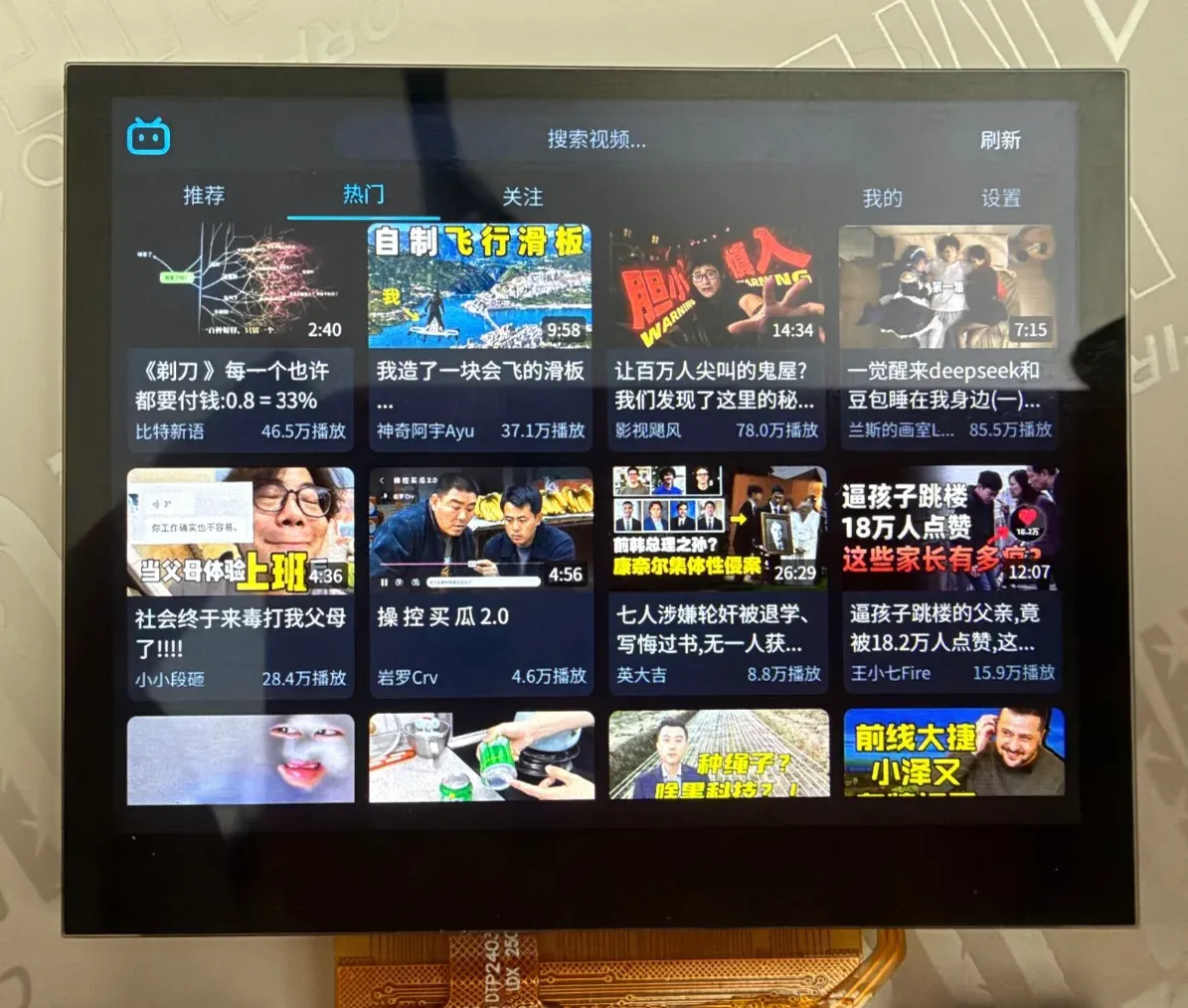
The photo shows the popular tab. The top bar has the logo, the search box (“search videos…”) and the refresh button; below it the tabs recommend, popular and following are on the left and me and settings on the right, with the current one underlined. The videos are cover cards in four columns: the cover with its length in the corner, the title (two lines) and, at the bottom, the uploader and the play count.
+--------------------------------------------------------------+| [logo] [ search ...............................] [refresh] | BAR_H 72| recommend popular following me settings | TABS_H 52|--------------------------------------------------------------|| +------+ +------+ +------+ +------+ || |cover | |cover | |cover | |cover | || |title | |title | |title | |title | 4 columns of 236 px || |up/vw | |up/vw | |up/vw | |up/vw | || +------+ +------+ +------+ +------+ |+--------------------------------------------------------------+ui_home.c has five tab buttons in one row and a panel or a grid behind each. The first three are lists, the last two are panels:
flowchart TD
    A["tab buttons 0..4"] --> B["show_tab(t)"]
    B --> C{"t < 3 ?"}
    C -- "yes" --> D["card grid of the list: recommend, popular, following"]
    C -- "no" --> E["panel: me, settings"]
    F["no login"] --> G["tab 2 hidden"]
#define LIST_TABS  3  /* recommend, popular, following: a card grid each */#define TAB_ME    3  /* at the right end of the row, with the settings */#define TAB_SETTINGS  4#define TABS    5
static void show_tab(int t){  tab = t;  for (int i = 0; i < TABS; i++) {    bool on = i == t;
    lv_obj_set_style_text_color(lv_obj_get_child(tab_btn[i], 0), on ? C_ACCENT : C_DIM, 0);    lv_obj_set_style_border_width(tab_btn[i], on ? 3 : 0, 0);    /* the grid or the panel of the tab is shown, the others hidden */  }}
/* ... */lv_obj_add_flag(tab_btn[2], LV_OBJ_FLAG_HIDDEN);  /* "following": until there is a login */
The card grid
Section titled “The card grid”ui_card.c builds a card as a plain LVGL object with a cover image, a duration label, the title (two lines), the number of views and the uploader. The position is computed from the index, so no layout is used:
flowchart LR
    A["idx"] --> B["col = idx % 4"]
    A --> C["row = idx / 4"]
    B --> D["x = col × (236 + 16)"]
    C --> E["y = row × (card_h + 16)"]
    D --> F["lv_obj_set_pos"]
    E --> F
#define CARD_W    236#define CARD_COLS  4
lv_obj_set_pos(o, (idx % CARD_COLS) * (CARD_W + MARGIN),      (idx / CARD_COLS) * (ui_card_height() + MARGIN));
The rounded top corners of the cover are not drawn by a clip (a clip makes LVGL render the object in an offscreen layer, which is slow). They are two 10×10 A8 masks in the colour of the page, laid over the corners:
flowchart LR
    A["distance to the circle centre per pixel"] --> B["A8 mask 10×10"]
    B --> C["mirror for the right corner"]
    C --> D["recolour to the page colour"]
    D --> E["laid over the cover corners"]
#define CORNER    10static uint8_t corner_px[2][CORNER_STRIDE * CORNER] __aligned(4);
for (int y = 0; y < CORNER; y++) {  for (int x = 0; x < CORNER; x++) {    float dx = x + 0.5f - CORNER, dy = y + 0.5f - CORNER;    float a = sqrtf(dx * dx + dy * dy) - CORNER + 0.5f;  /* 0 inside the circle, 1 outside */    uint8_t v = a <= 0.0f ? 0 : (a >= 1.0f ? 255 : (uint8_t)(a * 255.0f));
    corner_px[0][y * CORNER_STRIDE + x] = v;    corner_px[1][y * CORNER_STRIDE + CORNER - 1 - x] = v;  /* the mirror image */  }}
A list of 100 videos is 100 cards, but only the ones near the screen exist. window_rows() says which rows must have widgets (the screen and one card height around it); the others are deleted and built again when they come into view:
flowchart LR
    A["top = scroll_y, vh = height"] --> B["first = (top - row_h) / row_h"]
    A --> C["last = (top + vh + row_h) / row_h"]
    B --> D["rows in [first, last] have widgets"]
    C --> D
    D --> E["the others are deleted and rebuilt when they come into view"]
static void window_rows(struct ui_grid *g, int *first, int *last){  int row_h = ui_card_height() + MARGIN;  int top = lv_obj_get_scroll_y(g->obj), vh = lv_obj_get_height(g->obj);  int rows = (g->built + CARD_COLS - 1) / CARD_COLS;
  *first = MAX(0, (top - row_h) / row_h);  *last = MIN(rows - 1, (top + vh + row_h) / row_h);}
When the end of the list is near, ui_grid_more() asks the worker for the next page (CMD_MORE), once for each list length (asked_at).
Scrolling by moving the picture
Section titled “Scrolling by moving the picture”The same idea as for the comments, applied to the grid: when the finger scrolls the list by dy pixels, LVGL moves all the cards and would draw the whole list again. scrolled() instead lets the accelerator move the picture and marks only the rows that came in:
flowchart TD
    A["LV_EVENT_SCROLL: dy"] --> B{"jump, hidden, too far, other drawing waiting, no G2D?"}
    B -- "yes" --> C["draw everything"]
    B -- "no" --> D["shift_dy += dy"]
    D --> E["mark pend_top / pend_bottom"]
    E --> F["invalidation off, refresh_soon"]
    F --> G["REFR_START: add_strips"]
    G --> H["shift_rows (G2D) + draw only the new rows"]
static void scrolled(lv_event_t *e){  struct ui_grid *g = lv_event_get_user_data(e);  lv_display_t *d = lv_display_get_default();  int y = lv_obj_get_scroll_y(g->obj), dy = y - g->last_scroll;
  g->last_scroll = y;  g->covers_dirty = true;  /* ... for a jump, a hidden list or a step as big as the list: draw everything ... */  if (!move_pending(d, &r, dy)) {    /* something else waits to be drawn inside the list: draw everything */  } else {    g->shift_dy += dy;    /* the picture is moved once per frame, at the refresh */    if (dy > 0) {      g->pend_bottom = MIN(h, g->pend_bottom + dy);      g->pend_top = MAX(0, g->pend_top - dy);    } else {      g->pend_top = MIN(h, g->pend_top - dy);      g->pend_bottom = MAX(0, g->pend_bottom + dy);    }    lv_display_enable_invalidation(d, false);  /* LVGL's own full redraw is left out */    refresh_soon(d);  }}
At the start of the next refresh (add_strips(), LV_EVENT_REFR_START) the invalidation is switched on again, shift_rows() moves the picture of the list by the steps of the whole frame, and the rows that came in are marked dirty so LVGL draws only them. A cover that arrives while this goes on keeps its dirty area (move_pending() moves it by the same step), so it is not drawn twice. The state that LVGL sets on a list at the start and at the end of a scroll refreshes its style and used to draw the whole list; state_guard_on/off switch the invalidation off around it.
Covers
Section titled “Covers”A cover goes from the image server through the video engine to the screen without the CPU converting a pixel. Cards ask for a cover by its address; a pool of three threads (BILI_COVER_THREADS) fetches and decodes, and a cache of BILI_COVER_CACHE (24) pictures keeps them with reference counts:
stateDiagram-v2
    [*] --> SLOT_FREE
    SLOT_FREE --> SLOT_QUEUED: cover_request
    SLOT_QUEUED --> SLOT_BUSY: a cover thread takes the newest
    SLOT_BUSY --> SLOT_READY: fetched and decoded
    SLOT_BUSY --> SLOT_QUEUED: fetch failed, up to 3 tries
    SLOT_BUSY --> SLOT_FAILED: decode failed
    SLOT_READY --> SLOT_FREE: thrown out, refs == 0
enum slot_state { SLOT_FREE, SLOT_QUEUED, SLOT_BUSY, SLOT_READY, SLOT_FAILED };
struct slot {  enum slot_state state;  char pic[URL_LEN];  uint32_t *px;  int refs;    /* cards that show it */  uint8_t tries;    /* fetches that failed on the network */  uint32_t used;    /* tick of the last use, for the choice of what to throw out */};
void cover_request(const char *pic);      /* queue it if it is not there */const uint32_t *cover_acquire(const char *pic);    /* NULL until it is ready; counts a reference */void cover_release(const char *pic);
The server resizes: the request is <address>@236w_133h_1c.jpg, so the file is small (JPEG_MAX is 48 KiB). The thread that takes the newest request first (it is the one on the screen) fetches it with http_get_text() and decodes it:
flowchart TD
    A["load(pic)"] --> B["http_get_text @236w_133h_1c.jpg"]
    B --> C{"jpeg_for_engine ?"}
    C -- "baseline 4:2:0" --> D["vdec_decode_image → NV12"]
    D --> E["to_xrgb (G2D)"]
    C -- "other" --> F["decode_soft (tjpgd)"]
    E --> G["pixels XRGB8888"]
    F --> G
n = http_get_text(url, &(struct http_opts){.range_start = -1, .timeout_ms = 8000}, (char *)jpeg, JPEG_MAX, NULL);ret = jpeg_for_engine(jpeg, n) ? vdec_decode_image(vdec, VDEC_CODEC_JPEG, jpeg, n, VDEC_FORMAT_NV12, &f) : -ENOTSUP;if (ret == 0) { px = aligned_alloc(64, COVER_BYTES); to_xrgb(&f, px); /* G2D: NV12 -> XRGB8888 at the size of the cover */ vdec_frame_release(vdec, &f);} else if (ret == -ENOTSUP) { px = decode_soft(jpeg, n); /* the engine takes baseline 4:2:0 only: tjpgd for the rest */}jpeg_for_engine() reads the JPEG headers first and accepts only what the engine can decode (8 bit, three components, sampling 2×2/1×1/1×1, baseline); a file it would refuse is never given to it. to_xrgb() is one g2d_blit() that reads the NV12 picture, converts and scales it to the card size in one pass:
flowchart LR
    A["NV12 from the video engine"] --> B["g2d_blit"]
    B -- "convert and scale" --> C["XRGB8888 236×133<br/>stride 960"]
struct g2d_surface src = { .format = G2D_PIXFMT_NV12, .width = f->width, .height = f->height, .plane = {(void *)f->plane[0], (void *)f->plane[1]}, .pitch = {f->stride[0], f->stride[1]},};struct g2d_surface dst = { .format = G2D_PIXFMT_XRGB8888, .width = COVER_STRIDE / 4, .height = COVER_H, .plane = {out}, .pitch = {COVER_STRIDE},};g2d_blit(g2d, &src, &sr, &dst, &dr, G2D_ROTATE_0, G2D_FLAG_YUV_FULL_RANGE);The result has a row distance of 960 bytes and 64 byte alignment (with other strides LVGL drew noise). While a video plays cover_pause(true) stops the threads and cover_flush() frees the pictures, since the decoder needs the memory.
Search
Section titled “Search”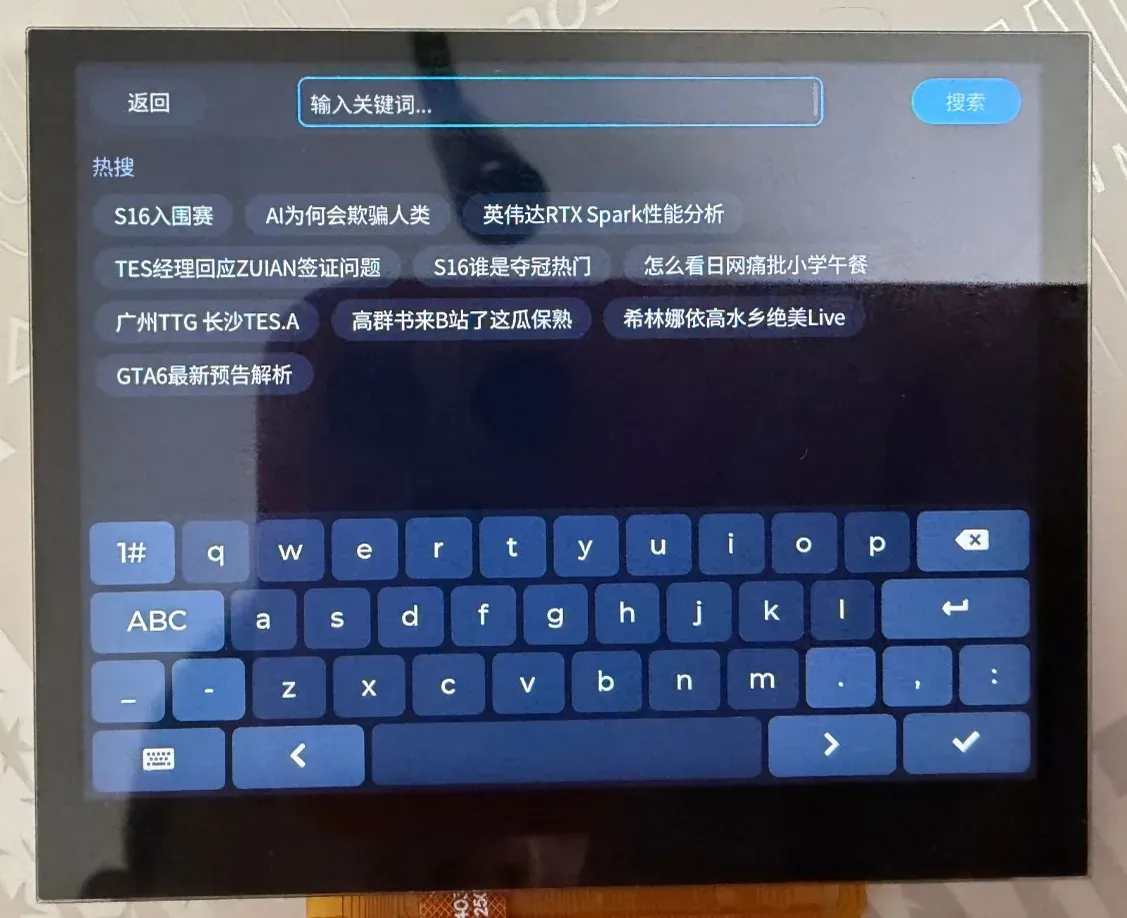
The search page: back on the left, the text box (“type a keyword…”) and the search button on top, the trending words as buttons below them, and the LVGL keyboard at the bottom. Typing Latin letters on it gives Chinese candidates through the pinyin input method; a tap on a trending word searches for it.
The search page is a text area, the LVGL keyboard and lv_ime_pinyin, which types Chinese one syllable at a time from a dictionary that the firmware supplies:
flowchart LR
    A["lv_keyboard"] --> B["lv_ime_pinyin"]
    C["bili_pinyin_dict"] --> B
    B --> D["candidate panel"]
    D --> E["text area"]
    E --> F["CMD_SEARCH"]
kb = lv_keyboard_create(page);ui_keyboard_style(kb);
ime = lv_ime_pinyin_create(page);lv_ime_pinyin_set_dict(ime, (lv_pinyin_dict_t *)bili_pinyin_dict);lv_ime_pinyin_set_keyboard(ime, kb);
The dictionary (src/ui/pinyin_dict.c) is generated by tools/make_pinyin_dict.py: for every toneless syllable, the characters that the font has, by falling frequency (the frequencies come from the dictionary of jieba, the syllables from pypinyin). The input method takes the first entry that starts with the typed letters, so the entries are sorted and “ni” comes before “nian”. The row of trending words under the field comes from CMD_HOT; a tap puts the word in the field and starts the search. The results are a list like the others; the worker adds cid with /x/player/pagelist when a result is played.
The player page
Section titled “The player page”stateDiagram-v2
[*] --> Idle
Idle --> Dragging: PRESSED
Dragging --> Dragging: PRESSING / seek_move
Dragging --> Idle: RELEASED / PRESS_LOST → player_seek
note right of Dragging: v = x on the bar, limited to the downloaded part
/* The progress bar is also the place to seek: the finger sets the position, letting go jumps there. */#define SEEK_MARGIN  8  /* thousandths kept back from the end of the downloaded part */
static void seek_move(void){  /* lim: the position cannot go past what is downloaded */  int v, lim = buffered >= 1000 ? 1000 : buffered - SEEK_MARGIN;  lv_point_t p;
  lv_indev_get_point(lv_indev_active(), &p);  v = (p.x - a.x1 - bar_x) * 1000 / bar_w;  v = CLAMP(v, 0, MAX(lim, 0));  drag_v = v;  /* the time label, the bar and the knob follow the finger */}
static void seek_event(lv_event_t *e){  lv_event_code_t code = lv_event_get_code(e);
  touched();  if (code == LV_EVENT_PRESSED) {    dragging = true;    seek_move();  } else if (code == LV_EVENT_PRESSING) {    if (dragging) {      seek_move();    }  } else if ((code == LV_EVENT_RELEASED || code == LV_EVENT_PRESS_LOST) && dragging) {    /* a finger that slides off the strip still sets the position */    dragging = false;    player_seek((uint32_t)((uint64_t)duration * drag_v / 1000));  }}
buffered is the downloaded part in thousandths: on_progress() of the download sets it with ui_set_buffered(). The progress bar draws two bars over each other, the downloaded part and the position. The icons of the buttons are drawn in icon_draw() on LV_EVENT_DRAW_MAIN_END with lv_draw_line(), lv_draw_triangle() and lv_draw_rect() (a triangle for play, two bars for pause, a chevron for back), since the font has no symbols.
The bars hide after four seconds without a touch:
flowchart TD
    A["every round"] --> B{"bars visible, not paused, 4 s without a touch?"}
    B -- "yes" --> C["show_bars(false)"]
    B -- "no" --> D["keep"]
    E["touch or pause"] --> F["show_bars(true)"]
if (bars_visible && !paused && k_uptime_get() - last_touch > HIDE_MS) { show_bars(false);}One message pill carries everything that is said to the user. When it is visible the comments are not moved as a picture (!ui_play_msg_visible() in ui_danmaku_run()), because the pill is drawn in the same area.
The account
Section titled “The account”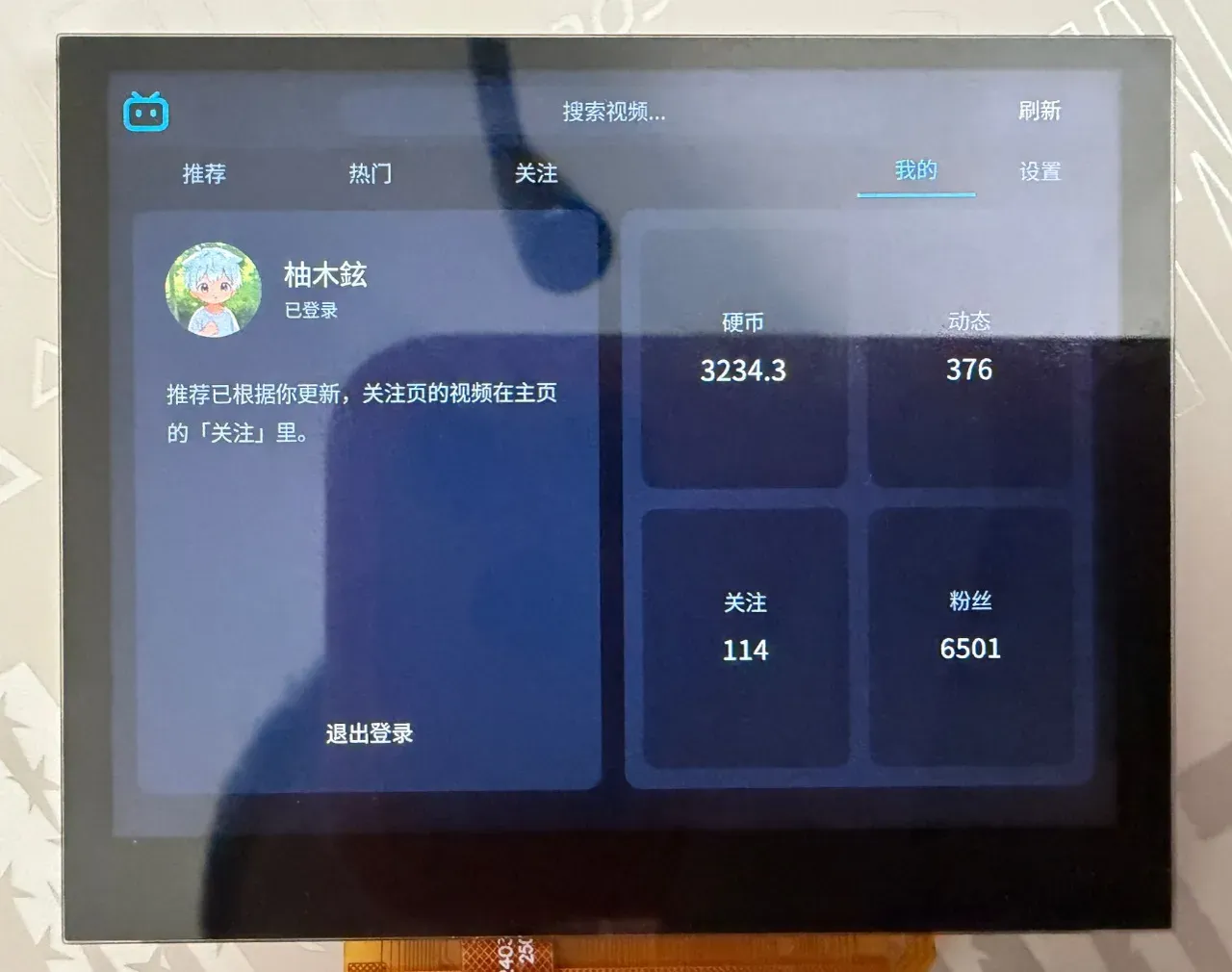
The me page after a login: the avatar, the name with “logged in” under it, a note that the recommendations now follow the account, the logout button and four tiles with the coins, posts, followed accounts and fans.
The login uses the web QR code flow, and it needs no cookie to start:
sequenceDiagram
    participant B as board
    participant P as passport.bilibili.com
    B->>P: GET .../qrcode/generate
    P-->>B: data.url, data.qrcode_key
    loop every 2 s
        B->>P: GET .../qrcode/poll?qrcode_key
        P-->>B: data.code
    end
    P-->>B: code 0: cookies in the url or Set-Cookie
    B->>B: account_set_from_text
int bili_api_qr_new(char *url, size_t url_size, char *key, size_t key_size){  char *a = fetch(PASSPORT "/x/passport-login/web/qrcode/generate");  /* data.url (what the code shows) and data.qrcode_key */}
int bili_api_qr_poll(const char *key, int *state){  /* GET .../qrcode/poll?qrcode_key=<key> */  ret = bili_parse_qr_poll(a, state, NULL, 0);  if (ret == 0 && *state == 0) {    /* the cookies are in the address of the answer, or set by the server */    ret = account_set_from_text(a);    if (ret != 0 && r->set_cookie[0] != '\0') {      ret = account_set_from_text(r->set_cookie);    }  }}
data.code of the poll answer is 86101 (not scanned), 86090 (scanned, waiting for the confirmation on the phone), 86038 (expired) or 0 (done). The worker maps them to a state the interface shows:
stateDiagram-v2
    [*] --> QR_WAIT: new code
    QR_WAIT --> QR_SCANNED: 86090
    QR_WAIT --> QR_EXPIRED: 86038
    QR_SCANNED --> QR_DONE: 0
    QR_WAIT --> QR_DONE: 0
    QR_DONE --> [*]: login_ready
    QR_WAIT --> QR_ERROR: other
static void qr_poll(void){  int state = -1, ret = bili_api_qr_poll(qr_key, &state);
  switch (state) {  case 86101: qr_set(QR_WAIT);    break;  case 86090: qr_set(QR_SCANNED); break;  case 0:     qr_set(QR_DONE); login_ready(); break;  case 86038: qr_set(QR_EXPIRED); break;  default:    qr_set(QR_ERROR);   break;  }}
The interface sends CMD_QR_POLL from a timer, about every two seconds. The code itself is drawn by LVGL’s lv_qrcode in a white rounded holder. On success the answer carries SESSDATA, bili_jct and DedeUserID; account.c picks them out of the text with one scanner (text_value() accepts them as a query string, a cookie list or JSON), keeps them in memory and writes them to auth.cfg:
flowchart LR
    A["answer text or Set-Cookie"] --> B["text_value ×3"]
    B --> C["SESSDATA, bili_jct, DedeUserID"]
    C --> D["kept in memory"]
    C --> E["auth.cfg on the card"]
    D --> F["account_cookie() → Cookie:"]
n = snprintf(buf, sizeof(buf), "SESSDATA=%s\nbili_jct=%s\nDedeUserID=%s\n", acc.sessdata, acc.jct, acc.uid);From then on account_cookie() adds them to the Cookie: line of every request (see headers() above). A saved login is checked at the start with /x/web-interface/nav and dropped when the server does not accept it (login_check()). After the login the recommendations are loaded again (now personal), the following tab appears, and the account page shows the name, the picture (cover_load_square()), the coins and the numbers from /x/web-interface/nav/stat.
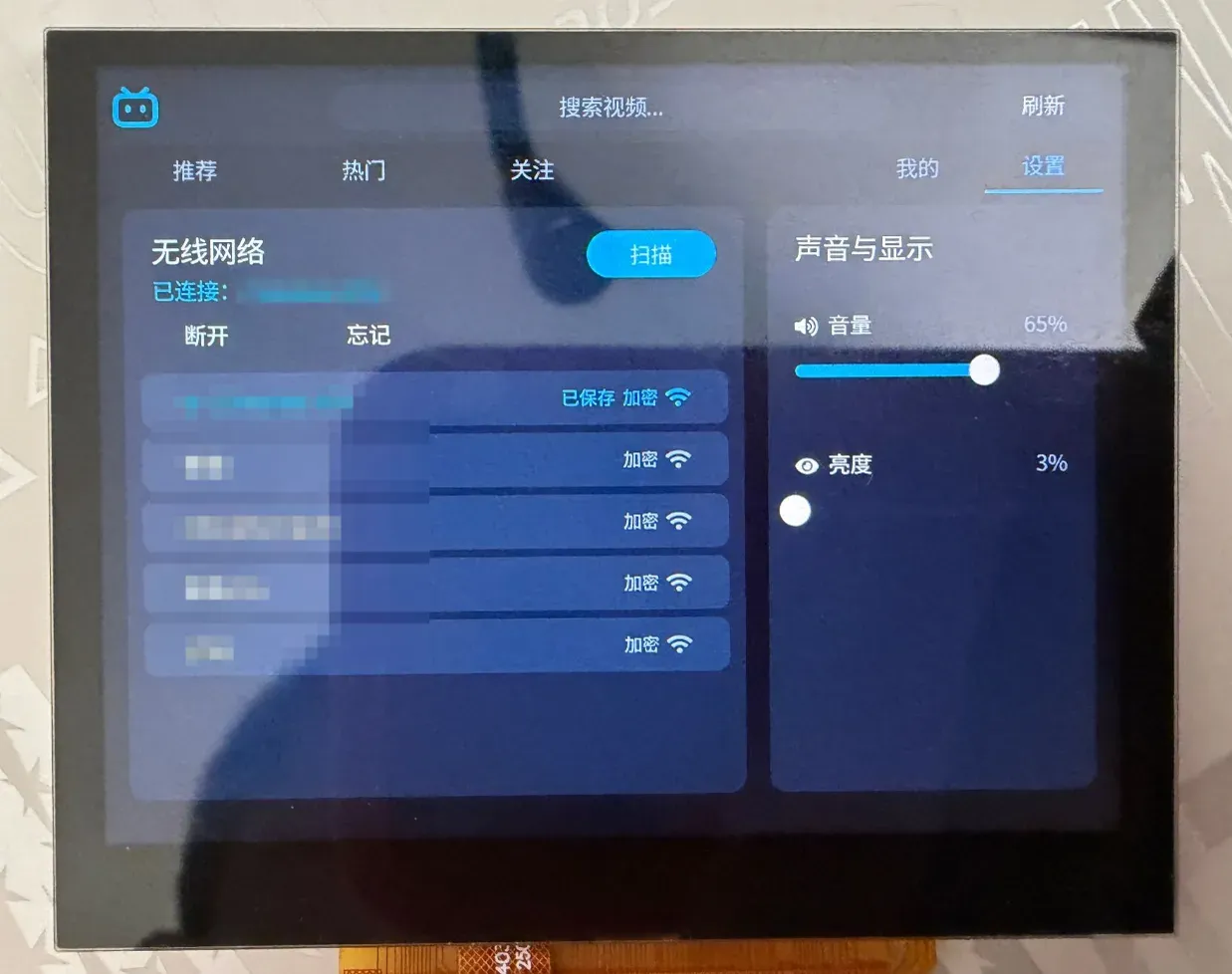
The settings page. On the left is the Wi-Fi card: the scan button, the network that is joined with the disconnect and forget buttons, and the list of networks found, marked as saved and encrypted, with their signal strength; the network names are blurred in the photo. On the right, the sound and display card holds the volume and brightness sliders.
src/net/wifi.c keeps a small state machine over Zephyr’s Wi-Fi management:
flowchart TD
    A["wifi_join"] --> B{"already connected?"}
    B -- "yes" --> C["wifi_disconnect"]
    B -- "no" --> D["state = CONNECTING"]
    C --> D
    D --> E["net_mgmt(WIFI_CONNECT)"]
    E --> F{"-EBUSY ?"}
    F -- "yes: up to 100×" --> G["k_msleep(500)"] --> E
    F -- "no" --> H["wait: association, then DHCP address"]
    H -- "failed" --> I["disconnect, state = FAILED"]
    H -- "ok" --> J["state = CONNECTED"]
enum wifi_state { WIFI_DISCONNECTED, WIFI_CONNECTING, WIFI_CONNECTED, WIFI_FAILED };
int wifi_join(const char *ssid, const char *psk, int timeout_s){  struct net_if *iface = net_if_get_first_wifi();  struct wifi_connect_req_params p = {    .ssid = ssid, .ssid_length = strlen(ssid),    .psk = psk, .psk_length = strlen(psk),    .security = strlen(psk) ? WIFI_SECURITY_TYPE_PSK : WIFI_SECURITY_TYPE_NONE,    .channel = WIFI_CHANNEL_ANY, .band = WIFI_FREQ_BAND_UNKNOWN,  };
  if (state != WIFI_DISCONNECTED) {    wifi_disconnect();  /* another network, or the same one again: leave it first */  }  k_sem_reset(&connected);  k_sem_reset(&got_ip);  state = WIFI_CONNECTING;  ret = net_mgmt(NET_REQUEST_WIFI_CONNECT, iface, &p, sizeof(p));  /* the driver reports every join, also a failed one, after at most 20 s; a request while an   * earlier join runs is answered with -EBUSY, so it is asked again */  for (int i = 0; ret == -EBUSY && i < 100; i++) {    k_msleep(500);    k_sem_reset(&connected);    ret = net_mgmt(NET_REQUEST_WIFI_CONNECT, iface, &p, sizeof(p));  }  /* wait for the association, then for the DHCP address; stop the attempts on a failure,   * or a network that does not answer would join later */}
The two semaphores are given by a handler of the net management events (NET_EVENT_WIFI_CONNECT_RESULT, NET_EVENT_IPV4_ADDR_ADD). The settings page shows the state and the last error, scans with NET_REQUEST_WIFI_SCAN, and offers disconnect, reconnect and forget; forget deletes wifi.cfg and needs two taps within 3 seconds (the first tap changes the button text and starts the timer). Volume and brightness are two sliders: the first calls player_set_volume(), the second display_set_brightness() on the display; both are saved in settings.cfg by CMD_SAVE_SETTINGS so the card is not written at every step of a finger.
The network on the board
Section titled “The network on the board”Things that were found when the client ran directly, without a proxy:
-
All connections are HTTPS, for the interface servers and for the CDN, with Zephyr’s TLS sockets (mbedTLS). The certificates are not verified by default (
BILI_TLS_VERIFYturns it on). Each connection takes memory: the mbedTLS heap is 256 KiB (MBEDTLS_HEAP_SIZE, the peak with four connections was 144 KiB) andNET_SOCKETS_TLS_MAX_CONTEXTSis 4 (with the default 1 the secondsocket()failed withENOMEM). -
The source address bug: the network stack chose the source address of a connection by the number of leading bits that the destination shares with the subnet of an address of the interface. The loopback address 127.0.0.1 (subnet 127.0.0.0) won for every destination whose first byte is below 128, which is every Bilibili server. The SYN then went to the loopback interface and the stack answered itself with a reset:
connect()failed withECONNREFUSEDafter 0 to 1 ms and no frame left the board, which looked like the server refusing the board (and made a proxy look necessary).net_if_ipv4_get_best_match()now skips a loopback address when the destination is not a loopback one:flowchart TD A["best match for dst"] --> B["for each address of the interface"] B --> C{"loopback address and dst is not loopback?"} C -- "yes" --> D["continue skip"] C -- "no" --> E["longest common prefix wins"] D --> B E --> F["source address"]if (net_ipv4_is_addr_loopback(&ipv4->unicast[i].ipv4.address.in_addr) &&!net_ipv4_is_addr_loopback((struct in_addr *)dst)) {continue;}The loopback interface stays: the control socket of the Wi-Fi driver uses 127.0.0.1.
-
DNS:
api.bilibili.comanswers with six addresses (DNS_RESOLVER_AI_MAX_ENTRIES=8) and the cover threads look names up at the same time (DNS_NUM_CONCUR_QUERIES=6). -
Network buffers have to hold the TCP window; with too few, packets were dropped and every loss cost a retransmission time out.
Memory
Section titled “Memory”The image is about 10.4 MB of the 16 MB; the text and the read-only data (font, Wi-Fi firmware) stay in the flash window. Measured on the board:
| State | Free RAM |
|---|---|
| home, covers loaded | about 6 MB |
| home, covers released | about 9.5 MB |
| player open (640×360) | about 1.8 MB |
The video decoder takes its pictures from a budget (VDEC_SUNXI_MAX_MEMORY_KB, 6144 here; with 4300 some streams stood still at 100 to 400 ms) and CONFIG_VDEC_SUNXI_H264_EXTRA_PICTURES keeps spare pictures (with too few the display showed torn pictures). The LVGL code, the user interface files and the cover decoder run from RAM (BILI_UI_RAM): code in the flash window is slow on a cache miss.
Test aids
Section titled “Test aids”BILI_SELFTESTruns the interface by itself on the board: scroll rounds, searches, a Wi-Fi leave/join/forget round, playing hot videos with a pause, a resume and nine quick taps on the button. It printsselftest: PASS (0 failures)at the end and checks that the free memory and the LVGL heap return to the reference after each video.- The recorder
src/debug/crumbs.ckeeps the last 256 context switches and interrupt entries in memory that a reset does not clear, and a watchdog that a thread feeds once a second resets the board when everything stops. After the reset the board waits in FEL with the memory intact; starting the loader again without a power cycle prints the ring (Sswitched in,Iinterrupt entered,Xleft, then the thread name;Nis a note that code leaves withbili_crumb("...")). A freeze on pause was found this way: the last note wasr-growof the video thread, and the player was reading through a pointer to a variable of an inner block ofplay(). - The host tests (
tests/host/run.sh, a directory that is kept next to the sources and is not part of the repository) build the HTTP parser, the JSON reader, the MD5 and the signature, the parsers with recorded answers, the danmaku scanner and the inflater with the sanitizers on the build machine.
Limits
Section titled “Limits”- 360P only (one MP4 file); 720P and up are not used.
- A very large video (the 87 MB file of a popular list) does not play: the decoder runs out of memory.
- The certificates are not verified unless you turn it on.
- The danmaku are plain text in one colour per comment; only scrolling, top and bottom comments are shown.
- No commenting, liking, coining or posting; no password or SMS login.