HTML renderer - litehtml
Draws HTML pages from the TF card onto the screen. litehtml (v0.9) parses the HTML, applies the CSS, and lays it out; the rendering layer on the board (lh_render.cpp) draws the laid-out boxes into an RGB565 buffer and hands it to the display engine. The component is zephyr-components/litehtml, and the sample is samples/html_viewer.
There is no browser engine: no JavaScript runs, there is no network access, and there is no touch or button input. When the page is too long it scrolls down on its own and comes back when it reaches the end.
flowchart TB
    SD["TF card<br/>page.html / img / font.lhf"] -->|"fs_read"| MAIN["html_viewer<br/>main.c / chunked.c / assets.c"]
    MAIN -->|"HTML text"| LH["litehtml<br/>parsing + CSS + layout"]
    FONT["cfb_font_1016<br/>10×16 bitmap font"] --> CT["lh_render.cpp<br/>box, text, image drawing"]
    LH -->|"boxes, text, background"| CT
    MAIN -->|"images / CJK glyphs"| CT
    CT -->|"lh_draw"| FB["RGB565 buffer 1024×600<br/>two in rotation"]
    FB -->|"display_sunxi_show_rgb"| PANEL["screen"]
Before you start, first complete Setting up the development environment and Getting the Zephyr source.
Preparation
Section titled “Preparation”The page, images, and font all live on the TF card; the board side needs no network access.
The sample looks for a page in the following order (pick_file() in main.c, lines 77–100):
CONFIG_SAMPLE_HTML_FILE, default/SD:/page.html.- If the file above does not exist, it takes the first
.htmlor.htmfile in the card’s root directory (case-insensitive; the order is the order in the directory, not necessarily alphabetical; subdirectories are not entered). - If there is none, it shows the built-in page compiled into the firmware.
static bool pick_file(char *path, size_t size){  struct fs_dirent ent;  struct fs_dir_t dir;
  strncpy(path, CONFIG_SAMPLE_HTML_FILE, size - 1);  path[size - 1] = '\0';  if (fs_stat(path, &ent) == 0) {    return true;  }  fs_dir_t_init(&dir);  if (fs_opendir(&dir, "/SD:") != 0) {    return false;  }  while (fs_readdir(&dir, &ent) == 0 && ent.name[0] != '\0') {    if (ent.type == FS_DIR_ENTRY_FILE && name_is_html(ent.name)) {      snprintk(path, size, "/SD:/%s", ent.name);      fs_closedir(&dir);      return true;    }  }  fs_closedir(&dir);  return false;}
The component ships with a test page, samples/html_viewer/page.html (4.4 KB, covering text styles, color blocks, lists, tables, nested boxes, and long text). The TF card is FAT or exFAT and supports long file names. The simplest way to try it:
cp ~/f101-zephyr/zephyr-components/litehtml/samples/html_viewer/page.html /path/to/SD/page.htmlThe page is read as UTF-8. Encoding and declarations such as <meta charset> make no difference here: the bytes that are read are handed straight to litehtml.
Images
Section titled “Images”<img> and the CSS background-image both go through the same loading callback, but only the custom .lhi file is recognized; PNG, JPEG, GIF, WebP, and SVG are not supported for direct reference.
- Write a relative path in the page, for example
<img src="img/a.lhi">. The path is resolved relative to the directory the page is in (image_cb()inassets.cconcatenatesdir + "/" + srcand reads the file); there is no handling of URLs ordata:. - The
.lhifile format:"LHI1", 16-bit width, 16-bit height (little-endian), followed by width×height RGB565 pixels (little-endian). There is no alpha channel. - A missing file, a wrong magic number, or a short length all count as “no such image”: the element has no size and is not drawn. Failures are cached too, so the card is not read over and over.
- The cache holds at most 40 entries totalling 6 MiB (
CACHE_ENTRIES,CACHE_LIMIT); when it overflows the least recently used are dropped.
There is no ready-made command-line conversion tool; the script below follows the same logic as to_lhi() and make_font() in tools/scrape_page.py (it needs Pillow, which is in Zephyr’s venv):
#!/usr/bin/env python3"""用法:  mk-lh-assets.py img  input image output.lhi [max width max height]  mk-lh-assets.py font 字体文件 输出.lhf 页面.html"""import html, struct, sysfrom PIL import Image, ImageDraw, ImageFont

def to_lhi(src, dst, max_w=640, max_h=360):    img = Image.open(src)    if img.mode in ("RGBA", "LA", "P"):          # pad transparent areas with a white background        img = img.convert("RGBA")        bg = Image.new("RGBA", img.size, (255, 255, 255, 255))        bg.alpha_composite(img)        img = bg    img = img.convert("RGB")    img.thumbnail((max_w, max_h), Image.LANCZOS)  # shrink only, never enlarge    w, h = img.size    out = bytearray(struct.pack("<4sHH", b"LHI1", w, h))    px = img.tobytes()    for i in range(0, len(px), 3):        r, g, b = px[i], px[i + 1], px[i + 2]        out += struct.pack("<H", ((r & 0xf8) << 8) | ((g & 0xfc) << 3) | (b >> 3))    open(dst, "wb").write(out)    print(dst, w, "x", h, len(out), "bytes")

def to_lhf(fontfile, dst, page, cell=16):    text = html.unescape(open(page, encoding="utf-8").read())    codes = sorted(c for c in set(map(ord, text)) if c >= 0x80 and c not in (0x200b, 0xfeff))    font = ImageFont.truetype(fontfile, cell)    keep, glyphs = [], []    for c in codes:        im = Image.new("L", (cell, cell), 0)        ImageDraw.Draw(im).text((0, -1), chr(c), font=font, fill=255)        if im.getbbox() is None:            continue        keep.append(c)        glyphs.append(im.tobytes())    with open(dst, "wb") as f:        f.write(struct.pack("<4sIII", b"LHF1", len(keep), cell, 0))        f.write(b"".join(struct.pack("<I", c) for c in keep))        f.write(b"".join(glyphs))    print(dst, len(keep), "glyphs")

if sys.argv[1] == "img": to_lhi(sys.argv[2], sys.argv[3], *map(int, sys.argv[4:6]))else: to_lhf(sys.argv[2], sys.argv[3], sys.argv[4]). ~/f101-zephyr/env.shpython3 mk-lh-assets.py img photo.png SD/img/photo.lhiWrite <img src="img/photo.lhi" width="320"> in the page and the image is scaled to the element’s size (nearest neighbour). The image is put into memory as raw RGB565; a 640×360 image takes 450 KiB, so mind the cache limit.
Fonts and CJK characters
Section titled “Fonts and CJK characters”The text on the screen comes from two places:
| Source | Range | Description |
|---|---|---|
cfb_font_1016 | ASCII 32–126 | the 10×16 bitmap font that comes with the Zephyr character framebuffer, compiled into the firmware |
font.lhf | the characters you specify | placed in the same directory as the page; 16×16 8-bit alpha glyphs, read into memory once at startup |
The font.lhf format: "LHF1", a 32-bit glyph count, a 32-bit cell size (16), 32 bits reserved, then a table of 32-bit code points in ascending order, and finally 16×16 bytes of alpha per glyph (rows from top to bottom). The font subcommand of the script above scans the page for every non-ASCII character it contains and renders them with the given font:
python3 mk-lh-assets.py font /usr/share/fonts/opentype/noto/NotoSansCJK-Regular.ttc SD/font.lhf SD/page.html(Replace the font path with one that exists on your machine; for a .ttc collection file Pillow uses the first font by default.)
Without font.lhf, or when a character on the page is not in it, non-ASCII characters are drawn as ?. The font is fixed: font-family has no effect, TTF/OTF/WOFF cannot be loaded, and @font-face is not supported.
Building
Section titled “Building”All the commands below are run in the workspace. The component depends on the litehtml submodule, which you must fetch the first time:
cd ~/f101-zephyr/zephyr-componentsgit submodule update --init litehtml/litehtmlWithout it litehtml/litehtml is an empty directory and CMake reports litehtml sources missing, run: git submodule update --init. Then build the sample:
. ~/f101-zephyr/env.shcd ~/f101-zephyrwest build -b yuzukineko -d build/html zephyr-components/litehtml/samples/html_viewerThe output is build/html/zephyr/zephyr.bin, linked at 0x40000000. prj.conf already has CONFIG_CPP, CONFIG_STD_CPP17, and CONFIG_LITEHTML, so no -D is needed.
The sample’s own CMakeLists.txt adds the component to the module path, so ZEPHYR_EXTRA_MODULES does not have to be set separately:
list(APPEND ZEPHYR_EXTRA_MODULES ${CMAKE_CURRENT_SOURCE_DIR}/../..)
find_package(Zephyr REQUIRED HINTS $ENV{ZEPHYR_BASE})project(html_viewer)
target_sources(app PRIVATE src/main.c src/chunked.c src/assets.c)
litehtml is a C++ library while the image uses a minimal C library, so the component’s CMakeLists.txt builds it separately with ExternalProject (ext/), using only the header-only parts of libstdc++, with exceptions disabled and the standard streams (iostream and the like) replaced by empty stub headers; it is built into a static library and linked into the image. The few missing C library functions are in src/litehtml_libc.c. To use it in your own application: add the module to ZEPHYR_EXTRA_MODULES and write CONFIG_CPP=y, CONFIG_STD_CPP17=y, and CONFIG_LITEHTML=y in prj.conf.
Running
Section titled “Running”Downloading and starting
Section titled “Downloading and starting”- For the first run, leave the page out: with no
.htmlfile in the TF card’s root directory the board shows the built-in page. To show your own page, copypage.html(along withimg/andfont.lhf) to the TF card’s root directory and insert it into the board. - Download it with either method in Building and running; the console is UART1 (PB00/PB01, 115200 8N1). For debugging use method one:
xfel ddr f101-s3,xfel write 0x40000000 build/html/zephyr/zephyr.bin,xfel exec 0x40000000. Power-cycle the board before each run.
The picture is a 1024×600 RGB565 frame sent to the display engine’s video plane with display_sunxi_show_rgb(); the scaling rule is the same as for a video frame: keep the aspect ratio and fill the width. The screen is 1024×768, so there are black bars at the top and bottom.
Output after running
Section titled “Output after running”No .html on the card: the built-in page is shown
Section titled “No .html on the card: the built-in page is shown”When the card is mounted and there is no .html file in the root directory, the serial output is:
*** Booting Zephyr OS build b6f3dfe1a1f4 ***heap: 13620 KiB free at the startno .html file on the SD cardpage: built inpage: "litehtml", 177 px high, parsed and laid out in 17 msheap: page and library use 2500 KiB (11120 KiB of the normal heap free)assets: 0 KiB of images cached, 0 loaded, 0 droppedpage: drawn in 11 msThe screen shows the built-in page. It is 177 px high, no taller than the screen, so it does not scroll and is redrawn once a second. If the mount fails, the line printed is cannot mount the SD card: <error code>; see Troubleshooting.
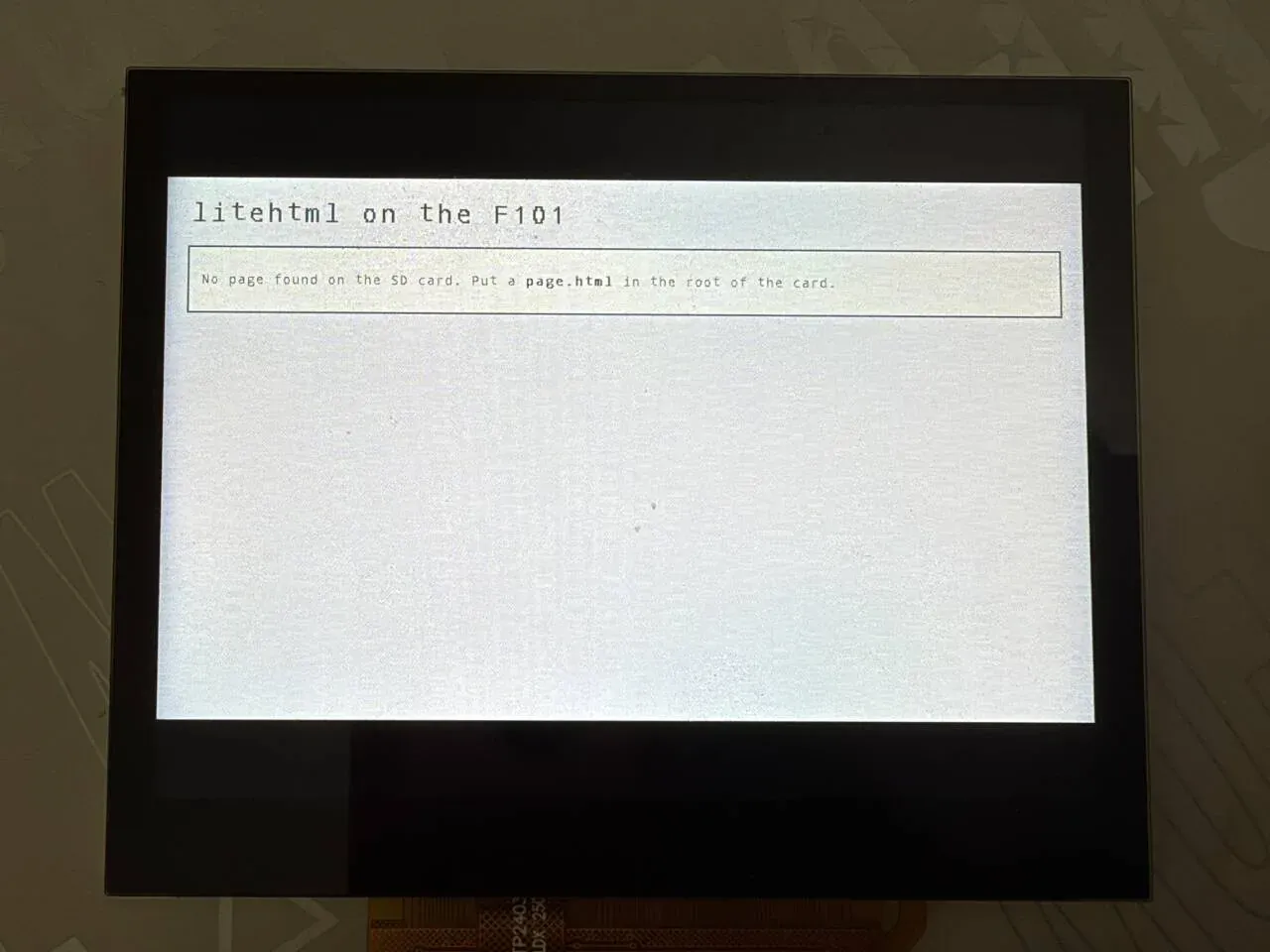
The photo shows the built-in page: the title litehtml on the F101, and below it a bordered box reading No page found on the SD card. Put a page.html in the root of the card.. The picture is in the middle of the panel, with black bars above and below.
A page on the card: loading the page, images, CJK characters
Section titled “A page on the card: loading the page, images, CJK characters”To show your own page, put page.html, font.lhf, and img/a.lhi in the card’s root directory and boot; the serial output is:
*** Booting Zephyr OS build b6f3dfe1a1f4 ***heap: 13620 KiB free at the startassets: extra glyphs from /SD:/font.lhf (4 KiB)assets: images from /SD:/imgchunked: /SD:/page.html, 35 KiB in 3 pieces of about 12 KiB, scanned in 14 ms, 1425 bytes of csschunk 0/3: 12643 bytes, 8431 px high, loaded in 410 mschunked: piece 0 y 0 drawn in 37 msThese lines mean, in order: font.lhf is read in, the image directory is registered, the page is split into 3 pieces (about 12 KiB each), and piece 0 has loaded; after that each frame takes about 37 ms. The screen shows the first screenful of the page.
Automatic scrolling and piece switching
Section titled “Automatic scrolling and piece switching”When the page is taller than the screen it scrolls down automatically. y is printed every 60 frames, and adjacent lines differ by 120 px, that is 2 px per frame, equal to CONFIG_SAMPLE_HTML_SCROLL_PX=2. When the scroll nears the end of a piece, the output is:
chunked: piece 0 y 7200 drawn in 39 mschunk 1/3: 12351 bytes, 8006 px high, loaded in 392 mschunked: piece 0 y 7320 drawn in 37 ms...chunked: piece 0 y 7920 drawn in 61 mschunked: piece 0 y 8040 drawn in 61 mschunked: piece 0 y 8160 drawn in 61 mschunked: piece 0 y 8280 drawn in 60 mschunked: piece 0 y 8400 drawn in 61 mschunked: piece 1 y 89 drawn in 37 ms- When piece 0 scrolls past
y=7231(less than two screens from the piece end at 8431) piece 1 is loaded in advance, taking 392 ms. The load is synchronous, so that frame stalls for about 0.4 seconds. - Past
y=7831, one screen before the piece end, both pieces start being drawn at once (lh_draw_over()) and each frame grows to about 61 ms. - Past 8431 it switches to piece 1,
piece 1 y 89, and the frame time returns to 37 ms.
Rendering flow
Section titled “Rendering flow”flowchart TD
A["main(): allocate two 1024×600 frames<br/>fs_mount, up to 10 retries"] --> B{"mount succeeded and<br/>pick_file found a page?"}
B -->|"no"| BI["built-in page<br/>printk: cannot mount… or<br/>no .html file on the SD card"]
B -->|"yes"| C["assets_init<br/>register the image callback, read font.lhf"]
C --> D{"CHUNK_KB > 0 ?"}
D -->|"yes"| E["chunked_run<br/>load piece by piece and scroll, returns only on error"]
D -->|"no"| F["read_file reads the whole page into memory"]
E -->|"error"| F
F --> G["lh_load<br/>parsing + layout"]
BI --> G
G --> H["loop: lh_draw draws a frame<br/>cache flush<br/>display_sunxi_show_rgb<br/>scroll position += SCROLL_PX"]
Main program
Section titled “Main program”main() is at lines 350–472 of samples/html_viewer/src/main.c. The key points:
- The two framebuffers
fbs[2]are 1024×600×2 bytes each, allocated from the normal heap withaligned_alloc(64, …)(lines 373–379). The buffer being shown on the screen is never written; the next frame is drawn into the other one, otherwise the scan-out would see a half-drawn frame. - The card needs a moment after power-up, so the mount is tried up to 10 times, 300 ms apart (lines 381–388).
- On success it calls
assets_init(path)and then decides whether to use piece-by-piece display based onCONFIG_SAMPLE_HTML_CHUNK_KB(lines 397–413):
if (mounted != 0) { printk("cannot mount the SD card: %d\n", mounted); } else if (!pick_file(path, sizeof(path))) { printk("no .html file on the SD card\n"); } else { assets_init(path);#if CONFIG_SAMPLE_HTML_CHUNK_KB > 0 /* returns only when the page cannot be shown piece by piece */ chunked_run(path, &font, disp, fbs); printk("chunked viewer failed, trying the page as a whole\n");#endif html = read_file(path); if (html != NULL) { source = path; } }- Whole-page mode:
read_file()reads the file,lh_load()parses and lays it out, and then frames are drawn in an endless loop (lines 436–471). If the page is no taller than the screen, orSCROLL_PXis 0, it is redrawn once a second; otherwise it scrollsCONFIG_SAMPLE_HTML_SCROLL_PXpixels per frame, stops for 2 seconds at the bottom and scrolls back up, and stops for 2 seconds again at the top.
  while (true) {    uint16_t *fb = fbs[cur];    struct display_sunxi_rgb img = {      .data = fb, .width = W, .height = H, .stride = W * 2,    };    int max_scroll = MAX(0, height - H);    int ret;
    t0 = k_uptime_get();    draw_page(page, fb, scroll);    sys_cache_data_flush_range(fb, W * H * sizeof(uint16_t));    if (scroll == 0 || scroll >= max_scroll) {      printk("page: drawn in %d ms\n", (int)(k_uptime_get() - t0));    }    /* returns when the new frame is on the screen: the other one is free again */    ret = display_sunxi_show_rgb(disp, &img);
Piece-by-piece display (the default path)
Section titled “Piece-by-piece display (the default path)”The default is CONFIG_SAMPLE_HTML_CHUNK_KB=12, so as long as there is a page on the card, chunked.c is used, even if the page is only 4 KB. What it does:
lh_index_scan()reads the file from start to end and finds the end of every child element of<body>as well as the positions of the<style>text in<head>.- Adjacent child elements are combined into a piece of about 12 KiB; only the piece on screen and the next piece are in memory, and each piece is an independent page:
<html><head><meta charset="utf-8"><style>+ all the CSS +</style></head>+ the original<body …>tag + this piece’s text +</body></html>. - When the scroll passes the end of a piece, the current piece is dropped and the next one is taken, while the one after that is loaded in advance. At the seam,
lh_draw_over()draws the next piece into the lower part of the same frame. - At the end of the last piece it waits 2 seconds and starts again from the first piece (it does not scroll back up).
The limits of the pieces:
- The markup must be well formed, with a closing tag for every non-empty element. A direct child element of
<body>is never split; if one child is very large, that piece is very large. - Sibling selectors that span pieces (
+,~,:nth-childand the like) do not take effect, because each piece is an independent page. - Style sheets are collected only from
<style>in<head>(css[]instruct lh_index, at most 16). External style sheets are not supported to begin with.
To render as a whole page only: set CONFIG_SAMPLE_HTML_CHUNK_KB to 0 at build time. Whole-page mode puts the entire document tree in the heap, and fails with a large page. The component also offers LITEHTML_PAGED_HEAP (paging on demand, with swap.bin on the TF card as backing store; see samples/html_viewer/paged.conf for the configuration).
Rendering layer
Section titled “Rendering layer”canvas_container in ext/src/lh_render.cpp implements litehtml’s document_container interface. The public interface is in include/litehtml_zephyr/lh.h:
| Function | Purpose |
|---|---|
lh_load(font, html, width, height) | parses and lays out for the viewport width, returning a page object. height is used only for vh units and media queries |
lh_content_height(page) | total height of the laid-out page (in pixels) |
lh_title(page) | the text of <title> |
lh_draw(page, fb, stride, w, h, scroll_y, bg) | clears with bg first, then draws one screen starting at row scroll_y into the RGB565 buffer |
lh_draw_over(…) | does not clear; draws over (used at the piece seams) |
lh_set_image_loader(fn, user) | registers the image callback, which returns RGB565 pixels |
lh_set_cjk_font(data, size) | registers the contents of font.lhf; the data must stay valid |
lh_free(page) | frees |
lh_index_scan(read, user, size, target, out) | piece scanning |
lh_load() and lh_draw() are just these few lines (lh_render.cpp lines 567–601):
struct lh_page *lh_load(const struct lh_font *font, const char *html, int width, int height){  auto *p = new lh_page(font, width, height);
  p->doc = litehtml::document::createFromString(html, &p->container);  if (!p->doc) {    delete p;    return nullptr;  }  p->doc->render(width);  p->content_h = p->doc->height();  return p;}
void lh_draw(struct lh_page *page, uint16_t *fb, int stride, int w, int h, int scroll_y, uint16_t bg){ for (int y = 0; y < h; y++) { std::fill(fb + (size_t)y * stride, fb + (size_t)y * stride + w, bg); } page->container.begin(fb, stride, w, h);
litehtml::position clip(0, 0, w, h);
page->doc->draw(0, 0, -scroll_y, &clip);}How text is drawn: create_font() takes the CSS font size as the glyph height and scales the glyph width by the 10:16 ratio (cell_w = size * 10 / 16, at least 1); bold (weight ≥ 600) adds 1 to the width and paints one extra column to the right; draw_glyph() scales the 10×16 bitmap to the target size with nearest neighbour, and italics are offset row by row. Underline, strikethrough, and overline are drawn as plain lines.
f->size = std::max(size, 6);f->weight = weight;f->italic = italic == litehtml::font_style_italic;f->decoration = decoration;f->cell_w = std::max(1, (f->size * font_->cell_w + font_->cell_h / 2) / font_->cell_h);if (weight >= 600) { f->cell_w++;}A CJK character in font.lhf is scaled to size × size, and the letter spacing is the font size.
Supported HTML / CSS scope
Section titled “Supported HTML / CSS scope”Look at it at two levels: what litehtml can lay out, and what this rendering layer can draw. Only what can be confirmed from the source is listed below.
Supported
Section titled “Supported”| Category | Details |
|---|---|
| HTML | gumbo parsing (an HTML5 error-tolerant parser); common tags such as headings, paragraphs, div, span, b, i, u, s, code, a, ul/ol/li, table, img, br |
| Box model | margin, padding, border (width and color, solid lines only), width/height, box-sizing |
| Layout | block, inline, inline-block, float, position (relative/absolute/fixed), display: table and <table>, display: flex/inline-flex |
| Text | font-size, font-weight, font-style, text-align, text-decoration, text-transform (ASCII letters only), white-space, vertical-align, line-height |
| Units | px, %, em, rem, pt and so on, vw/vh/vmin/vmax |
| Color | hexadecimal, rgb(), rgba(), color names; rgba alpha blends with the existing pixels |
| Background | background-color; background-image takes a .lhi and supports repeat/repeat-x/repeat-y, position, and size |
| List markers | bullets, hollow squares (circle), filled squares, and numeric numbering (1. style) |
| Other | overflow clipping (rectangular); <style> inline style sheets; selectors; basic conditions in @media such as width, height, screen (the viewport is fixed at 1024×600); CSS variables var() (litehtml handles var( in its style.cpp) |
Not supported
Section titled “Not supported”| Item | Actual situation |
|---|---|
| JavaScript | Not supported; <script> is not executed |
| Link clicks, forms, input | Not supported. on_anchor_click() and set_cursor() are empty functions, and there is no input device on the board |
| External style sheets | Not supported. import_css() is an empty function, neither <link rel="stylesheet"> nor @import is loaded, and styles must be written into <style> |
| Image formats | Only .lhi; PNG/JPEG/GIF/WebP/SVG and data: addresses are not supported |
| Fonts | Only the ASCII 10×16 bitmap (scaled) and the glyphs in font.lhf; font-family, @font-face, and TTF/WOFF are not supported, and there is no anti-aliasing |
| Gradients | Not supported; the rendering layer draws solid fills only |
| Rounded corners | Not supported; border-radius is ignored |
| Border styles | Dashed, dotted, double, groove and the rest are all drawn as solid lines (draw_borders() only tests for none/hidden) |
calc() | Not supported; litehtml’s css_length.cpp has TODO: Make support for calc, and a calc(…) is handled as the default value |
| CSS Grid | Not supported. The component’s documentation states clearly that litehtml has no grid |
| Shadows, opacity properties, transforms, animations, transitions | Not supported: the rendering layer has no matching drawing and litehtml does not parse these properties either |
| Scrolling interaction | Not supported: only automatic scrolling, no manual scrolling; an element with overflow: scroll cannot scroll |
If the page comes from a web page it must be rewritten with tools/scrape_page.py; see the next section.
Turning a web page into a page you can display
Section titled “Turning a web page into a page you can display”tools/scrape_page.py URL OUTDIR [--font FONT] fetches a web page: it strips scripts and event attributes, inlines the style sheets (@media is evaluated for the viewport width first, and display:grid becomes flex wrapping), converts images to .lhi, and renders the CJK characters that appear on the page into font.lhf. Copy all of OUTDIR to the TF card and display the index.html in it. It needs Pillow and network access. The layout is still only approximate. tools/host_preview/host_main.cpp is a PC build of the same rendering layer, for looking at the result without the board.
How to change the page content
Section titled “How to change the page content”No rebuild is needed:
- Change
page.htmlon the TF card and power-cycle. - To add an image to the page: convert it to
.lhi, put it inimg/, and use<img src="img/x.lhi">. - For CJK characters on the page: regenerate
font.lhfand put it in the same directory as the page. - For a larger page: keep the markup well formed (see the limits of the pieces).
The smallest page:
<!DOCTYPE html><html><head><meta charset="utf-8"><title>hello</title><style> body { margin: 24px; background: #f4f6fb; color: #222; } h1 { color: #1a4fa0; } .box { background: #fff; border: 2px solid #1a4fa0; padding: 12px; }</style></head><body><h1>Hello</h1><div class="box"><p>A <b>bold</b> word.</p></div></body></html>Features and where to change them
Section titled “Features and where to change them”| Feature | Location | How to change |
|---|---|---|
| Page path | pick_file() in main.c, CONFIG_SAMPLE_HTML_FILE | change at build time, see Configuration options |
| Scroll speed | CONFIG_SAMPLE_HTML_SCROLL_PX | pixels per frame; 0 turns scrolling off |
| Viewport size | there is one #define W 1024 and #define H 600 at the top of each of main.c and chunked.c | both files must be changed together; the width passed to lh_load(), the framebuffer size, and display_sunxi_show_rgb() all use it |
| Background color | #define BG 0xffff in both files | RGB565; where the page does not cover, this is the color |
| Built-in page | builtin_page[] in main.c (lines 43–49) | change the string; it is shown when no page is found |
| Font | the font structure in main.c (cfb_font_1016, 10×16) | replace it with another bitmap of the same format (struct lh_font, 20 bytes per glyph) |
| Image cache | CACHE_ENTRIES and CACHE_LIMIT in assets.c | change the macros |
| Piece size | CONFIG_SAMPLE_HTML_CHUNK_KB | 0 turns pieces off |
| Manual scrolling, paging | not implemented in the sample | you must wire up input yourself in the main() loop and change the scroll variable |
Adding manual scrolling
Section titled “Adding manual scrolling”The scroll in the sample is driven only by SCROLL_PX. To wire up an input device, the idea is to change the loop at the end of main.c: remove the automatic increment and decrement and instead change scroll from button or touch events, clamped to the range 0 to max_scroll. This applies only to whole-page mode (CHUNK_KB=0); in piece mode the scrolling is in the y += CONFIG_SAMPLE_HTML_SCROLL_PX line in chunked.c. It is not implemented in the sample.
Using it in your own program
Section titled “Using it in your own program”The rendering layer does not depend on the sample’s file reading; all it needs is an HTML string and an RGB565 buffer:
#include <litehtml_zephyr/lh.h>
extern const uint8_t cfb_font_1016[95][20];
static const struct lh_font font = {  .glyphs = cfb_font_1016, .first = 32, .last = 126, .cell_w = 10, .cell_h = 16,};
struct lh_page *page = lh_load(&font, "<h1>hi</h1>", 1024, 600);
lh_draw(page, fb, 1024, 1024, 600, 0, 0xffff);/* fb is a buffer of 1024*600 uint16_t RGB565 values; call sys_cache_data_flush_range() when drawing is done */lh_free(page);
Configuration options
Section titled “Configuration options”The sample (samples/html_viewer/Kconfig):
| Option | Default | Description |
|---|---|---|
CONFIG_SAMPLE_HTML_FILE | "/SD:/page.html" | the page to show; if it does not exist, the first .html/.htm in the card’s root directory is used |
CONFIG_SAMPLE_HTML_SCROLL_PX | 2 | pixels scrolled per frame; 0 means no scrolling |
CONFIG_SAMPLE_HTML_CHUNK_KB | 12 | piece size (KiB); 0 means whole-page layout |
CONFIG_SAMPLE_HTML_BENCH | off | loads every page_*.html on the card in turn (smallest to largest), prints the time and memory, and then goes into normal display |
CONFIG_SAMPLE_HTML_PAGED_MB | 200 | virtual size of the paged heap (MiB), effective only with LITEHTML_PAGED_HEAP |
How to override:
west build -b yuzukineko -d build/html zephyr-components/litehtml/samples/html_viewer -- \ -DCONFIG_SAMPLE_HTML_FILE='"/SD:/web/index.html"' -DCONFIG_SAMPLE_HTML_SCROLL_PX=4The component (zephyr-components/litehtml/Kconfig):
| Option | Description |
|---|---|
CONFIG_LITEHTML | builds litehtml and links it into the image; depends on CPP and RISCV |
CONFIG_LITEHTML_PAGED_HEAP | the malloc family is served from an on-demand paged region, and swapped-out pages are written to a file on the TF card; depends on DEMAND_PAGING, BACKING_STORE_SWAP, FILE_SYSTEM. For usage see samples/html_viewer/paged.conf: -DEXTRA_CONF_FILE=paged.conf |
The rendering-related options in the sample’s prj.conf:
| Option | Purpose |
|---|---|
CONFIG_CPP | enables C++ support |
CONFIG_STD_CPP17 | C++17 |
CONFIG_LITEHTML | enables the component |
CONFIG_STATIC_INIT_GNU | runs the constructors of C++ global objects |
CONFIG_SDHC | SD host controller driver |
CONFIG_DISK_ACCESS | disk access layer |
CONFIG_DISK_DRIVER_SDMMC | treats the SD/MMC card as a disk |
CONFIG_FILE_SYSTEM | filesystem framework |
CONFIG_FAT_FILESYSTEM_ELM | FatFs |
CONFIG_FS_FATFS_EXFAT | supports exFAT cards |
CONFIG_FS_FATFS_LFN | supports long file names |
CONFIG_FS_FATFS_LFN_MODE_STACK | long file name buffers on the stack |
CONFIG_DISPLAY | display driver |
CONFIG_CHARACTER_FRAMEBUFFER | character framebuffer, only to get cfb_font_1016 |
CONFIG_CHARACTER_FRAMEBUFFER_USE_DEFAULT_FONTS | compiles in the default fonts |
CONFIG_FPU | hardware floating point |
CONFIG_FPU_SHARING | floating point shared between threads |
CONFIG_MAIN_STACK_SIZE=65536 | main thread stack 64 KiB; litehtml’s recursive layout needs a fairly deep stack |
CONFIG_COMMON_LIBC_MALLOC_ARENA_SIZE=-1 | the malloc arena uses all the remaining memory |
CONFIG_HEAP_MEM_POOL_SIZE=262144 | kernel heap 256 KiB |
Code structure
Section titled “Code structure”| File | Contents |
|---|---|
samples/html_viewer/src/main.c | picks the page, reads the file, whole-page display loop, built-in page, benchmark mode |
samples/html_viewer/src/chunked.c | piece-by-piece display |
samples/html_viewer/src/assets.c | image cache and font.lhf reading |
ext/src/lh_render.cpp | rendering layer: font, background, border, image, clipping |
ext/src/lh_index.c | piece scanner |
ext/src/lh_stubs.cpp, ext/shim/ | standard library adaptation (no exceptions, no streams) |
src/litehtml_libc.c | the missing C library functions |
src/litehtml_paged_heap.c | paged heap |
include/litehtml_zephyr/lh.h | public interface |
tools/scrape_page.py | fetches and converts a web page |
tools/host_preview/ | PC preview |
litehtml/litehtml/ | litehtml submodule |
- Text is the fixed 10×16 bitmap scaled, with no font selection and no anti-aliasing; non-ASCII characters need
font.lhf, otherwise they show as?. - Gradients, rounded corners, and shadows are not supported and borders are drawn as solid lines only; CSS Grid and
calc()are not supported. - Only
.lhiimages are recognized, and they have no alpha channel. - JavaScript, link navigation, forms, animations, and external style sheets are not supported.
- There is no input device, so only automatic scrolling is possible; for manual scrolling see Adding manual scrolling. When the page is no taller than the screen it does not scroll (
max_scrollis 0, and the loop redraws once a second). - In piece mode the scroll speed is about 33 px/s: each frame draws for 37 ms, plus the time waiting for the display and for printing. To go faster, raise
CONFIG_SAMPLE_HTML_SCROLL_PX. - The on-screen picture is a fixed 1024×600, and the screen is 1024×768, so there are black bars at the top and bottom.
- When the page is too large to fit in memory, pieces are required; in piece mode selectors that span pieces and rules that need the whole page do not take effect, and moving to a new piece stalls.
- A web page must first be converted with
tools/scrape_page.py, and the converted layout is approximate.
Troubleshooting
Section titled “Troubleshooting”| Symptom | Cause and handling |
|---|---|
The build reports litehtml sources missing, run: git submodule update --init | the submodule was not fetched: cd zephyr-components && git submodule update --init litehtml/litehtml |
display not ready | the display device did not come up; confirm that you built for the yuzukineko board |
cannot mount the SD card: <error code> | all 10 mount attempts failed: the card is not seated properly, or it is not FAT/exFAT |
no .html file on the SD card | the card is mounted but there is no page.html and no other .html/.htm in the root directory, so the built-in page is shown. Copy the page to the root directory |
| A different page is shown | When there is no page.html, the first .html in the root directory is taken, in directory order, not alphabetical order. Name the page you want page.html |
| An image is not shown | the file is not at <page directory>/<src>, or it is not a .lhi |
CJK characters show as ? | there is no font.lhf, or this character on the page was not generated into it |
chunked viewer failed, trying the page as a whole | piece scanning or loading failed (malformed markup, not enough memory, etc.), so it falls back to whole-page mode |
lh_load failed | not enough memory; split the page up or use pieces |
no memory for the frames | allocating the two framebuffers failed; the heap is too small |
show_rgb failed: <error code> | the display driver did not accept this frame |