iOS screen mirroring - AirPlay
Mirror the iPhone’s screen onto the board: the board joins WiFi and appears in the iPhone’s “Control Center - Screen Mirroring” list as an AirPlay receiver; once the iPhone picks it, the phone encodes its screen into an H.264 stream and sends it over, and the board decodes it with the on-chip video engine and sends it straight to the display’s video plane. The sample is zephyr-components/ios-screen-mirror/samples/ios_player.
The protocol part of the ios-screen-mirror component comes from RPiPlay (an AirPlay mirroring receiver with the FairPlay handshake), kept as a git submodule under rpiplay/. The OpenSSL, Bonjour (mDNSResponder) and libplist that the original library depends on are replaced here by mbedTLS, Zephyr’s own DNS-SD responder, and a very small binary plist reader/writer (src/plist.c).
flowchart TB
    WIFI["AIC8800 WiFi<br/>wlan0 + DHCPv4"] --- PHONE["iPhone<br/>Screen Mirroring"]
    PHONE -.->|"mDNS _airplay / _raop"| MDNS["Zephyr mDNS responder<br/>ios_dnssd.c"]
    PHONE -->|"TCP 7000<br/>pairing, FairPlay, SETUP"| RAOP["RPiPlay raop<br/>rpiplay/lib"]
    PHONE -->|"TCP mirror stream<br/>AES-CTR encrypted H.264"| RTPM["raop_rtp_mirror<br/>decrypt → Annex B"]
    RAOP --> RTPM
    RTPM -->|"video callback"| APP["main.c<br/>on_video() → vdec"]
    APP -->|"vdec_stream_feed"| VDEC["vdec video engine<br/>NV12 → display video plane"]
Only the picture is mirrored. The audio in the AirPlay stream is received, but the sample’s audio callback is an empty function and drops it straight away, so the board makes no sound; see Scope.
Before you start, complete Setting up the development environment and Getting the Zephyr source.
Preparation
Section titled “Preparation”Getting the RPiPlay submodule
Section titled “Getting the RPiPlay submodule”rpiplay/ is a submodule; if it has not been pulled the directory is empty and the build will not find rpiplay/lib. Pull it inside zephyr-components:
cd ~/f101-zephyr/zephyr-componentsgit submodule update --init ios-screen-mirror/rpiplayWhat you need
Section titled “What you need”| Item | Notes |
|---|---|
| Board | yuzukineko, with the AIC8800 WiFi module and a 1024×768 MIPI-DSI panel |
| TF card | FAT or exFAT. The sample uses it to read the WiFi configuration /SD:/wifi.cfg; when the card has no such file, only the SSID/password compiled in can be used |
| WiFi | A 2.4 GHz or 5 GHz WPA2-PSK (or open) network; the board and the iPhone must be on the same layer-2 network, because discovery relies on multicast mDNS |
| iPhone | An iOS device with Screen Mirroring. No app needs to be installed |
WiFi configuration
Section titled “WiFi configuration”The board’s WiFi is the AIC8800; the driver and the interface are covered in AIC8800 WIFI, and this section only describes how the sample uses it. The order in which the sample takes the SSID and password (wifi_load() at lines 105–134 of main.c):
- Read
/SD:/wifi.cfgfrom the TF card: the first line is the SSID, the second the password, plain text, each line ending in a newline. The SSID is at most 32 bytes and the password at most 64 bytes. - If the file cannot be read, or its first line is empty, use the build options
CONFIG_SAMPLE_IOS_WIFI_SSIDandCONFIG_SAMPLE_IOS_WIFI_PSK. - If neither place has an SSID: the screen shows
No WiFi: put wifi.cfg on the cardand the sample exits.
An empty password connects as an open network, otherwise as WPA2-PSK (WIFI_SECURITY_TYPE_PSK). WPA3 is not supported; for the reason see the AIC8800 page.
wifi.cfg example (two lines, with no extra blank lines or quotes):
MyHomeWiFimy-password-123In the workspace:
. ~/f101-zephyr/env.shcd ~/f101-zephyrwest build -b yuzukineko -d build/ios-mirror zephyr-components/ios-screen-mirror/samples/ios_playerThe output is build/ios-mirror/zephyr/zephyr.bin, about 3.6 MB, linked at 0x40000000, with 21.67% of RAM used. The sample’s CMakeLists.txt adds the component (two directories up) and the sibling aic8800 to ZEPHYR_EXTRA_MODULES by itself, so nothing has to be specified by hand.
The sample’s prj.conf selects CONFIG_MINIMAL_LIBC=y: the AIC8800 and RPiPlay adaptation headers are written for the minimal C library, and an application using this component on its own must select it as well.
Download it with either method from Build and run; the console is UART1 (PB00/PB01, 115200 8N1). For debugging use method one:
xfel ddr f101-s3xfel write 0x40000000 build/ios-mirror/zephyr/zephyr.binxfel exec 0x40000000Output after running
Section titled “Output after running”1. Boot and joining the WiFi
Section titled “1. Boot and joining the WiFi”After downloading and executing, the status card Joining the WiFi appears in the middle of the screen. The serial port outputs, in order: display and touchscreen initialization; ios: Joining the WiFi; the AIC8800 identified as D80 (chip_id=c3) and its firmware download; the wifi.cfg read from the TF card and the join, with WPA enter FHOST_WPA_STATE_CONNECTED; the address from DHCP, printed as ios: address ….
2. AirPlay service starts
Section titled “2. AirPlay service starts”Once the address is in, the serial port outputs airplay: Initialized server socket(s), airplay: "F101 Mirror" on port 7000, ios: Screen Mirroring: choose "F101 Mirror", and the screen card becomes Screen Mirroring: choose "F101 Mirror". ios: mDNS group joined: -120 is EALREADY, meaning the responder had already joined the multicast group when the interface came up; it is not a failure, see Startup sequence.
*** Booting Zephyr OS build b6f3dfe1a1f4 ***[00:00:00.493,000] <inf> display_sunxi: 1024x768 @ 60 Hz, fb 0x40384180, video plane 0[00:00:00.564,000] <inf> gt967: GT967 firmware 0x1040, 1024x768ios: Joining the WiFi[00:00:01.597,000] <inf> aic8800: aicwf chipid: USE AIC8800D80[00:00:03.022,000] <inf> aic8800: sdio card up: 2 functions[00:00:03.024,000] <inf> aic8800: chip_id=c3, chip_sub_id=2[00:00:03.024,000] <inf> aic8800: ### Upload firmware, @ = 120000[00:00:04.219,000] <inf> aic8800: aic_wifi_init ok[00:00:04.219,000] <inf> aic8800: Connect Wi-Fi: <SSID>, <PSK>[00:00:08.439,000] <inf> aic8800: WPA enter FHOST_WPA_STATE_CONNECTEDios: address 192.168.x.xios: mDNS group joined: -120airplay: Initialized server socket(s)airplay: "F101 Mirror" on port 7000ios: Screen Mirroring: choose "F101 Mirror"Log excerpt; the SSID, password, MAC and IP have been replaced with placeholders (the driver prints the SSID and password in clear text on the Connect Wi-Fi and SET_NETWORK lines).
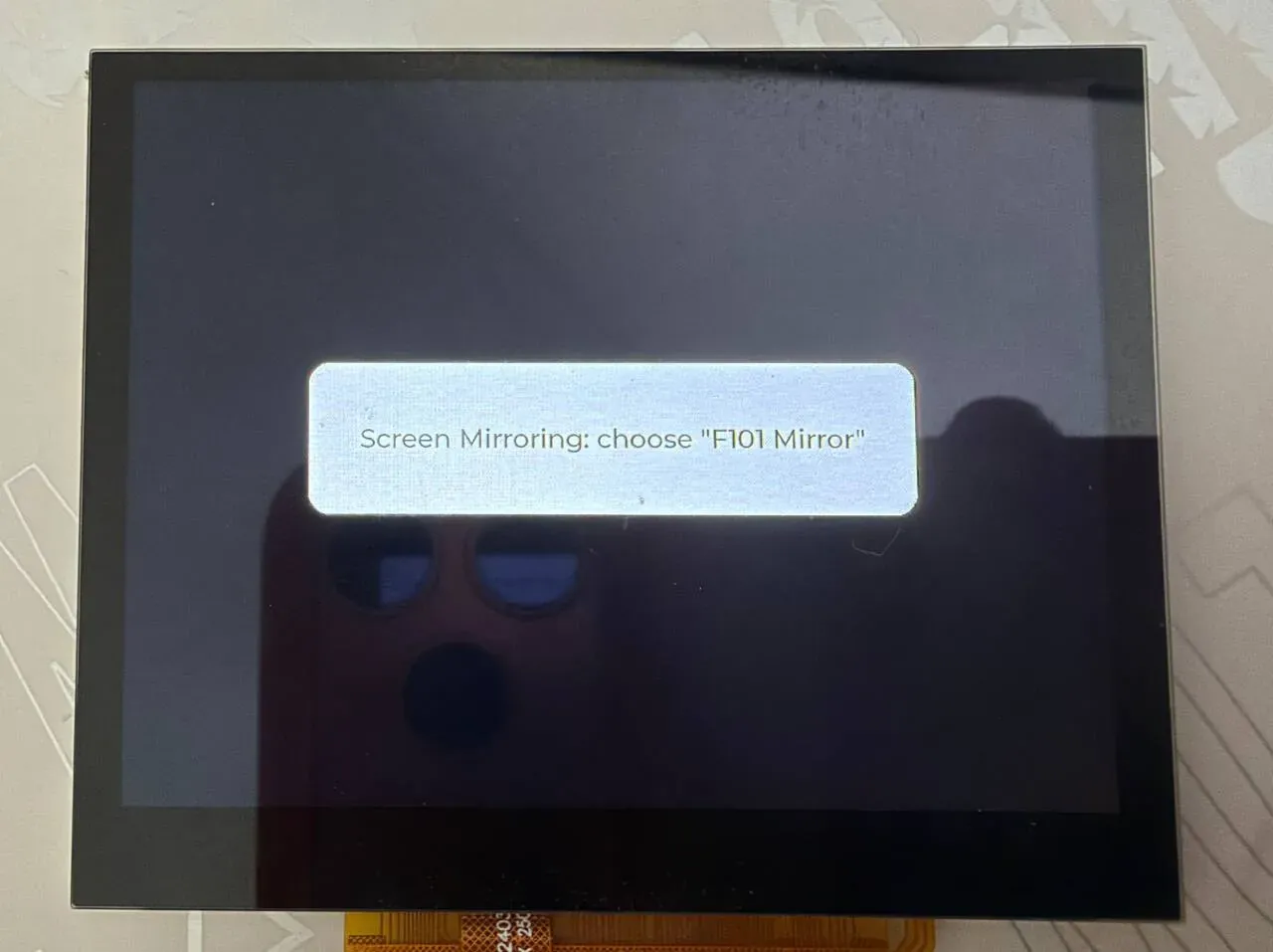
In the middle of the board screen is the status card, reading Screen Mirroring: choose "F101 Mirror" and waiting for the iPhone to connect.
3. Discover and mirror from the iPhone
Section titled “3. Discover and mirror from the iPhone”- Connect the iPhone to the same WiFi as the board (the same subnet; the router must not have AP isolation or client isolation on, or neither multicast nor unicast will get through).
- Pull down from the top right corner (swipe up from the bottom on models with a Home button) to open Control Center, and tap Screen Mirroring.
- F101 Mirror appears in the list (the name is set by
CONFIG_IOS_MIRROR_NAME); tap it. - The phone screen starts mirroring onto the board. Open Screen Mirroring again and tap Stop Mirroring to end it.
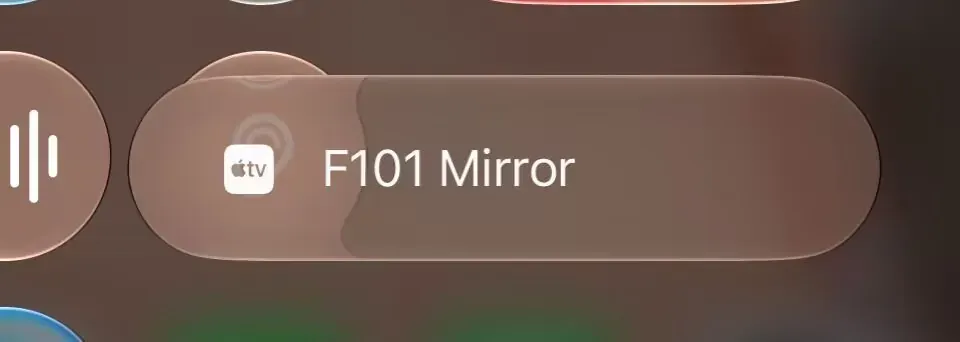
In the Control Center’s Screen Mirroring list, F101 Mirror appears with the Apple TV icon; tap it to start mirroring.
4. What appears on the board
Section titled “4. What appears on the board”After the phone has selected F101 Mirror, the serial port outputs ios: phone connected, ios: stream profile … and ios: first picture <W>x<H> in order, and after that one statistics line every 5 seconds; for the meaning of each line see Console output.
In portrait orientation the mirror stream is about 448×972 and the board screen is 1024×768, so the picture is scaled to its aspect ratio and centred, with black bars on both sides. Once the first frame is drawn the status card hides itself; when the phone stops mirroring or disconnects, the card reappears reading Waiting for the phone.
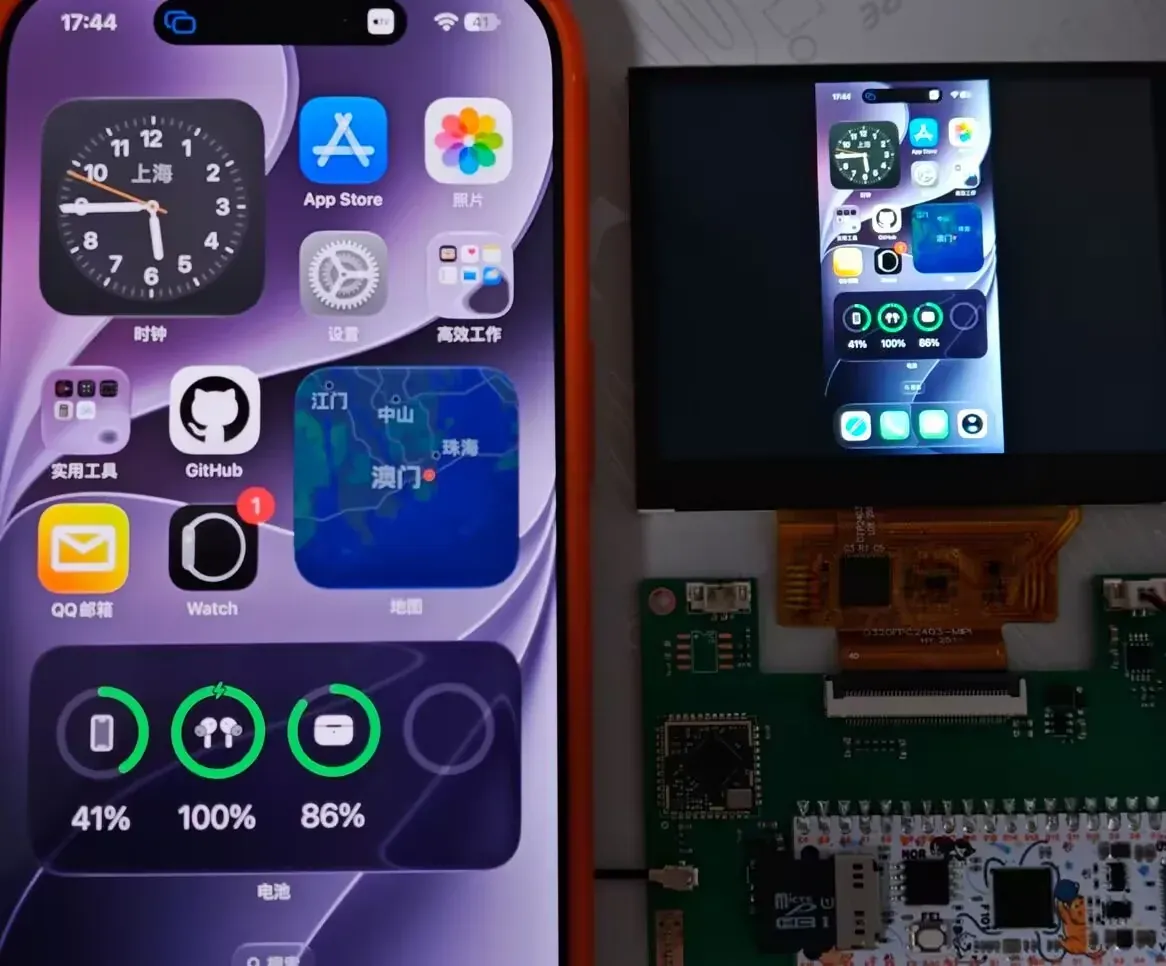
On the left is the iPhone, on the right the board screen: the phone is in portrait, and the picture is scaled to fit and centred with black bars on both sides.
Protocol flow
Section titled “Protocol flow”Discovery: mDNS / DNS-SD
Section titled “Discovery: mDNS / DNS-SD”The iPhone does not find the receiver by typing in an IP; it relies on Bonjour (multicast DNS-SD). All the board has to do is answer for these two service types:
| Service | Instance name | Port | Purpose |
|---|---|---|---|
_raop._tcp | <12 hex digits of the MAC>@<name> | CONFIG_IOS_MIRROR_PORT | This is what iOS looks for in the Screen Mirroring list |
_airplay._tcp | <name> | same as above | The AirPlay service itself |
src/ios_dnssd.c defines these two records statically with Zephyr’s STRUCT_SECTION_ITERABLE(dns_sd_rec, …), and the name and TXT data are filled in at run time by airplay_start(). The TXT of the two records carries the device capabilities: et (encryption type), cn (audio codecs), ft/features (feature bits), pk (public key), deviceid (MAC) and so on, all taken from RPiPlay and written in rpiplay/lib/dnssdint.h.
Connecting: pairing, FairPlay, SETUP
Section titled “Connecting: pairing, FairPlay, SETUP”After the iPhone selects the board it sends HTTP/RTSP requests to the board’s TCP port, and raop.c dispatches them to handler functions by method and path:
sequenceDiagram
    participant P as iPhone
    participant B as Board (RPiPlay raop)
    participant A as main.c

    P->>B: mDNS query _raop._tcp / _airplay._tcp
    B-->>P: instance name + port + TXT (capabilities, public key)
    P->>B: GET /info
    B-->>P: display capabilities (width/height from CONFIG_IOS_MIRROR_WIDTH/HEIGHT)
    P->>B: POST /pair-setup (32-byte ed25519 public key)
    B-->>P: the board's ed25519 public key
    P->>B: POST /pair-verify (x25519 agreement + signature)
    B-->>P: x25519 public key + signature
    P->>B: POST /fp-setup (16 bytes)
    B-->>P: 142 bytes
    P->>B: POST /fp-setup (164 bytes)
    B-->>P: 32 bytes
    P->>B: SETUP (plist: ekey, eiv, timingPort)
    Note over B: FairPlay recovers the AES key,<br/>starts NTP time sync, creates the RTP and mirror channels
    B-->>P: timingPort, eventPort
    P->>B: SETUP (streams: type 110 mirror, type 96 audio)
    B-->>P: mirror dataPort, audio dataPort/controlPort
    B->>A: connection(true)
    P->>B: RECORD
    P-)B: mirror TCP connection: SPS/PPS packet
    B->>A: video(SPS/PPS, config=true)
    loop every picture packet
        P-)B: AES-CTR encrypted H.264 packet + NTP timestamp
        Note over B: decrypt, change the length prefix to 00 00 00 01
        B->>A: video(data, pts, config=false)
        A->>A: vdec_stream_feed + vdec_stream_get_frame + display_sunxi_show_yuv
    end
    P->>B: TEARDOWN / close the connection
    B->>A: flush(), connection(false)
Key points:
/pair-setupand/pair-verifyuse ed25519 and x25519 (src/ed25519_ops.c,src/ios_crypto.c, based on mbedTLS and an ed25519 implementation)./fp-setupis the FairPlay handshake (rpiplay/lib/playfair/, the playfair implementation inside RPiPlay). Its job is to let the board recover the AES key fromekey, after which the picture data can be decrypted.- The mirrored picture data travels on its own TCP connection (the
dataPortwithtype=110in SETUP), and each packet is encrypted with AES-CTR; the key is derived with SHA-512 from the FairPlay result, the x25519 shared secret and thestreamConnectionID(mirror_buffer.c). - Timestamps:
raop_ntp.csynchronizes time with the phone on thetimingPort, andraop_rtp_mirror.cconverts the NTP timestamp in the packet into the board’s local time and hands it to the callback aspts.
Data flow: from the phone’s pixels to the screen
Section titled “Data flow: from the phone’s pixels to the screen”flowchart TB
subgraph PH["iPhone"]
ENC["screen → H.264 encode"]
end
subgraph SW["Board: AirPlay library thread (stack 10 KB, priority 8)"]
RX["mirror TCP receive<br/>raop_rtp_mirror.c"]
DEC["AES-CTR decrypt<br/>mirror_buffer.c"]
CONV["length prefix → start code<br/>SPS/PPS in its own packet"]
end
subgraph AP["Board: main.c on_video()"]
SPS["config packet: parse the SPS<br/>compute the size, reopen the decode stream if needed"]
FEED["vdec_stream_feed"]
DRAIN["vdec_stream_get_frame"]
SHOW["display_sunxi_show_yuv<br/>nonblock, release one frame late"]
end
ENC --> RX --> DEC --> CONV --> FEED
CONV --> SPS --> FEED
FEED --> VE["video engine H.264 decode"]
VE --> DRAIN --> SHOW --> LCD["video plane → TCON → DSI"]
The interface from the AirPlay library to the application is just the callbacks in include/ios_zephyr/airplay.h, see Interface.
Features and where to change them
Section titled “Features and where to change them”| Feature | Location | How to change it |
|---|---|---|
| Read the WiFi configuration | wifi_load() at lines 105–134 of main.c | Change the wifi.cfg path or format |
| Join WiFi, wait for an address | wifi_join() at lines 136–168 of main.c | Change the timeout (30 seconds) or the security type |
| Status card | ui_build(), status() at lines 40–75 of main.c | Change the text, size, colour |
| Decode stream parameters | stream_open() at lines 195–207 of main.c | Change buffer_size, holding_frames |
| One packet of picture data arrives | on_video() at lines 359–435 of main.c | Decoding, display, statistics |
| The phone connects or leaves | on_connection() at lines 437–447 of main.c | Close the decode stream and show the waiting text on disconnect |
| The phone stops mirroring | on_flush() at lines 449–455 of main.c | Close the decode stream |
| Start AirPlay | airplay_start(), lines 494–500 of main.c | Change the name and the port |
| Advertised screen size | the 1920/1080 that CMakeLists.txt substitutes into raop_handlers.h | Change CONFIG_IOS_MIRROR_WIDTH/HEIGHT |
| Audio | audio_process() at lines 20–23 of src/airplay.c | Currently an empty function, see Scope |
Startup sequence
Section titled “Startup sequence”main() (lines 457–511 of main.c) in order:
ui_build()builds the status card; check that the video engine, the display and the WiFi interface (net_if_get_first_wifi()) are ready.- Call
fs_mount()up to 5 times to mount the TF card (one second apart); a failure is only printed and does not exit, because the SSID from the build options can still be used. wifi_join(): read the configuration,NET_REQUEST_WIFI_CONNECT, and wait for the connection result (30 seconds) and the IPv4 address (30 seconds).- Join the mDNS multicast group
224.0.0.251by hand withnet_ipv4_igmp_join(). The mDNS responder joins the group when the interface goes up, but in this sample the interface comes up before the responder starts, so this is done once more here; when the group has already been joined it returns-EALREADY(-120), which is where themDNS group joined: -120in the log comes from. - Fill the MAC of the WiFi interface into
cfg.hw_addrand callairplay_start(&cfg). - Change the card text to
Screen Mirroring: choose "<name>"and then loop callinglv_timer_handler()to refresh the status card.
memcpy(cfg.hw_addr, net_if_get_link_addr(iface)->addr, sizeof(cfg.hw_addr));ret = airplay_start(&cfg);if (ret != 0) { printk("ios: cannot start AirPlay: %d\n", ret); status("Cannot start AirPlay"); return 0;}Receiving a picture: on_video()
Section titled “Receiving a picture: on_video()”Each time the AirPlay thread decodes one H.264 packet it calls on_video() (lines 359–435 of main.c), which under one mutex:
config == true: this packet is SPS/PPS.read_sps()parses the SPS for the width and height and estimates the memory the decoder needs aswidth × height × 3/2 × (2 + HOLD_FRAMES); if that exceedsCONFIG_VDEC_SUNXI_MAX_MEMORY_KB - 512KB it closes the decode stream and the screen showsUnsupported resolution WxH; if not, it closes the old stream (the size may have changed) and callsstream_open()again.- Otherwise feed the data with
vdec_stream_feed(); if it will not take it (-EAGAIN), calldrain()first to pull frames and retry. drain()(lines 222–259) takes out each frame and shows it withdisplay_sunxi_show_yuv()(nonblock = true,bt709 = true); the frame before last is released one frame later, so that a frame still being scanned out is not overwritten. When the first frame is shown the status card is hidden.- Print one statistics line every 5 seconds.
Note: the picture is displayed as soon as it is decoded; the sample does not use pts to wait for a time (it hands pts to the decoder unchanged), so there is no audio/video synchronization and no dropped-frame logic, and the latency depends on the decode speed.
Configuration options
Section titled “Configuration options”Component (ios-screen-mirror/Kconfig)
Section titled “Component (ios-screen-mirror/Kconfig)”| Option | Default | Notes |
|---|---|---|
CONFIG_IOS_MIRROR | n | Turn on the iOS screen mirroring component. Depends on networking, TCP and UDP, and automatically selects the mDNS responder, DNS-SD and mbedTLS (SHA-512, AES CTR/CBC) |
CONFIG_IOS_MIRROR_NAME | "F101 Mirror" | The name shown in the Screen Mirroring list |
CONFIG_IOS_MIRROR_PORT | 7000 | TCP port of the AirPlay server, 0 for any free port |
CONFIG_IOS_MIRROR_WIDTH | 1920 | Display width advertised to the phone (pixels); the phone decides the stream size from it, substituted into RPiPlay’s raop_handlers.h at build time |
CONFIG_IOS_MIRROR_HEIGHT | 1080 | Display height advertised to the phone |
CONFIG_IOS_MIRROR_THREAD_STACK | 10240 | Stack in bytes for each AirPlay library thread; the busiest HTTP/RTSP thread uses about 6 KB |
CONFIG_IOS_MIRROR_THREAD_PRIORITY | 8 | Priority of the AirPlay library threads |
Sample (samples/ios_player/Kconfig)
Section titled “Sample (samples/ios_player/Kconfig)”| Option | Default | Notes |
|---|---|---|
CONFIG_SAMPLE_IOS_WIFI_SSID | "" | SSID used when there is no /SD:/wifi.cfg |
CONFIG_SAMPLE_IOS_WIFI_PSK | "" | WPA2 password used when there is no /SD:/wifi.cfg |
CONFIG_SAMPLE_IOS_HOLD_FRAMES | 4 | Frames the decoder keeps in addition to the two working frames. Each frame is about 650 KB with a portrait stream; too few and the decoder has no frame available and stalls, and a value of 2 deadlocks |
Example, putting the SSID and name into the build:
west build -b yuzukineko -d build/ios-mirror zephyr-components/ios-screen-mirror/samples/ios_player -- \ -DCONFIG_SAMPLE_IOS_WIFI_SSID='"MyHomeWiFi"' \ -DCONFIG_SAMPLE_IOS_WIFI_PSK='"my-password-123"' -DCONFIG_IOS_MIRROR_NAME='"Board A"'Options in prj.conf related to screen mirroring
Section titled “Options in prj.conf related to screen mirroring”| Option | Effect |
|---|---|
CONFIG_AIC8800 | WiFi driver, see AIC8800 WIFI |
CONFIG_WIFI, CONFIG_NET_L2_WIFI_MGMT | Zephyr WiFi management interface, used by the sample to start the connection |
CONFIG_NET_DHCPV4 | Get an address |
CONFIG_NET_IPV4_IGMP | Join the mDNS multicast group 224.0.0.251 |
CONFIG_NET_IPV6=n | IPv4 only |
CONFIG_NET_HOSTNAME="f101-mirror" | Hostname, used by the mDNS responder for the .local name |
CONFIG_MDNS_RESOLVER_BUF_SIZE=1024 | mDNS packet buffer |
CONFIG_NET_PKT_RX_COUNT=64, CONFIG_NET_BUF_RX_COUNT=128 and so on | The network buffers the video stream needs; the default pools are too small |
CONFIG_NET_TCP_MAX_RECV_WINDOW_SIZE=32768 | TCP receive window |
CONFIG_NET_CONTEXT_REUSEADDR, CONFIG_NET_CONTEXT_REUSEPORT | Socket reuse, used when the AirPlay library listens again |
CONFIG_DYNAMIC_THREAD* | The AirPlay library creates threads at run time, with the stacks taken from the heap |
CONFIG_VDEC | Video engine driver |
CONFIG_DISPLAY_SUNXI_ARGB8888, CONFIG_LVGL, CONFIG_LV_COLOR_DEPTH_32 | The status card is drawn on the ARGB plane, above the video plane |
CONFIG_FAT_FILESYSTEM_ELM, CONFIG_FS_FATFS_EXFAT, CONFIG_FS_FATFS_LFN | Read wifi.cfg from the TF card |
CONFIG_HEAP_MEM_POOL_SIZE=262144 | Heap |
CONFIG_FPU, CONFIG_FPU_SHARING | Hardware floating point |
boards/yuzukineko.conf and boards/yuzukineko.overlay enable the GT967 touchscreen and register it as LVGL’s pointer input; main.c does not handle touch, and the status card is only used for display.
Code layout
Section titled “Code layout”| File | Content |
|---|---|
samples/ios_player/src/main.c | Sample: WiFi, status card, decoding and display |
include/ios_zephyr/airplay.h, src/airplay.c | The interface to the application: airplay_start(), airplay_stop(), turning RPiPlay’s callbacks into application callbacks |
src/ios_dnssd.c | Implements RPiPlay’s dnssd_* interface with Zephyr’s DNS-SD responder |
src/ios_crypto.c, src/ed25519_ops.c | Implements the AES-CTR/CBC, x25519, ed25519 and SHA-512 that RPiPlay needs, with mbedTLS |
src/plist.c, include/plist/plist.h | A small binary plist reader/writer, replacing libplist |
src/ios_posix.c, shim/ | POSIX adaptation: threads, gettimeofday, clock_gettime, sscanf, socket wrappers, missing headers |
rpiplay/lib/ | RPiPlay: raop (RTSP/HTTP server), raop_rtp_mirror (mirror data stream), raop_ntp, pairing, playfair (FairPlay) |
Interface
Section titled “Interface”include/ios_zephyr/airplay.h:
struct airplay_config {  /** Name in the Screen Mirroring list */  const char *name;  /** Address that identifies the receiver (the MAC of the network interface) */  uint8_t hw_addr[6];  /** TCP port, 0 for any free one */  uint16_t port;  /**   * One piece of the H.264 stream, Annex B; config is set for the SPS/PPS (a new one means   * the picture size may have changed). Called from the connection thread: do not block.   */  void (*video)(const uint8_t *data, size_t size, uint64_t pts_us, bool config, void *arg);  /** An iPhone connected (true) or went away (false) */  void (*connection)(bool up, void *arg);  /** The phone stopped mirroring: the picture should go */  void (*flush)(void *arg);  void *arg;};
/** Starts the server and registers the services; 0 or a negative errno */int airplay_start(const struct airplay_config *cfg);
void airplay_stop(void);| Item | Notes |
|---|---|
video | Called on the connection thread; do not block for long. When config is true the packet is SPS/PPS; pts_us is the timestamp in microseconds converted to the board’s local time |
connection | The phone connected (true) or left (false) |
flush | The phone stopped mirroring; the application should take the picture down |
airplay_start() | Returns 0 or a negative errno: -EALREADY already started; -ENOMEM allocation failed; -EIO listening failed |
There is no audio callback: src/airplay.c sets RPiPlay’s audio_process to an empty function.
Console output
Section titled “Console output”Below are the formats of the outputs, from main.c and src/airplay.c:
| Output | Meaning |
|---|---|
ios: Joining the WiFi | Starting to join WiFi |
ios: address <IP> | Got a DHCP address |
airplay: "<name>" on port <port> | AirPlay service started |
ios: phone connected / ios: phone disconnected | The phone connected, left |
ios: stream profile <p> level <l>, <n> reference frames, <W>x<H> | SPS received, the stream parameters parsed out |
ios: <W>x<H> does not fit the decoder (<N> KB) | The stream is too big for the decoder |
ios: first picture <W>x<H> | The first frame was drawn |
ios: <n> packets (<n>/s), <n> shown, <n> KB/s, decode <n> ms per <n> ms | One statistics line every 5 seconds: packets, frames shown, bit rate, decode time |
ios: decoder has no free picture buffer | The decoder has no free picture buffer; printed at most once a second |
ios: decoder not taking data (...) | The decoder has not taken data for a long time |
ios: feed error <error code> | Feeding data failed |
- Picture only, no sound; if you need sound, hook up I2S/codec in
audio_process().audio_process()insrc/airplay.cis an empty function; the AirPlay audio data is received and dropped straight away, and the board does not play it. - The resolution is limited by the decoder’s memory. The
Kconfigsays as much: a portrait phone stream (about 448×972) is fine, while 1920×1080 landscape is rejected and the screen showsUnsupported resolution. The criterion is thatwidth × height × 3/2 × (2 + HOLD_FRAMES)does not exceedCONFIG_VDEC_SUNXI_MAX_MEMORY_KB - 512KB (that option is currently 8192). - No audio/video synchronization and no timestamp scheduling: the picture is displayed as soon as it is decoded.
- No touch feedback: the iPhone picture can only be watched, not tapped on the board.
- IPv4 only, discovery relies on multicast mDNS, and the phone and board must be on the same layer-2 network.
- One phone: the sample has only one decode stream and display path, so two phones at the same time are not supported.
- WPA3 is not supported (a limitation of the AIC8800, see AIC8800 WIFI).
- Phone compatibility: the protocol part follows RPiPlay’s implementation (pretending to be an
AppleTV2,1,srcvers220.68). - License: GPL-3.0, see the top of the page.
Troubleshooting
Section titled “Troubleshooting”| Observation | Cause and handling |
|---|---|
The build reports that files under rpiplay/lib are missing | The submodule was not pulled, see Getting the RPiPlay submodule |
The screen shows No WiFi: put wifi.cfg on the card | There is no wifi.cfg on the card and no CONFIG_SAMPLE_IOS_WIFI_SSID was set. Format: first line the SSID, second line the password |
Cannot join the WiFi | Wrong password, weak signal, the AP offering only WPA3, or no address within 30 seconds |
Cannot start AirPlay | Listening on the port failed (the port is in use) or out of memory; the serial port has ios: cannot start AirPlay: <error code> |
| F101 Mirror is not in the phone’s Screen Mirroring list | The phone and the board are not on the same subnet; the router has client isolation or multicast filtering on; the board’s mDNS did not join the multicast group |
| The connection fails after selecting it | Check the serial port for error lines starting with airplay:; make sure it is iOS Screen Mirroring and not “mirror video” |
Unsupported resolution WxH | The stream is too big for the decoder; use the phone in portrait, or lower CONFIG_SAMPLE_IOS_HOLD_FRAMES (too small a value deadlocks; below 4 is not recommended) |
ios: decoder has no free picture buffer keeps appearing | The decoder’s frame buffers are exhausted; raise CONFIG_SAMPLE_IOS_HOLD_FRAMES (with enough CONFIG_VDEC_SUNXI_MAX_MEMORY_KB as well) |