NES - FC emulator
Reads .nes games from the TF card and runs them. The emulation core is nofrendo; the picture (RGB565) is handed to the display engine’s scaling video plane, the sound goes over I2S to the on-chip codec, and the gamepad buttons are semi-transparent buttons drawn on LVGL and operated with the touchscreen. The code is in zephyr-components/nes (nofrendo plus a layer of Zephyr glue), and the sample is samples/nes_player.
flowchart TB
    SD["TF card<br/>.nes / .sav"] -->|"fs_read"| EMU["nesemu<br/>nofrendo core"]
    TP["Touchscreen GT967<br/>up to 5 points"] -->|"input events"| PAD["pad.c<br/>LVGL buttons + touch hit test"]
    PAD -->|"NESEMU_KEY_* mask"| EMU
    PAD -.->|"LVGL draw"| ARGB["ARGB plane<br/>stacked on the video plane"]
    EMU -->|"RGB565 256x224"| VID["video.c<br/>display thread"]
    VID -->|"display_sunxi_show_rgb"| VP["video plane<br/>scaled to full screen"]
    EMU -->|"PCM 16-bit"| RING["audio.c<br/>ring buffer"]
    RING -->|"i2s_write"| CODEC["on-chip codec<br/>headphone / amplifier"]
    RING -.->|"wait when the queue is full = real-time pacing"| EMU
The running speed is decided by the sound: each time the emulator finishes a frame it pushes that frame’s sound into the ring buffer; when the queued sound exceeds RATE / 15 sample frames the emulation pauses until the codec has played part of it. When the queued sound is less than RATE / 30, the next frame is only emulated and not drawn, which keeps the sound from breaking up.
Before you start, first complete Setting up the development environment and Getting the Zephyr source.
Preparation
Section titled “Preparation”Prepare a TF card and a .nes game file. You must supply the ROM yourself; the repository contains no game files. Use a ROM you are entitled to use, such as a backup of a cartridge you own or a homebrew game whose author allows distribution.
- Format the TF card as FAT or exFAT.
- Copy the
.nesfile (iNES format) to the root directory of the card. - At startup
pick_rom()first looks forCONFIG_SAMPLE_NES_ROM(default/SD:/game.nes); if it does not exist it scans the root directory and uses the first file it finds with the extension.nesor.NES. If there is none in the root directory, it printsno .nes file on the cardand exits. - For games with a battery, the save file sits next to the ROM, with
.nesin the file name replaced by.sav. The main loop checks every 3 seconds and writes only when the save data has changed; at startup it reads it back if present.
What the core requires of the ROM:
| Item | Details |
|---|---|
| File format | iNES (.nes); other formats are not supported |
| File size | 16 bytes to CONFIG_NES_MAX_ROM_SIZE_KB (default 2048 KiB); the whole file is read into memory |
| Mapper | 0 1 2 3 4 5 7 9 10 11 15 16 18 19 20 21 22 23 24 30 31 32 33 34 40 41 42 46 50 64 65 66 70 71 73 74 75 76 78 79 85 87 93 94 119 160 162 176 185 191 192 193 194 195 206 228 229 231, that is, those present in nofrendo/mappers/. Other mappers fail to load and return -EINVAL or -ENOTSUP |
| TV standard | NTSC (60 Hz, 256×224 picture) or PAL (50 Hz, 256×240) is detected automatically from the ROM; a file name containing (E) or (Europe) is forced to PAL |
Building
Section titled “Building”Run this in the workspace. The sample pulls in the component with ZEPHYR_EXTRA_MODULES in its own CMakeLists.txt, so no extra arguments are needed:
. ~/f101-zephyr/env.shcd ~/f101-zephyrwest build -b yuzukineko -d build/nes zephyr-components/nes/samples/nes_playerThe output is build/nes/zephyr/zephyr.bin, about 4.5 MB, linked at 0x40000000. samples/nes_player/boards/yuzukineko.conf is merged automatically when building for this board; it enables I2C and INPUT so the touchscreen works.
Running
Section titled “Running”Download it with either method in Building and running; the console is UART1 (PB00/PB01, 115200 8N1).
- Method one for debugging:
xfel ddr f101-s3,xfel write 0x40000000 build/nes/zephyr/zephyr.bin,xfel exec 0x40000000. - Method three for stand-alone running:
mkuf2.py app build/nes/zephyr/zephyr.bin -o out/nes.uf2, then drag it onto theF101BOOTdrive.
Operation is touchscreen-only; there are no physical buttons. The D-pad is on the left, the two round B and A buttons are on the right, and SELECT and START are at the bottom center. Multi-touch (5 points) is supported, so you can hold a direction and press A and B at the same time.
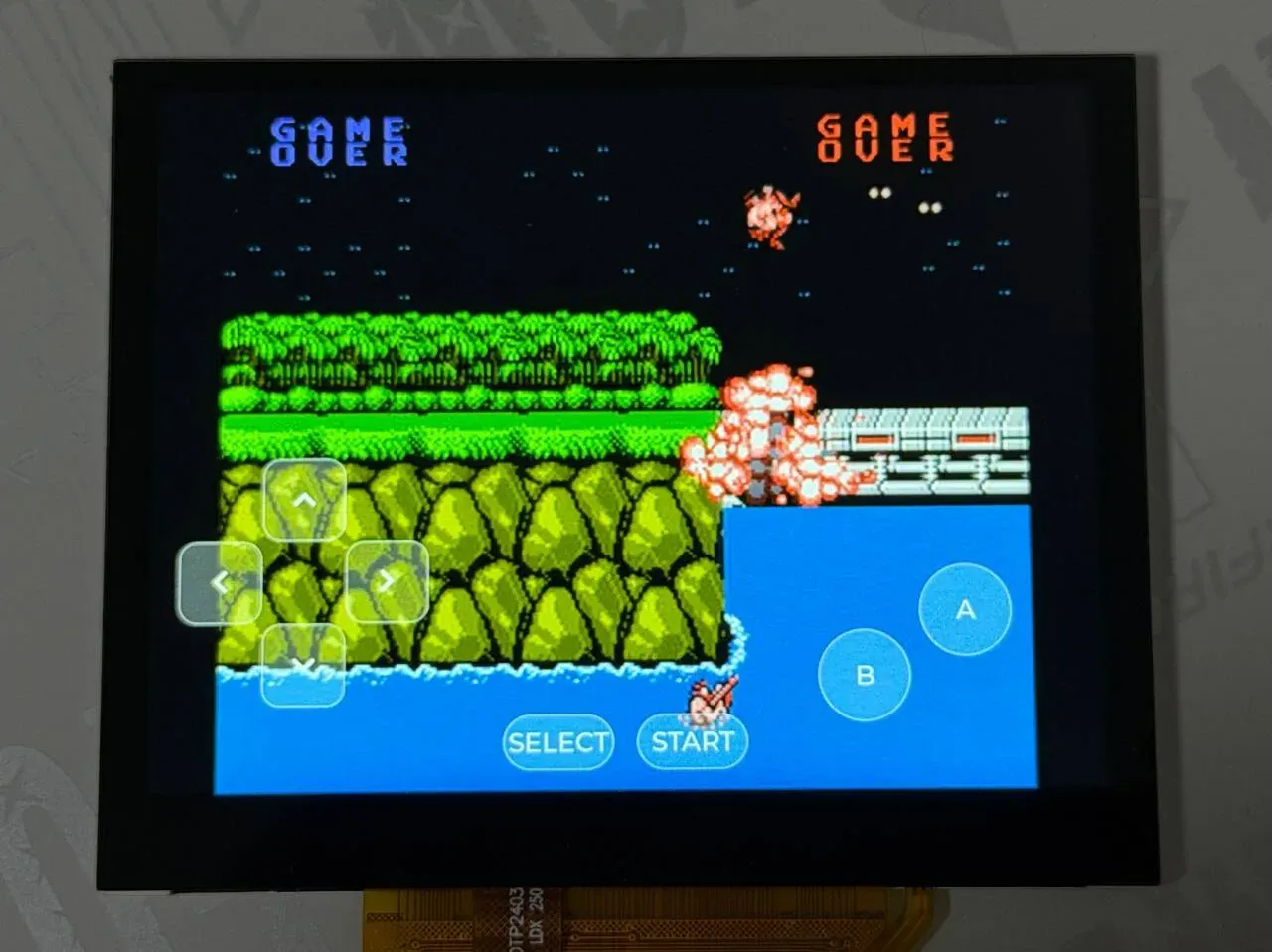
The photo shows a Contra screen. The game picture is scaled up and shown in the middle of the panel, with the semi-transparent on-screen buttons stacked on top: the D-pad at the lower left, the two round B and A buttons at the lower right, and SELECT and START at the bottom center. A held button changes color; in the photo the left D-pad key is being held.
Output after running
Section titled “Output after running”After downloading and running, the serial port shows the following output in order. The game name is written as <game name> in the log.
Touchscreen and display initialization
Section titled “Touchscreen and display initialization”After bootup display_sunxi reports a 1024×768 panel, and the GT967 touch controller reads out its firmware version and is configured for 1024×768 with up to 5 points:
*** Booting Zephyr OS build b6f3dfe1a1f4 ***[00:00:00.493,000] <inf> display_sunxi: 1024x768 @ 60 Hz, fb 0x400a42c0, video plane 0[00:00:00.564,000] <inf> gt967: GT967 firmware 0x1040, 1024x768[00:00:00.570,000] <inf> gt967: configuration 0x63: 1024 x 768, up to 5 point(s), module switch 0x04The touchscreen resolution matches the display, so touch coordinates can be compared directly with the buttons’ screen coordinates without conversion.
TF card mount and ROM selection
Section titled “TF card mount and ROM selection”With one .nes in the root directory and CONFIG_SAMPLE_NES_ROM not set, the log prints the ROM path and the save path:
ROM /SD:/<游戏名>.nes, save /SD:/<游戏名>.savThe default /SD:/game.nes does not exist, so pick_rom() found the .nes in the root directory, and the save path has the extension changed to .sav.
ROM loading
Section titled “ROM loading”nofrendo prints the result of parsing the iNES header: file size, PRG/CHR sizes, mapper number, and TV standard:
NES: System initialized!ROM: Found iNES file of size 131088.ROM: Game found in database. ! ROM: prg_ram_banks mismatch! (DB: 0, ROM: 1)ROM: CRC32: F6035030ROM: Mapper: 2, PRG:128K, CHR:0K, Flags: V---MMC: Mapper UNROM (iNES 002)MMC: PRG-ROM: 16 banksMMC: PRG-RAM: 1 banksMMC: CHR-RAM: 1 banksNES: System type: NES-NTSC (NTSC-U)NES: System reset (hard)The NTSC UNROM (mapper 2) cartridge loads successfully and the main loop starts.
Real-time pacing
Section titled “Real-time pacing”Once the game starts, the main loop prints one line of statistics every 5 seconds, from which the effect of the sound-based pacing is visible:
nes: 310 frames, emulation 3163 us/frame, sound 248000 frames pushed, queued 2752, underruns 0, ring empty 8, slab full 471nes: 301 frames, emulation 3310 us/frame, sound 240800 frames pushed, queued 2912, underruns 0, ring empty 8, slab full 941| Field | Meaning |
|---|---|
frames | Frames run in these 5 seconds. NTSC at full speed is about 300 frames (60.1 fps); the log shows 301 |
emulation ... us/frame | Emulation time per frame, not counting waiting for sound. It must be under 16639 μs (the duration of one frame) to keep up with real time; here it is about 3.3 ms |
sound ... frames pushed | Sample frames pushed into the ring buffer; at 48 kHz this is about 240000 in 5 seconds, which matches the log |
queued | Sample frames queued in the ring buffer, holding around RATE / 15 (3200), which shows that the sound is what paces it |
underruns | Number of I2S underrun restarts; the log shows 0 |
ring empty | Times the sound thread found fewer than one block in the ring buffer; the log shows 8, and it does not grow |
slab full | Times the sound thread waited for an I2S block. While the sound is pacing the run this value keeps growing; it is not a fault |
Picture output path
Section titled “Picture output path”The emulator converts the PPU’s 8-bit indexed picture to RGB565 and writes it into the buffer the caller supplies, removing the 8 overscan lines at the top and bottom (leaving 224 lines on NTSC). The code is in blit() in nesemu.c:
/* the 8 bit picture of the PPU to RGB565, without the overscan lines */static void blit(uint8 *src){  nes_t *nes = nes_getptr();  unsigned int h = nesemu_height();
  if (out_buf == NULL) {    return;  }  src = NES_SCREEN_GETPTR(src, 0, nes->overscan);  for (unsigned int y = 0; y < h; y++) {    uint16_t *d = out_buf + y * NESEMU_WIDTH;
    for (int x = 0; x < NESEMU_WIDTH; x++) {      d[x] = palette[src[x]];    }    src += NES_SCREEN_PITCH;  }  drawn = 1;}
This buffer comes from video.c: four 256×240×2-byte buffers are used in rotation (NBUF), so while the emulation thread draws the next frame the display is still scanning the previous one. When drawing is done it calls video_present(), flushes the cache, and wakes the display thread with a semaphore:
void video_present(unsigned int width, unsigned int height){ cur = (cur + 1) % NBUF; sys_cache_data_flush_range(buf[cur], STRIDE * height); ready_w = width; ready_h = height; atomic_set(&ready_idx, cur); k_sem_give(&frame_sem);}The display thread video_main() waits for refreshes in its own thread, without holding up the emulation (whose pacing is set by the sound), and shows only the latest frame:
k_sem_take(&frame_sem, K_FOREVER); idx = atomic_get(&ready_idx); img.data = buf[idx]; img.width = ready_w; img.height = ready_h; img.stride = STRIDE; img.nonblock = false; ret = display_sunxi_show_rgb(disp, &img);display_sunxi_show_rgb() hands the RGB565 buffer to the display engine’s video plane, where the hardware scales it to the whole screen. The LVGL used for the buttons draws on the ARGB plane above it, so the buttons are stacked on the game picture. The scale factor and whether the aspect ratio is preserved are decided by the display driver; the sample does not control them.
To change the number of buffers, change NBUF in video.c.
Sound output path
Section titled “Sound output path”At the end of nesemu_run_frame() the frame’s APU output (mono) is copied into stereo with the same left and right:
/* the sound of the frame, mono to stereo; what the caller did not take yet is dropped */ n = MIN(apu->samples_per_frame, SAMPLE_FRAMES_MAX); for (int i = 0; i < n; i++) { pcm[2 * i] = pcm[2 * i + 1] = apu->buffer[i]; }The main loop takes it out and pushes it into the ring buffer in audio.c (audio_push()); if it cannot push it sleeps 1 ms and tries again. Each time the sound thread audio_main() has 512 sample frames (one block) it takes a block from the memory slab and sends it with i2s_write(), pre-filling 3 blocks before I2S_TRIGGER_START. An i2s_write() return of -EIO means an I2S underrun; it counts one underruns and pre-fills again.
The volume is set when the sound thread starts, with the value from CONFIG_SAMPLE_NES_VOLUME:
audio_codec_start_output(ctl); audio_codec_set_property(ctl, AUDIO_PROPERTY_OUTPUT_VOLUME, AUDIO_CHANNEL_ALL, (audio_property_value_t){.vol = CONFIG_SAMPLE_NES_VOLUME});The range is 0 to 255, default 150. The sample rate comes from CONFIG_SAMPLE_NES_RATE; the option help says only 48000 or 44100 is supported.
The few lines in the main loop that decide the speed are in main.c:
nesemu_set_keys(pad_keys()); nesemu_set_frame_buffer(video_acquire()); /* a frame that runs late is not drawn, the sound has priority */ nesemu_set_frameskip(audio_queued() < RATE / 30 ? 1 : 0); if (nesemu_run_frame()) { video_present(NESEMU_WIDTH, nesemu_height()); } while (audio_queued() > HIGH_WATER) { k_msleep(1); }HIGH_WATER is RATE / 15, about 67 ms of sound. To reduce the latency from button press to sound, lower it; setting it too low breaks up the sound.
UI and on-screen button implementation
Section titled “UI and on-screen button implementation”All the code is in samples/nes_player/src/pad.c.
How the two input paths divide the work:
- There is only one source of button state:
touch_scan(). It computes the button mask from the touch points received from the INPUT subsystem;pad_main()writes it intoatomic_t keysevery 16 ms, and the main loop reads it each frame withpad_keys()and passes it tonesemu_set_keys(). - The LVGL buttons are only for display and change color when pressed; they do not produce button state. LVGL’s own pointer input handles only one finger, whereas the game needs a direction and A/B pressed at the same time, so LVGL events are not used.
- On a board whose devicetree has no
zephyr,touch(HAS_TOUCHis 0), nothing writes the button mask; the buttons are drawn but cannot be operated.
LVGL draws on the display engine’s ARGB framebuffer plane (CONFIG_DISPLAY_SUNXI_ARGB8888), above the video plane, and pad_main() first sets the screen background to fully transparent so the game picture shows through.
flowchart TD
    G["GT967 touch controller<br/>I2C, up to 5 points"] -->|"INPUT_ABS_MT_SLOT / X / Y<br/>INPUT_BTN_TOUCH"| CB["touch_event()<br/>INPUT_CALLBACK_DEFINE<br/>writes fingers[slot]"]
    CB --> TBL[("fingers[5]<br/>x, y, down")]
    LOOP["pad_main() loop<br/>every 16 ms"] --> SCAN["touch_scan()"]
    TBL --> SCAN
    KT[("pad_keys_tbl[]<br/>x, y, w, h, bit for each button")] --> SCAN
    SCAN -->|"hit = rectangle ± HIT_MARGIN<br/>hold RELEASE_HOLD_MS after release"| MASK["button bit mask"]
    SCAN -->|"lv_obj_add_state<br/>LV_STATE_PRESSED"| LV["LVGL button highlight<br/>lv_timer_handler()"]
    MASK -->|"atomic_set"| KEYS[("atomic_t keys")]
    KEYS -->|"pad_keys()"| MAIN["main() each frame<br/>nesemu_set_keys()"]
    MAIN -->|"input_update(0, keys & 0xff)"| CORE["nofrendo gamepad 1"]
Creating the LVGL widgets
Section titled “Creating the LVGL widgets”Each button is created by key_add(): an lv_button plus an lv_label. The arguments are the top-left coordinate, width and height, the text, the corresponding gamepad key bit, and the corner radius.
static void key_add(int x, int y, int w, int h, const char *text, uint32_t bit, int radius){  lv_obj_t *b = lv_button_create(lv_screen_active());  lv_obj_t *l = lv_label_create(b);
  lv_obj_set_size(b, w, h);  lv_obj_align(b, LV_ALIGN_TOP_LEFT, x, y);  lv_obj_set_style_radius(b, radius, 0);  lv_obj_set_style_bg_color(b, lv_color_white(), 0);  lv_obj_set_style_bg_opa(b, LV_OPA_30, 0);  lv_obj_set_style_bg_color(b, lv_color_make(255, 200, 60), LV_STATE_PRESSED);  lv_obj_set_style_bg_opa(b, LV_OPA_70, LV_STATE_PRESSED);  lv_obj_set_style_border_color(b, lv_color_white(), 0);  lv_obj_set_style_border_opa(b, LV_OPA_50, 0);  lv_obj_set_style_border_width(b, 2, 0);  lv_obj_set_style_shadow_width(b, 0, 0);  lv_obj_set_style_text_font(l, &lv_font_montserrat_28, 0);  lv_obj_set_style_text_color(l, lv_color_white(), 0);  lv_label_set_text(l, text);  lv_obj_center(l);
if (nkeys < MAX_KEYS) { pad_keys_tbl[nkeys++] = (struct pad_key){ .obj = b, .x = x, .y = y, .w = w, .h = h, .bit = bit, }; }}- Normally it is white at 30% opacity; in the pressed state (
LV_STATE_PRESSED) it is orange at 70% opacity. - The coordinate and size are also stored in
pad_keys_tbl[], and the touch test uses that table rather than reading the position of the LVGL object. There are at mostMAX_KEYS(10) keys; any beyond that are only drawn and do not respond. - The D-pad text uses LVGL’s built-in symbols such as
LV_SYMBOL_LEFT, with themontserrat_28font, which requiresCONFIG_LV_FONT_MONTSERRAT_28inprj.conf.
Mapping touches to gamepad key bits
Section titled “Mapping touches to gamepad key bits”Touch events are first recorded in fingers[], one entry per touch slot. INPUT_CALLBACK_DEFINE binds the callback to the device the devicetree zephyr,touch points at:
static void touch_event(struct input_event *evt, void *user_data){ switch (evt->code) { case INPUT_ABS_MT_SLOT: cur_slot = CLAMP(evt->value, 0, TOUCH_SLOTS - 1); break; case INPUT_ABS_X: fingers[cur_slot].x = evt->value; break; case INPUT_ABS_Y: fingers[cur_slot].y = evt->value; break; case INPUT_BTN_TOUCH: fingers[cur_slot].down = evt->value != 0; break; }}INPUT_CALLBACK_DEFINE(DEVICE_DT_GET(DT_CHOSEN(zephyr_touch)), touch_event, NULL);touch_scan() compares each button against the 5 fingers one by one: a finger inside the button rectangle (expanded by HIT_MARGIN = 12 pixels on each of the four sides) counts as pressed. The touch controller occasionally reports one frame of “no finger” while the finger has not left; handling that literally would be a release plus a re-press, so the press is held for RELEASE_HOLD_MS (50 ms) after release. When a button’s state changes, LV_STATE_PRESSED is added to or removed from the LVGL button at the same time:
/* the keys that have a finger on them; also shows the state on the buttons */static uint32_t touch_scan(void){  uint32_t mask = 0;  uint32_t now = k_uptime_get_32();
  for (int k = 0; k < nkeys; k++) {    struct pad_key *key = &pad_keys_tbl[k];    bool pressed = false;
    for (int f = 0; f < TOUCH_SLOTS; f++) {      if (fingers[f].down && fingers[f].x >= key->x - HIT_MARGIN &&          fingers[f].x < key->x + key->w + HIT_MARGIN &&          fingers[f].y >= key->y - HIT_MARGIN &&          fingers[f].y < key->y + key->h + HIT_MARGIN) {        pressed = true;      }    }    if (pressed) {      key->hold_until = now + RELEASE_HOLD_MS;    } else if ((int32_t)(now - key->hold_until) < 0) {      pressed = true;    }    if (pressed) {      mask |= key->bit;    }    if (pressed != key->shown) {      if (pressed) {        lv_obj_add_state(key->obj, LV_STATE_PRESSED);      } else {        lv_obj_remove_state(key->obj, LV_STATE_PRESSED);      }      key->shown = pressed;    }  }
  return mask;}
The hit area is one ring larger than the button, so a finger in the gap between two adjacent buttons triggers both at once; this is how diagonal directions are pressed.
The pad_main() thread runs a round every 16 ms: it updates keys, then calls lv_timer_handler() to let LVGL redraw.
while (true) {#if HAS_TOUCH atomic_set(&keys, touch_scan());#endif lv_timer_handler(); k_msleep(16); }The main loop reads it once per frame, and nesemu_set_keys() passes the low 8 bits of the mask to the core’s gamepad 1:
void nesemu_set_keys(uint32_t keys){ /* the key bits of the API are the pad bits of the core, up to the order of the directions */ input_update(0, keys & 0xff);}boards/yuzukineko.conf sets the input thread priority to 4, higher than the emulation (the main thread, priority 6), so finger events are not lost while a frame is being emulated.
Where to change the layout
Section titled “Where to change the layout”The layout is built once in pad_main(). The origin is the top-left corner of the screen and the unit is the pixel; the values are written for the 1024×768 panel of the yuzukineko board:
static void pad_main(void *a, void *b, void *c){  lv_obj_set_style_bg_opa(lv_screen_active(), LV_OPA_TRANSP, 0);
  /*   * The layout is for the 1024x768 panel of the yuzukineko board, origin top left. The picture   * (256x224 scaled by the video plane) fills the screen behind the keys.   */  key_add(30, 498, 90, 90, LV_SYMBOL_LEFT, NESEMU_KEY_LEFT, 20);  key_add(210, 498, 90, 90, LV_SYMBOL_RIGHT, NESEMU_KEY_RIGHT, 20);  key_add(120, 408, 90, 90, LV_SYMBOL_UP, NESEMU_KEY_UP, 20);  key_add(120, 588, 90, 90, LV_SYMBOL_DOWN, NESEMU_KEY_DOWN, 20);
  key_add(830, 528, 100, 100, "A", NESEMU_KEY_A, LV_RADIUS_CIRCLE);  key_add(720, 598, 100, 100, "B", NESEMU_KEY_B, LV_RADIUS_CIRCLE);
key_add(380, 688, 120, 60, "SELECT", NESEMU_KEY_SELECT, 30); key_add(524, 688, 120, 60, "START", NESEMU_KEY_START, 30);- To change the position, change the first two arguments; to change the size, the third and fourth; to change the key bit, the sixth (
NESEMU_KEY_*). - To add a key (auto-fire, say), add another
key_add()line; if the total exceeds 10, raiseMAX_KEYS.nesemu_set_keys()takes only the low 8 bits, so an added key must correspond to a gamepad key the core already has. - The hit area is
HIT_MARGINand the debounce time isRELEASE_HOLD_MS; both are at the top ofpad.c. - When switching to another screen or touch controller, the layout coordinates and the touch coordinates must be in the same coordinate system;
zephyr,touchin the devicetree must point at the new device, and the matching driver must be enabled inboards/*.conf.
Configuration options
Section titled “Configuration options”The sample’s own options (samples/nes_player/Kconfig):
| Option | Default | Description |
|---|---|---|
CONFIG_SAMPLE_NES_ROM | "/SD:/game.nes" | Preferred ROM path; if the file does not exist, the first .nes in the root directory is used |
CONFIG_SAMPLE_NES_RATE | 48000 | Sound output sample rate; the option help says only 48000 or 44100 is supported |
CONFIG_SAMPLE_NES_VOLUME | 150 | codec output volume, range 0–255 |
CONFIG_SAMPLE_NES_BENCH | off | does not wait for sound and does not display; runs a fixed number of frames and prints the time per frame and a picture CRC |
CONFIG_SAMPLE_NES_BENCH_FRAMES | 1200 | number of frames for the benchmark; prints a picture CRC every 200 frames (depends on SAMPLE_NES_BENCH) |
The component’s options (zephyr-components/nes/Kconfig):
| Option | Default | Description |
|---|---|---|
CONFIG_NES | off (enabled in the sample) | builds the nofrendo core; depends on RISCV and selects the filesystem |
CONFIG_NES_MAX_ROM_SIZE_KB | 2048 | maximum ROM file accepted, range 16–2048 |
To change them, append -D to the build command, quoting string values; you can also write them straight into prj.conf:
west build -b yuzukineko -d build/nes zephyr-components/nes/samples/nes_player -- -DCONFIG_SAMPLE_NES_ROM='"/SD:/roms/demo.nes"'The main options in prj.conf:
| Option | Purpose |
|---|---|
CONFIG_NES | enables the emulation core |
CONFIG_CRC | CRC used for save-file checks (to tell whether the save data has changed) |
CONFIG_SDHC | SD host controller driver |
CONFIG_DISK_DRIVER_SDMMC | accesses the SD card as a disk |
CONFIG_FAT_FILESYSTEM_ELM | FatFs filesystem |
CONFIG_FS_FATFS_EXFAT | supports exFAT cards |
CONFIG_FS_FATFS_LFN | supports long file names |
CONFIG_I2S | I2S driver; the sound goes through it to the codec |
CONFIG_AUDIO | Zephyr audio subsystem |
CONFIG_AUDIO_CODEC | codec interface: turns the output on and off and sets the volume |
CONFIG_RING_BUFFER | sound ring buffer |
CONFIG_DISPLAY | display driver |
CONFIG_DISPLAY_SUNXI_ARGB8888 | ARGB8888 plane; LVGL draws on this plane |
CONFIG_LVGL | LVGL graphics library |
CONFIG_LV_COLOR_DEPTH_32 | LVGL uses 32-bit color with alpha, which the semi-transparent buttons need |
CONFIG_LV_Z_MEM_POOL_SIZE=131072 | LVGL memory pool |
CONFIG_LV_Z_VDB_SIZE=4 | LVGL draw buffer as a percentage of the screen |
CONFIG_LV_FONT_MONTSERRAT_16 | LVGL font 16 |
CONFIG_LV_FONT_MONTSERRAT_28 | the font 28 used for the button text |
CONFIG_FPU | hardware floating point |
CONFIG_FPU_SHARING | floating point used by multiple threads |
CONFIG_HEAP_MEM_POOL_SIZE=262144 | heap size; the whole ROM is read into the heap and the video buffers are allocated from it too |
CONFIG_MAIN_STACK_SIZE=16384 | main thread stack; the emulation core runs in the main thread |
CONFIG_MAIN_THREAD_PRIORITY=6 | main thread priority, lower than the input thread (4) and the sound thread (3) |
CONFIG_SUN252I_F101_RVV | enables RISC-V vector extension support on the F101 |
CONFIG_VDEC=n | the sample does not use the video engine, so it is off |
The touch-related options are in boards/yuzukineko.conf:
| Option | Purpose |
|---|---|
CONFIG_I2C=y | the touch controller hangs on I2C (I2C is off by default in prj.conf) |
CONFIG_INPUT=y | input subsystem |
CONFIG_INPUT_GT967_MAX_TOUCH_POINTS=5 | reports 5 touch points at once |
CONFIG_INPUT_THREAD_PRIORITY_OVERRIDE=y | allows changing the input thread priority |
CONFIG_INPUT_THREAD_PRIORITY=4 | input thread priority, higher than the emulation thread |
CONFIG_INPUT_QUEUE_MAX_MSGS=64 | input event queue length |
Code structure
Section titled “Code structure”| File | Contents |
|---|---|
samples/nes_player/src/main.c | mounts the TF card, picks the ROM, and runs the main loop (emulate, push sound, pace by sound, save, statistics) |
samples/nes_player/src/video.c | four RGB565 buffers used in rotation; the display thread calls display_sunxi_show_rgb() |
samples/nes_player/src/audio.c | sound ring buffer and I2S output thread; sets the codec volume |
samples/nes_player/src/pad.c | LVGL buttons, touch reading, touch hit test, button mask |
zephyr-components/nes/src/nesemu.c, include/nes_zephyr/nesemu.h | the emulation core’s Zephyr interface: load ROM, run a frame, fetch sound, save |
zephyr-components/nes/nofrendo/ | the nofrendo core (from Retro-Go, GPL-2.0), with local changes: NES_NO_STDIO removes the FILE loading, and the CRC is provided by the glue |
| Thread | Priority | What it does |
|---|---|---|
sound thread audio | 3 | ring buffer → I2S blocks |
| input thread (INPUT subsystem) | 4 | reads touches, calls touch_event() |
display thread video | 5 | waits for a new frame, calls display_sunxi_show_rgb() |
| main thread | 6 | runs the emulation, pushes sound, paces |
button thread pad | 7 | touch_scan(), LVGL refresh |
- Operation is by touchscreen; on a board without
zephyr,touchthe buttons are only displayed and cannot be operated. - There is only gamepad 1P; 2P is not supported.
- Battery saves (
.sav) are supported; pause, reset, save states, and a game-selection menu are not. - The sound is mono copied to stereo.
- Scaling is done by the display driver; the sample offers no toggle between full screen and aspect-preserving.
- Only
.nesin iNES format is supported;.fdsand.nsfare not; mappers are limited to those nofrendo already implements.