HTML 渲染器 - litehtml
把 TF 卡上的 HTML 页面画到屏幕上。litehtml(v0.9)负责解析 HTML、套 CSS、排版,板子上的渲染层(lh_render.cpp)把排好的盒子画进一块 RGB565 缓冲,再交给显示引擎。组件是 zephyr-components/litehtml,示例是 samples/html_viewer。
没有浏览器内核:不跑 JavaScript,不联网,没有触摸或按键输入。页面太长时自己往下滚,滚到头再回来。
flowchart TB
    SD["TF 卡<br/>page.html / img / font.lhf"] -->|"fs_read"| MAIN["html_viewer<br/>main.c / chunked.c / assets.c"]
    MAIN -->|"HTML 文本"| LH["litehtml<br/>解析 + CSS + 排版"]
    FONT["cfb_font_1016<br/>10×16 点阵字体"] --> CT["lh_render.cpp<br/>盒子、文字、图片绘制"]
    LH -->|"盒子、文字、背景"| CT
    MAIN -->|"图片 / 汉字字形"| CT
    CT -->|"lh_draw"| FB["RGB565 缓冲 1024×600<br/>两块轮换"]
    FB -->|"display_sunxi_show_rgb"| PANEL["屏幕"]
开始前请先完成 配置开发环境 和 获取 Zephyr 代码。
页面、图片、字体都放在 TF 卡上,板子端不需要联网。
示例按下面的顺序找页面(main.c 的 pick_file(),77–100 行):
CONFIG_SAMPLE_HTML_FILE,默认/SD:/page.html。- 上一条的文件不存在,就取卡根目录里第一个
.html或.htm文件(不区分大小写,顺序是目录里的存放顺序,不一定是字母序;不进子目录)。 - 都没有,显示编译进固件的内置页面。
static bool pick_file(char *path, size_t size){  struct fs_dirent ent;  struct fs_dir_t dir;
  strncpy(path, CONFIG_SAMPLE_HTML_FILE, size - 1);  path[size - 1] = '\0';  if (fs_stat(path, &ent) == 0) {    return true;  }  fs_dir_t_init(&dir);  if (fs_opendir(&dir, "/SD:") != 0) {    return false;  }  while (fs_readdir(&dir, &ent) == 0 && ent.name[0] != '\0') {    if (ent.type == FS_DIR_ENTRY_FILE && name_is_html(ent.name)) {      snprintk(path, size, "/SD:/%s", ent.name);      fs_closedir(&dir);      return true;    }  }  fs_closedir(&dir);  return false;}
组件自带一个测试页 samples/html_viewer/page.html(4.4 KB,覆盖文字样式、颜色块、列表、表格、嵌套盒子、长文本)。TF 卡是 FAT 或 exFAT,支持长文件名。最简单的试法:
cp ~/f101-zephyr/zephyr-components/litehtml/samples/html_viewer/page.html /path/to/SD/page.html页面按 UTF-8 读。编码、<meta charset> 之类声明不影响这里:读进来的字节直接交给 litehtml。
<img> 和 CSS 的 background-image 都走同一个加载回调,但只认自定义的 .lhi 文件,不支持 PNG、JPEG、GIF、WebP、SVG 直接引用。
- 页面里写相对路径,例如
<img src="img/a.lhi">。路径相对页面所在目录解析(assets.c的image_cb()把dir + "/" + src拼起来读文件),没有 URL、data:之类的处理。 .lhi文件格式:"LHI1",16 位宽,16 位高(小端),后面是宽×高个 RGB565 像素(小端)。没有透明通道。- 找不到文件、魔数不对、长度不够,都当作“没有这张图”:元素没有尺寸,不画。失败的结果也会缓存,不会反复读卡。
- 缓存最多 40 个条目、合计 6 MiB(
CACHE_ENTRIES、CACHE_LIMIT),超出时丢掉最久没用的。
没有现成的转换命令行工具,下面的脚本,逻辑和 tools/scrape_page.py 里的 to_lhi()、make_font() 一致(需要 Pillow,Zephyr 的 venv 里有):
#!/usr/bin/env python3"""用法:  mk-lh-assets.py img  输入图片 输出.lhi [最大宽 最大高]  mk-lh-assets.py font 字体文件 输出.lhf 页面.html"""import html, struct, sysfrom PIL import Image, ImageDraw, ImageFont

def to_lhi(src, dst, max_w=640, max_h=360):    img = Image.open(src)    if img.mode in ("RGBA", "LA", "P"):          # 透明部分垫白底        img = img.convert("RGBA")        bg = Image.new("RGBA", img.size, (255, 255, 255, 255))        bg.alpha_composite(img)        img = bg    img = img.convert("RGB")    img.thumbnail((max_w, max_h), Image.LANCZOS)  # 只缩小,不放大    w, h = img.size    out = bytearray(struct.pack("<4sHH", b"LHI1", w, h))    px = img.tobytes()    for i in range(0, len(px), 3):        r, g, b = px[i], px[i + 1], px[i + 2]        out += struct.pack("<H", ((r & 0xf8) << 8) | ((g & 0xfc) << 3) | (b >> 3))    open(dst, "wb").write(out)    print(dst, w, "x", h, len(out), "bytes")

def to_lhf(fontfile, dst, page, cell=16):    text = html.unescape(open(page, encoding="utf-8").read())    codes = sorted(c for c in set(map(ord, text)) if c >= 0x80 and c not in (0x200b, 0xfeff))    font = ImageFont.truetype(fontfile, cell)    keep, glyphs = [], []    for c in codes:        im = Image.new("L", (cell, cell), 0)        ImageDraw.Draw(im).text((0, -1), chr(c), font=font, fill=255)        if im.getbbox() is None:            continue        keep.append(c)        glyphs.append(im.tobytes())    with open(dst, "wb") as f:        f.write(struct.pack("<4sIII", b"LHF1", len(keep), cell, 0))        f.write(b"".join(struct.pack("<I", c) for c in keep))        f.write(b"".join(glyphs))    print(dst, len(keep), "glyphs")

if sys.argv[1] == "img": to_lhi(sys.argv[2], sys.argv[3], *map(int, sys.argv[4:6]))else: to_lhf(sys.argv[2], sys.argv[3], sys.argv[4]). ~/f101-zephyr/env.shpython3 mk-lh-assets.py img photo.png SD/img/photo.lhi页面里写 <img src="img/photo.lhi" width="320">,图片会缩放到元素的尺寸(最近邻)。图片是原样放进内存的 RGB565,一张 640×360 的图占 450 KiB,注意缓存上限。
屏幕上的字来自两处:
| 来源 | 范围 | 说明 |
|---|---|---|
cfb_font_1016 | ASCII 32–126 | Zephyr 字符帧缓冲自带的 10×16 点阵字体,编进固件 |
font.lhf | 你指定的字符 | 放在页面同一目录,16×16 的 8 位透明度字形,启动时一次读进内存 |
font.lhf 格式:"LHF1",32 位字形个数,32 位字格大小(16),32 位保留,后面是按码点升序排列的 32 位码点表,最后是每个字形 16×16 字节的透明度(从上到下的行)。上面脚本的 font 子命令会扫描页面里出现的所有非 ASCII 字符,按给定字体渲染:
python3 mk-lh-assets.py font /usr/share/fonts/opentype/noto/NotoSansCJK-Regular.ttc SD/font.lhf SD/page.html(字体路径换成你机器上有的;.ttc 集合文件 Pillow 默认取第一个字体。)
没有 font.lhf,或者页面里的字不在里面,非 ASCII 字符画成 ?。字体是固定的:font-family 不起作用,不能加载 TTF/OTF/WOFF,也不支持 @font-face。
以下命令都在工作区里执行。组件依赖 litehtml 子模块,第一次要拉:
cd ~/f101-zephyr/zephyr-componentsgit submodule update --init litehtml/litehtml不拉的话 litehtml/litehtml 是空目录,CMake 会报 litehtml sources missing, run: git submodule update --init。然后编译示例:
. ~/f101-zephyr/env.shcd ~/f101-zephyrwest build -b yuzukineko -d build/html zephyr-components/litehtml/samples/html_viewer产物是 build/html/zephyr/zephyr.bin,链接地址 0x40000000。prj.conf 里已经有 CONFIG_CPP、CONFIG_STD_CPP17、CONFIG_LITEHTML,不需要加 -D。
示例的 CMakeLists.txt 自己把组件加进模块路径,不用另外设 ZEPHYR_EXTRA_MODULES:
list(APPEND ZEPHYR_EXTRA_MODULES ${CMAKE_CURRENT_SOURCE_DIR}/../..)
find_package(Zephyr REQUIRED HINTS $ENV{ZEPHYR_BASE})project(html_viewer)
target_sources(app PRIVATE src/main.c src/chunked.c src/assets.c)
litehtml 是 C++ 库,而镜像用的是精简 C 库,所以组件的 CMakeLists.txt 用 ExternalProject 单独编一遍(ext/),只用 libstdc++ 里纯头文件的部分,关闭异常,标准流(iostream 等)用空壳头文件顶替,编成静态库再链进镜像。缺的几个 C 库函数在 src/litehtml_libc.c。在自己的应用里用:把模块加进 ZEPHYR_EXTRA_MODULES,prj.conf 里写 CONFIG_CPP=y、CONFIG_STD_CPP17=y、CONFIG_LITEHTML=y。
- 第一次运行先不放页面:TF 卡根目录里没有
.html文件,板子显示内置页面。要显示自己的页面时,把page.html(以及img/、font.lhf)拷到 TF 卡根目录,插进板子。 - 用 编译与运行 里的任一种方式下载,控制台是 UART1(PB00/PB01,115200 8N1)。调试用方式一:
xfel ddr f101-s3、xfel write 0x40000000 build/html/zephyr/zephyr.bin、xfel exec 0x40000000。每次先给板子断电再上电。
画面是 1024×600 的 RGB565 帧,用 display_sunxi_show_rgb() 送到显示引擎的视频层,缩放规则与视频帧相同:保持长宽比,铺满宽度。屏幕是 1024×768,所以上下有黑边。
运行后的输出
Section titled “运行后的输出”卡上没有 .html:显示内置页面
Section titled “卡上没有 .html:显示内置页面”卡已挂载、根目录里没有 .html 文件时,串口输出:
*** Booting Zephyr OS build b6f3dfe1a1f4 ***heap: 13620 KiB free at the startno .html file on the SD cardpage: built inpage: "litehtml", 177 px high, parsed and laid out in 17 msheap: page and library use 2500 KiB (11120 KiB of the normal heap free)assets: 0 KiB of images cached, 0 loaded, 0 droppedpage: drawn in 11 ms屏幕显示内置页面。它 177 px 高,不比屏幕高,所以不滚动,每秒重画一次。挂载失败时打印的是 cannot mount the SD card: <错误码>,见 排错。
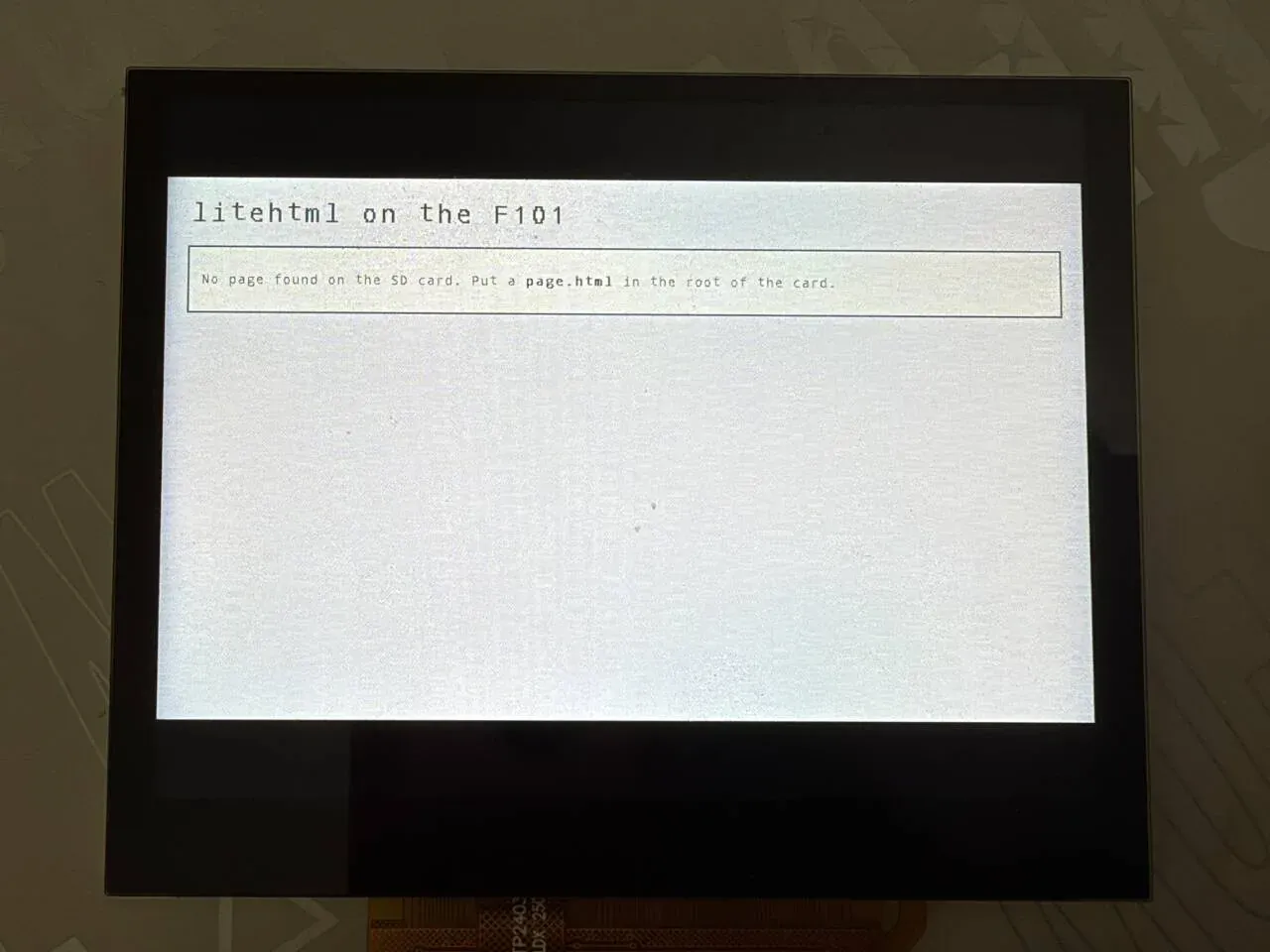
照片里是内置页面:标题 litehtml on the F101,下面一个带边框的框,写着 No page found on the SD card. Put a page.html in the root of the card.。画面在面板中间,上下是黑边。
卡上有页面:加载页面、图片、汉字
Section titled “卡上有页面:加载页面、图片、汉字”要显示自己的页面时,卡根目录放好 page.html、font.lhf 和 img/a.lhi 后启动,串口输出:
*** Booting Zephyr OS build b6f3dfe1a1f4 ***heap: 13620 KiB free at the startassets: extra glyphs from /SD:/font.lhf (4 KiB)assets: images from /SD:/imgchunked: /SD:/page.html, 35 KiB in 3 pieces of about 12 KiB, scanned in 14 ms, 1425 bytes of csschunk 0/3: 12643 bytes, 8431 px high, loaded in 410 mschunked: piece 0 y 0 drawn in 37 ms这几行依次表示:font.lhf 读入、图片目录登记、页面被分成 3 片(每片约 12 KiB)、第 0 片加载完成,之后每帧约 37 ms。屏幕上显示页面的第一屏。
自动滚动与分片切换
Section titled “自动滚动与分片切换”页面比屏幕高时自动往下滚。每 60 帧打印一次 y,相邻两行差 120 px,即每帧 2 px,等于 CONFIG_SAMPLE_HTML_SCROLL_PX=2。滚到片尾附近时,输出如下:
chunked: piece 0 y 7200 drawn in 39 mschunk 1/3: 12351 bytes, 8006 px high, loaded in 392 mschunked: piece 0 y 7320 drawn in 37 ms...chunked: piece 0 y 7920 drawn in 61 mschunked: piece 0 y 8040 drawn in 61 mschunked: piece 0 y 8160 drawn in 61 mschunked: piece 0 y 8280 drawn in 60 mschunked: piece 0 y 8400 drawn in 61 mschunked: piece 1 y 89 drawn in 37 ms- 第 0 片滚过
y=7231(离片尾 8431 不到两屏)时提前加载第 1 片,用了 392 ms。加载是同步的,那一帧会停顿约 0.4 秒。 - 越过
y=7831,也就是片尾前一屏,开始同时画两片(lh_draw_over()),每帧涨到约 61 ms。 - 越过 8431 后切到第 1 片,
piece 1 y 89,帧时间回到 37 ms。
flowchart TD
    A["main(): 分配两块 1024×600 帧<br/>fs_mount,最多重试 10 次"] --> B{"挂载成功且<br/>pick_file 找到页面?"}
    B -->|"否"| BI["内置页面<br/>printk: cannot mount… 或<br/>no .html file on the SD card"]
    B -->|"是"| C["assets_init<br/>注册图片回调,读 font.lhf"]
    C --> D{"CHUNK_KB > 0 ?"}
    D -->|"是"| E["chunked_run<br/>分片加载并滚动,只在出错时返回"]
    D -->|"否"| F["read_file 整页读进内存"]
    E -->|"出错"| F
    F --> G["lh_load<br/>解析 + 排版"]
    BI --> G
    G --> H["循环: lh_draw 画一帧<br/>cache flush<br/>display_sunxi_show_rgb<br/>滚动位置 += SCROLL_PX"]
main() 在 samples/html_viewer/src/main.c 的 350–472 行。要点:
- 两块帧缓冲
fbs[2]各 1024×600×2 字节,用aligned_alloc(64, …)从普通堆分配(373–379 行)。屏幕上显示的那一块永远不被写,画下一帧画到另一块,不然扫描输出会看到画到一半的帧。 - 卡上电后要等一会儿,挂载最多试 10 次、每次间隔 300 ms(381–388 行)。
- 成功后调
assets_init(path),再按CONFIG_SAMPLE_HTML_CHUNK_KB决定走分片显示(397–413 行):
if (mounted != 0) { printk("cannot mount the SD card: %d\n", mounted); } else if (!pick_file(path, sizeof(path))) { printk("no .html file on the SD card\n"); } else { assets_init(path);#if CONFIG_SAMPLE_HTML_CHUNK_KB > 0 /* returns only when the page cannot be shown piece by piece */ chunked_run(path, &font, disp, fbs); printk("chunked viewer failed, trying the page as a whole\n");#endif html = read_file(path); if (html != NULL) { source = path; } }- 整页模式:
read_file()读文件,lh_load()解析排版,然后无限循环画帧(436–471 行)。页面不比屏幕高、或者SCROLL_PX为 0,每秒重画一次;否则每帧滚动CONFIG_SAMPLE_HTML_SCROLL_PX像素,到底后停 2 秒掉头往回滚,到顶再停 2 秒。
  while (true) {    uint16_t *fb = fbs[cur];    struct display_sunxi_rgb img = {      .data = fb, .width = W, .height = H, .stride = W * 2,    };    int max_scroll = MAX(0, height - H);    int ret;
    t0 = k_uptime_get();    draw_page(page, fb, scroll);    sys_cache_data_flush_range(fb, W * H * sizeof(uint16_t));    if (scroll == 0 || scroll >= max_scroll) {      printk("page: drawn in %d ms\n", (int)(k_uptime_get() - t0));    }    /* returns when the new frame is on the screen: the other one is free again */    ret = display_sunxi_show_rgb(disp, &img);
分片显示(默认走这条)
Section titled “分片显示(默认走这条)”默认 CONFIG_SAMPLE_HTML_CHUNK_KB=12,所以只要卡上有页面,就走 chunked.c,哪怕页面只有 4 KB。它的做法:
lh_index_scan()把文件从头到尾读一遍,找到<body>每个子元素的结尾,以及<head>里的<style>文本位置。- 把相邻子元素合成大约 12 KiB 一片;只有屏幕上的那一片和下一片在内存里,每一片是一个独立的页面:
<html><head><meta charset="utf-8"><style>+ 全部 CSS +</style></head>+ 原来的<body …>标签 + 这一片的文本 +</body></html>。 - 滚动越过一片的末尾时,丢掉当前片、换下一片,同时提前加载再下一片。接缝处用
lh_draw_over()把下一片画在同一帧的下半部分。 - 滚到最后一片的末尾,等 2 秒,从第一片重新开始(不会往回滚)。
分片的限制:
- 标记必须写规整,所有非空元素都要有结束标签。
<body>的一个直接子元素不会被切开,一个子元素本身特别大,这一片就特别大。 - 跨片的兄弟选择器(
+、~、:nth-child之类)不生效,因为每一片是独立的页面。 - 样式表只从
<head>里的<style>收集(struct lh_index的css[],最多 16 个)。外部样式表本来就不支持。
只想按整页渲染:编译时把 CONFIG_SAMPLE_HTML_CHUNK_KB 设成 0。整页模式要把整个文档树放进堆里,页面大了会失败。组件还提供 LITEHTML_PAGED_HEAP(按需换页、以 TF 卡上的 swap.bin 做后备存储,配置见 samples/html_viewer/paged.conf)。
ext/src/lh_render.cpp 里的 canvas_container 实现 litehtml 的 document_container 接口。对外接口在 include/litehtml_zephyr/lh.h:
| 函数 | 作用 |
|---|---|
lh_load(font, html, width, height) | 解析并按视口宽度排版,返回页面对象。height 只用于 vh 单位和媒体查询 |
lh_content_height(page) | 排版后页面的总高度(像素) |
lh_title(page) | <title> 的文字 |
lh_draw(page, fb, stride, w, h, scroll_y, bg) | 先用 bg 清空,再把从 scroll_y 行开始的一屏画进 RGB565 缓冲 |
lh_draw_over(…) | 不清空,叠画(分片接缝用) |
lh_set_image_loader(fn, user) | 注册图片回调,返回 RGB565 像素 |
lh_set_cjk_font(data, size) | 注册 font.lhf 的内容,数据要一直有效 |
lh_free(page) | 释放 |
lh_index_scan(read, user, size, target, out) | 分片扫描 |
lh_load() 和 lh_draw() 就这么几行(lh_render.cpp 567–601 行):
struct lh_page *lh_load(const struct lh_font *font, const char *html, int width, int height){  auto *p = new lh_page(font, width, height);
  p->doc = litehtml::document::createFromString(html, &p->container);  if (!p->doc) {    delete p;    return nullptr;  }  p->doc->render(width);  p->content_h = p->doc->height();  return p;}
void lh_draw(struct lh_page *page, uint16_t *fb, int stride, int w, int h, int scroll_y, uint16_t bg){ for (int y = 0; y < h; y++) { std::fill(fb + (size_t)y * stride, fb + (size_t)y * stride + w, bg); } page->container.begin(fb, stride, w, h);
litehtml::position clip(0, 0, w, h);
page->doc->draw(0, 0, -scroll_y, &clip);}文字怎么画:create_font() 把 CSS 字号当作字高,字宽按 10:16 的比例缩放(cell_w = size * 10 / 16,至少 1),粗体(权重 ≥ 600)宽度加 1 并往右多涂一列;draw_glyph() 用最近邻把 10×16 点阵缩放到目标尺寸,斜体按行错位。下划线、删除线、上划线直接画线。
f->size = std::max(size, 6);f->weight = weight;f->italic = italic == litehtml::font_style_italic;f->decoration = decoration;f->cell_w = std::max(1, (f->size * font_->cell_w + font_->cell_h / 2) / font_->cell_h);if (weight >= 600) { f->cell_w++;}font.lhf 里的汉字按字号缩成 size × size,字间距就是字号。
支持的 HTML / CSS 范围
Section titled “支持的 HTML / CSS 范围”分两层看:litehtml 能排版什么,和这块渲染层能画什么。下面只写能从源码确认的。
| 类别 | 内容 |
|---|---|
| HTML | gumbo 解析(HTML5 容错解析器);标题、段落、div、span、b、i、u、s、code、a、ul/ol/li、table、img、br 等常见标签 |
| 盒模型 | margin、padding、border(宽度、颜色,只画实线)、width/height、box-sizing |
| 布局 | 块、行内、inline-block、float、position(relative/absolute/fixed)、display: table 和 <table>、display: flex/inline-flex |
| 文字 | font-size、font-weight、font-style、text-align、text-decoration、text-transform(仅 ASCII 字母)、white-space、vertical-align、line-height |
| 单位 | px、%、em、rem、pt 等、vw/vh/vmin/vmax |
| 颜色 | 十六进制、rgb()、rgba()、颜色名;rgba 的透明度会和已有像素混合 |
| 背景 | background-color;background-image 取 .lhi,支持 repeat/repeat-x/repeat-y、位置、尺寸 |
| 列表标记 | 圆点、空心方块(circle)、实心方块,数字编号(1. 样式) |
| 其他 | overflow 裁剪(矩形);<style> 内联样式表;选择器;@media 里 width、height、screen 等基本条件(视口固定为 1024×600);CSS 变量 var()(litehtml 的 style.cpp 里处理了 var() |
| 内容 | 实际情况 |
|---|---|
| JavaScript | 不支持,<script> 不执行 |
| 链接点击、表单、输入 | 不支持。on_anchor_click()、set_cursor() 是空函数,板子上没有输入设备 |
| 外部样式表 | 不支持。import_css() 是空函数,<link rel="stylesheet"> 和 @import 都不会加载,样式要写进 <style> |
| 图片格式 | 只有 .lhi;PNG/JPEG/GIF/WebP/SVG、data: 地址不支持 |
| 字体 | 只有 ASCII 10×16 点阵(缩放)和 font.lhf 里的字形;font-family、@font-face、TTF/WOFF 不支持,也没有抗锯齿 |
| 渐变 | 不支持,渲染层只画纯色填充 |
| 圆角 | 不支持,border-radius 被忽略 |
| 边框样式 | 虚线、点线、双线、凹凸等都画成实线(draw_borders() 只判断是不是 none/hidden) |
calc() | 不支持,litehtml 的 css_length.cpp 里是 TODO: Make support for calc,遇到 calc(…) 按默认值处理 |
| CSS Grid | 不支持。组件说明里明确写了 litehtml 没有 grid |
| 阴影、透明度属性、变换、动画、过渡 | 不支持:渲染层没有对应的绘制,litehtml 也没有解析这些属性 |
| 滚动交互 | 不支持:只有自动滚动,不能手动滚;overflow: scroll 的元素不能滚 |
页面如果来自网页,需要经过 tools/scrape_page.py 重写,见下一节。
把网页转成能显示的页面
Section titled “把网页转成能显示的页面”tools/scrape_page.py URL OUTDIR [--font FONT] 会抓一个网页:去掉脚本和事件属性,把样式表内联(@media 先按视口宽度求值,display:grid 改成 flex 换行),图片转 .lhi,页面里出现的汉字渲染成 font.lhf。OUTDIR 整个拷到 TF 卡,显示里面的 index.html。它依赖 Pillow,也需要联网。排版仍然只是近似。tools/host_preview/host_main.cpp 是同一个渲染层的 PC 版,用来不接板子看结果。
怎么改页面内容
Section titled “怎么改页面内容”不需要重新编译:
- 改 TF 卡上的
page.html,重新上电。 - 页面里加图片:转成
.lhi,放进img/,用<img src="img/x.lhi">。 - 页面里有汉字:重新生成
font.lhf,放在页面同一目录。 - 页面比较大:保持标记规整(见分片的限制)。
最小的页面:
<!DOCTYPE html><html><head><meta charset="utf-8"><title>hello</title><style> body { margin: 24px; background: #f4f6fb; color: #222; } h1 { color: #1a4fa0; } .box { background: #fff; border: 2px solid #1a4fa0; padding: 12px; }</style></head><body><h1>Hello</h1><div class="box"><p>A <b>bold</b> word.</p></div></body></html>功能与修改位置
Section titled “功能与修改位置”| 功能 | 位置 | 怎么改 |
|---|---|---|
| 页面路径 | main.c 的 pick_file(),CONFIG_SAMPLE_HTML_FILE | 编译时改,见 配置选项 |
| 滚动速度 | CONFIG_SAMPLE_HTML_SCROLL_PX | 每帧像素数,0 关闭滚动 |
| 视口大小 | main.c 和 chunked.c 开头各有一份 #define W 1024、#define H 600 | 两个文件要一起改;lh_load() 的宽度、帧缓冲大小、display_sunxi_show_rgb() 都用它 |
| 背景色 | 两个文件里的 #define BG 0xffff | RGB565,页面没盖到的地方是这个颜色 |
| 内置页面 | main.c 的 builtin_page[](43–49 行) | 改字符串,找不到页面时显示它 |
| 字体 | main.c 的 font 结构(cfb_font_1016,10×16) | 换成别的同格式点阵(struct lh_font,每个字形 20 字节) |
| 图片缓存 | assets.c 的 CACHE_ENTRIES、CACHE_LIMIT | 改宏 |
| 分片大小 | CONFIG_SAMPLE_HTML_CHUNK_KB | 0 关闭分片 |
| 手动滚动、翻页 | 示例没有实现 | 需要自己在 main() 的循环里接输入,改 scroll 变量 |
示例里的 scroll 只由 SCROLL_PX 驱动。要接输入设备,思路是改 main.c 末尾的循环:去掉自动增减,改成由按键或触摸事件改 scroll,范围限制在 0 到 max_scroll。这只适用于整页模式(CHUNK_KB=0);分片模式的滚动在 chunked.c 的 y += CONFIG_SAMPLE_HTML_SCROLL_PX 那一行。示例没有实现。
在自己的程序里用
Section titled “在自己的程序里用”渲染层不依赖示例的文件读取,只要有 HTML 字符串和一块 RGB565 缓冲:
#include <litehtml_zephyr/lh.h>
extern const uint8_t cfb_font_1016[95][20];
static const struct lh_font font = {  .glyphs = cfb_font_1016, .first = 32, .last = 126, .cell_w = 10, .cell_h = 16,};
struct lh_page *page = lh_load(&font, "<h1>hi</h1>", 1024, 600);
lh_draw(page, fb, 1024, 1024, 600, 0, 0xffff);/* fb 是 1024*600 个 uint16_t 的 RGB565 缓冲;画完要 sys_cache_data_flush_range() */lh_free(page);示例(samples/html_viewer/Kconfig):
| 选项 | 默认 | 说明 |
|---|---|---|
CONFIG_SAMPLE_HTML_FILE | "/SD:/page.html" | 要显示的页面;不存在时取卡根目录第一个 .html/.htm |
CONFIG_SAMPLE_HTML_SCROLL_PX | 2 | 每帧滚动的像素数,0 为不滚动 |
CONFIG_SAMPLE_HTML_CHUNK_KB | 12 | 分片大小(KiB),0 为整页排版 |
CONFIG_SAMPLE_HTML_BENCH | 关 | 依次加载卡上所有 page_*.html(从小到大),打印耗时和内存,之后再进正常显示 |
CONFIG_SAMPLE_HTML_PAGED_MB | 200 | 换页堆的虚拟大小(MiB),仅在 LITEHTML_PAGED_HEAP 时有效 |
覆盖的写法:
west build -b yuzukineko -d build/html zephyr-components/litehtml/samples/html_viewer -- \ -DCONFIG_SAMPLE_HTML_FILE='"/SD:/web/index.html"' -DCONFIG_SAMPLE_HTML_SCROLL_PX=4组件(zephyr-components/litehtml/Kconfig):
| 选项 | 说明 |
|---|---|
CONFIG_LITEHTML | 编译 litehtml 并链进镜像;依赖 CPP 和 RISCV |
CONFIG_LITEHTML_PAGED_HEAP | malloc 系列改由按需换页的区域提供,换出页写到 TF 卡的文件;依赖 DEMAND_PAGING、BACKING_STORE_SWAP、FILE_SYSTEM。用法见 samples/html_viewer/paged.conf:-DEXTRA_CONF_FILE=paged.conf |
示例 prj.conf 里和渲染相关的选项:
| 选项 | 作用 |
|---|---|
CONFIG_CPP | 启用 C++ 支持 |
CONFIG_STD_CPP17 | C++17 |
CONFIG_LITEHTML | 启用组件 |
CONFIG_STATIC_INIT_GNU | 运行 C++ 全局对象的构造函数 |
CONFIG_SDHC | SD 主机控制器驱动 |
CONFIG_DISK_ACCESS | 磁盘访问层 |
CONFIG_DISK_DRIVER_SDMMC | 把 SD/MMC 卡作为磁盘 |
CONFIG_FILE_SYSTEM | 文件系统框架 |
CONFIG_FAT_FILESYSTEM_ELM | FatFs |
CONFIG_FS_FATFS_EXFAT | 支持 exFAT 卡 |
CONFIG_FS_FATFS_LFN | 支持长文件名 |
CONFIG_FS_FATFS_LFN_MODE_STACK | 长文件名缓冲放栈上 |
CONFIG_DISPLAY | 显示驱动 |
CONFIG_CHARACTER_FRAMEBUFFER | 字符帧缓冲,只为了拿到 cfb_font_1016 |
CONFIG_CHARACTER_FRAMEBUFFER_USE_DEFAULT_FONTS | 编入默认字体 |
CONFIG_FPU | 硬件浮点 |
CONFIG_FPU_SHARING | 多线程共用浮点 |
CONFIG_MAIN_STACK_SIZE=65536 | 主线程栈 64 KiB,litehtml 递归排版需要较深的栈 |
CONFIG_COMMON_LIBC_MALLOC_ARENA_SIZE=-1 | malloc 区域用剩余的全部内存 |
CONFIG_HEAP_MEM_POOL_SIZE=262144 | 内核堆 256 KiB |
| 文件 | 内容 |
|---|---|
samples/html_viewer/src/main.c | 选页面、读文件、整页显示循环、内置页面、基准模式 |
samples/html_viewer/src/chunked.c | 分片显示 |
samples/html_viewer/src/assets.c | 图片缓存与 font.lhf 读取 |
ext/src/lh_render.cpp | 渲染层:字体、背景、边框、图片、裁剪 |
ext/src/lh_index.c | 分片扫描器 |
ext/src/lh_stubs.cpp、ext/shim/ | 标准库适配(无异常、无流) |
src/litehtml_libc.c | 补缺的 C 库函数 |
src/litehtml_paged_heap.c | 换页堆 |
include/litehtml_zephyr/lh.h | 对外接口 |
tools/scrape_page.py | 抓网页并转换 |
tools/host_preview/ | PC 版预览 |
litehtml/litehtml/ | litehtml 子模块 |
- 文字是固定的 10×16 点阵缩放,没有字体选择和抗锯齿;非 ASCII 字符需要
font.lhf,否则显示?。 - 不支持渐变、圆角、阴影,边框只画实线;不支持 CSS Grid、
calc()。 - 图片只认
.lhi,没有透明通道。 - 不支持 JavaScript、链接跳转、表单、动画、外部样式表。
- 没有输入设备,只能自动滚动;需要手动滚动时见 加手动滚动。页面不比屏幕高时不滚动(
max_scroll为 0,循环里每秒重画一次)。 - 分片模式下滚动速度约 33 px/s:每帧画 37 ms,再加等显示和打印的时间。想快就加大
CONFIG_SAMPLE_HTML_SCROLL_PX。 - 屏幕画面固定 1024×600,屏幕是 1024×768,上下有黑边。
- 页面大到放不进内存时必须分片;分片模式下跨片的选择器和需要看整页的规则不起作用,翻到新的一片有停顿。
- 网页需要先用
tools/scrape_page.py转换,转换后的版式是近似的。
| 现象 | 原因与处理 |
|---|---|
编译时报 litehtml sources missing, run: git submodule update --init | 子模块没拉:cd zephyr-components && git submodule update --init litehtml/litehtml |
display not ready | 显示设备没起来,确认编译的是 yuzukineko 板级 |
cannot mount the SD card: <错误码> | 10 次挂载都失败:卡没插好,或者不是 FAT/exFAT |
no .html file on the SD card | 卡已经挂载上了,但根目录里没有 page.html,也没有别的 .html/.htm,显示内置页面。把页面拷到根目录 |
| 显示的是别的页面 | 没有 page.html 时取的是根目录第一个 .html,顺序是目录顺序,不是字母序。把想看的页面命名成 page.html |
| 图片不显示 | 文件不在 <页面目录>/<src>,或者不是 .lhi |
汉字显示成 ? | 没有 font.lhf,或者页面里这个字没有生成进去 |
chunked viewer failed, trying the page as a whole | 分片扫描或加载失败(标记不规整、内存不够等),改走整页模式 |
lh_load failed | 内存不够;把页面拆小,或使用分片 |
no memory for the frames | 两块帧缓冲分配失败,堆太小 |
show_rgb failed: <错误码> | 显示驱动不接受这帧 |